Showing posts with label CreateSpace. Show all posts

Tuesday, March 19, 2019

KDP Print versus Nook Press

One of my most popular blog posts is from 2016, when I compared using Amazon's CreateSpace to using Barnes & Noble's Nook Press Print. CreateSpace is gone now, replaced by KDP Print, but I recently published Tribes as a paperback on both KDP Print and on Nook Press, so below is a comparison of print publishing via Amazon and Barnes and Noble using the versions of those platforms in use today.

Both platforms have fully integrated print and ebook publication. Each title appears once in the author's list of Projects (B&N) or on the Bookshelf  (KDP), with the ability to add it in a second format and neither one makes you create the ebook first.. Basically, most of the features/options below apply to both ebook and print formats.

Pre-order

Nook Press offered the choice of putting the book on sale now or using pre-order but it didn't give me a chance to say when it would be available. After processing finished, I saw this message on my projects page.

  • Your pre-order print book Tribes has a publication date of March 26, 2019. You must upload your final files by March 11, 2019. If you’re unable to do so, you must push your publication date or your book will go off sale.

And that was that! So pre-ordering was available on B&N but without a lot of options.

With KDP, pre-ordering is an option only for Kindle books. It does let you set the date, though. In fact, the pre-order option is the only way you can launch the book with the X-Ray feature enabled from the start. 

Categories:

KDP only allows two categories but it was very easy to add both.

Nook says it allows 5 categories but after I added the first, I could not figure out how to add more.  Also, selecting a category required me to specify three levels: category, subcategory, and sub-subcategory.


ISBN:

Both KDP Print and Nook Press provide free ISBNs for print books, but if you use their ISBN, it cannot be used anywhere else. I always buy my own ISBNs and register them to my imprint, Cracked Mirror Press. I want the paperback to have one single ISBN.

In the past, B&N has rejected the ISBN I used on Amazon KDP, but this time  I had not yet clicked publish on Amazon when I set up the Nook version. Also, I didn't select "expanded distribution" on KDP, which causes Amazon to make the book available on other online bookstores such as Barnes & Noble, Consequently, I was able to use my own ISBN for the Nook Press version.

Formats:

Both platforms offer paperback, but Nook Press can also do hardback. I have no idea of the requirements because I have never used that option, but it is there.

One advantage B&N has is the "Buy online, pick up in store" option that shows up on the product page. It's only really an advantage if a reader lives near a store with an Espresso Book Machine to print the book, but it's there.

Pricing:

Amazon stated my cost to print (which is the cost of author copies) as $4.44 and B&N estimated it as $5.00. This does not cover shipping, of course.

Proof copies:

Both platforms allow you to order a proof copy; the one from KDP had a "Not for resale" stripe on the front cover, but the Nook one did not.

Linking the print and ebook versions:

Both platforms allow you to create a new version of an existing title in a new format just by clicking a button on the entry for the existing format. I had, in fact, pulled the Nook Press version of Tribes from sale before I published the Nook press paperback, but it was still in the system (it was, in fact, still for sale, because before I published it to B&N directly, I made it available to B&N via Smashwords; this was years ago, well before I published it directly on Nook Press, I had quite a time getting that version pulled from sale). .Anyway, B&N automatically added the Nook book description and other details about the ebook when I clicked the link to create the print book .On the B&N product page, it showed one entry for Tribes but with two formats. So, linking product pages was no problem on the Nook end.

On Amazon, for some reason even though I created the paperback by clicking the "Create paperback" button on the Kindle version's entry, it did not link the product pages. If you searched Amazon for the title and author without specifying Kindle, it showed both formats but with two entries, like this:
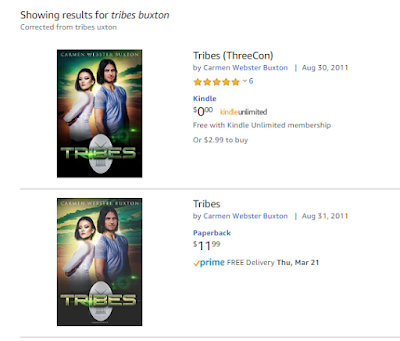


If you limited the search to the Kindle store, you would see only the Kindle version, with no indication a paperback exists. Likewise, clicking one entry brings up that product page with no link to the other version. Amazon claims linking will happen automatically within 72 hours, but I have always had to ask them to link the books, which is what I had to do for Tribes. It didn't take them long and now it looks like this:


Conclusion

In terms of ease of use, the two platforms are actually pretty similar. Also of note is that the PDFs for the interior and the cover worked fine on both platforms. Of course, in both cases, I had selected white paper instead of cream, which I suspect is why the covers worked for both.


Saturday, September 15, 2018

An Update on Moving Books to KDP Print

So, Amazon appears to have finally worked things out. As I mentioned in my earlier post, I had moved three of my print titles over to KDP Print from CreateSpace. I moved them one at a time, using the Create Paperback link on KDP, and I was able to keep the same ISBNs (I own the ISBNs for all my books; I purchased them from Bowker). The reason I could keep the ISBNs is that the interface asked me if they were published on CS and gave me a chance to enter the ISBN. Amazon has changed that protocol so that the KDP Create Paperback button didn't allow using an existing ISBN.

Amazon was working on a way to move all a writer/publisher's CS titles to KDP in a single step. They had a link for it on the KDP bookshelf weeks ago, but it didn't work! Apparently, they unplugged one way to move titles before making sure the new way worked. After a while, they took that link away, but it returned a couple of days ago, and I was able to use it successfully, if not seamlessly.

At the point in time I clicked the link, I had five titles in CS. One was in draft because I am having problems with that cover and I cannot fix them myself. One of the five I had approved for sale recently, even though the cover needs work because they are things I can fix, and I wasn't sure it would move to KDP if it was still in draft. The other three had all been for sale for sometime and were properly linked to their Kindle versions on their Amazon product pages.

So, once I clicked the "Move my titles" link on the KDP bookshelf, I got the page with the three buttons: validate my CS account, validate my KDP account, and move the books. This time all three buttons seemed to work!  When it was done, everything disappeared from CS. The account was still there, but there were NO books listed.

In KDP, results were less uniform. One of the titles moved over perfectly, and was already linked to the Kindle version. The other titles have moved over but had not linked automatically.  When a book exists in KDP in two formats, if they are properly linked, there is only one entry on the bookshelf, like this:


Each format has its own menu to edit content, details, etc., but they are one title.  If there is only one format, the entry on the bookshelf looks like this:


If the book is a Kindle book, the links are for creating or linking a paperback, and if it's a paperback, the links are for creating or linking a Kindle version. For four of the five books I moved over in one step, KDP created a second entry on the bookshelf instead of linking them. When I tried to link them myself, using the Link to Existing Paperback on the Kindle bookshelf entry, it did not work, but when I used the Link to Existing Kindle version on the newly-created paperback entries, it worked fine. I was very pleased that the draft CS title with the problematic cover came over just fine, as a draft entry in KDP. And for the one that's in better shape, but isn't really ready for prime time, I was able to pull it off sale by using the Unpublish option on the paperback menu.

My books are all now moved over. Goodbye, CreateSpace. It was nice knowing you,


Monday, August 27, 2018

I made the jump to KDP print! (well, halfway, anyway)

UPDATE, Sept. 9, 2018: Amazon has changed things. They have cut off being able to input the ISBN and move the files from CreateSpace, so at present, if you have your own paperback ISBN, you cannot move your books from CS to KDP.  There was a link at the top of the KDP bookshelf to move all your books from CS to KDP, but it did not seem to work (at least not for me) and now it's gone. Hopefully, Amazon will restore it once it works properly.
------------------------
So, I keep hearing that Amazon will shutter CreateSpace, their separate self-publishing arm for physical "printing" (they do CDs and DVDs as well as paperback books) and make everyone use KDP, which now has an option to "Create Paperback."

In the past I stuck with CreateSpace because it had some functions not offered in KDP Print but it looks like those are pretty well accounted for now.  In additon, if the book already exists in CreateSpace, Amazon has made it very easy to move the book over to KDP. When you click the link in the KDP database (illustrated here with a title I have not yet published in print) to create a paperback, you get a form to fill out that's partly filled in from the Kindle version.


If you answer yes to the question "Have you published this book on CreateSpace?" it gives you a place to enter the ISBN (whether it's an ISBN CreateSpace assigned or one you own). Once you do that, KDP retrieves the PDFs of the interior and the cover so you don't even have to load them again. One quirk I found was that if you had loaded your book to CreateSpace but didn't actually publish it, this process won't work; you need to complete publication on CS, and then move the book over to KDP Print. You still have an option to get a draft copy from KDP if you want to be sure. I notice that instead of merely marking "proof" on an inside page, KDP puts a Not for Resale banner on the draft copy's cover,


Once the paperback version exists in KDP, the entry for that book includes a separate set of options for that version. The menu there is where you can order author copies and make changes, if needed. 


So far I have moved over three out of my six print titles. One thing I thought was better is, KDP let me price the books a couple of bucks cheaper than CreateSpace did. Now, this could have been because CS lowered their prices, too, but didn't notify authors they could change prices on existing  books, but I thought it was positive. It's much harder to compete with traditional publishing in print because you can't undercut them on cost like you can with ebooks.

Anther advantage is, your print sales (once they are shipped) show up in the same Sales Dashboard bar graph as your Kindle sales. Free ebooks "sales" are blue, regular ebook sales are gold, and print sales are gray. The Month to Date spreadsheet-style chart has a button to select paperback or ebook format.

The final advantage is, the paperback version of Alien Vows was linked to the Kindle version within 24 hours, without my doing anything to request it.

At present, I have three titles in KDP Print and three still in CreateSpace. When I get ready to publish my other five ebooks in print, I will start with KDP.


Friday, May 26, 2017

TURNABOUT has launched!

So, Turnabout  is now available in paperback and on Kindle! I always launch first on Kindle only,as far as ebooks, because that way the book can participate in KDP Select, which allows Amazon subscribers to borrow the book. They pay a flat fee, and the author is paid based on the number of pages they read. The agreement lasts 90 days, at at the end of that time, I will decide whether to renew Kindle Select or launch on additional platforms.

Meanwhile, here's the blurb!


  • Jason Miller's biggest worries were keeping up with his homework, paying for his classic jazz habit,and hiding the fact that he carried a flip phone. But then one day he finds himself teleporting from place to place, a talent he can't control. It gets worse when he lands in an alternate world, one that has many, many more women than men. It sounds great until Jason learns the downside to being a precious commodity: Having a harem is no fun when you're the one who's locked up.


Cover by Alexander Von Ness

Sunday, October 16, 2016

Barnes & Noble Nook Press Print vs Amazon CreateSpace

I have used CreateSpace, Amazon's print-on-demand (POD) service to publish three of my books in paperback. The way CreateSpace works is, you upload files for the interior of the book and for the cover, and Amazon then sells the books online. Unlike traditional publishing, they don't print multiple copies and wait for them to sell; they print single copies using an Espresso Book Machine only once someone has ordered a copy. However, the author/publisher can order bulk copies at a lower price directly from CreateSpace (not from Amazon.com) and sell those copies themselves. This also makes it cheaper to get print copies for contest giveaways and to give reviewers.

Smackdown

Recently, Barnes & Noble decided to get into the act and announced that Nook Press would also let you create a POD book that would then be for sale on the Barnes & Noble online store.  I decided to try it. I uploaded virtually the same files for King of Trees that I had used on CreateSpace (I did have change to make the cover file a teensy bit smaller) and was able to publish using Barnes & Noble's Nook Press Print.


CreateSpace copy on left. B&N on right.
I ordered a copy from each vendor, and as you can see, the difference in appearance between the two is minimal. In real life as opposed to this not-that-great photo, the gold lettering on the B&N cover was a little brighter than it was in the CreateSpace cover. The only other concrete difference was in the back cover, which I thought was cleaner-looking on the Amazon copy. Note the bar code area on the back of the book.  CreateSpace does not print the price and Nook Press does.

Amazon left; B & N right

Some differences I observed:

  • On both platforms, the vendor sets a minimum price you can charge for the book, based on size, but interestingly, it was almost $1.50 lower on Barnes & Noble than on Amazon.  Of course, the royalty per book is lower, too, by almost the same amount. And, because of shipping costs, a customer might well pay more on B&N, as Amazon make CreateSpace books eligible for free shipping for Prime members. 
  • Both vendors let you do bulk orders at a lower price, but B&N sets a 125 copy minimum. Possibly, they use a different press for those orders, and not the Espresso. CreateSpace lets you "bulk" order as few copies as you like, but the shipping costs make it cheaper than retail only if you get at least 8 or 10. 
  • CreateSpace will distribute to Amazon in some other countries, and to other vendors, including B&N. Note that you make a teeny-tiny royalty for non-Amazon sales.  Nook Press only goes to B&N online. 
  • CreateSpace lets you order an actual print proof copy before you put the book up for sale on Amazon. If Nook Press does that, I could not find out how to do it. The only preview I could see was online. 
  • Amazon is better at tweaking the PDF files for you if there is a minor problem. Nook Press just states the problem and tells you to fix it.
  • I would give the Create-Space interface the edge over Nook Press, partly because I could not figure out a way to bulk order; there is a tab for Orders in the Nook dashboard, but all that happens when you click it is you get an empty screen that says "No orders yet." Because of that, I cannot compare the bulk order prices. Not that I would actually order 125 copies, but I would have liked to initiate the process to at least find out the per copy price. Update: I found the Order link! It was right near the Edit link. In spite of what the FAQ said (as I understood it), you can in fact oder just one copy; 125 is the maximum number, not the minimum. The bulk order price for KoT on B&N Nook is $6.92, versus $5.00 on Kindle. 
  • On the other hand, Nook Press does let you link the print book to an existing ebook during the publishing process, which CreateSpace doesn't do. Amazon does link the two copies up after a few days, but it's annoying that you have to wait and hope it happens. 
  • Nook Press was very slow to actually put my book on sale; it spent about a week in pending status. On the other hand, replacing the front cover of the Nook ebook (I got a new cover when I decided to do print) was really quick, but Amazon took several days to disseminate the new cover for the Kindle version after I had changed it in KDP.  That's not really a print book issue, but it's only fair to mention it.
  • I did not see any indication that B&N offers anything like Kindle Matchbook, which lets you give away (or sell really cheaply) the Kindle version of the book to anyone who buys the paperback.

From the help screens, it looks like if a Nook Press Print book sells enough copies, you can ask B&N to carry it in stores, but it doesn't say how many copies that is.

If you want to check King of Trees out online, here's the link for B&N, and for Amazon.

Friday, August 5, 2016

Where Magic Rules has launched in print!

My fantasy novella Where Magic Rules is now available as a paperback as well as an ebook. The paperback is $5.99 but if you buy it, the Kindle version is free. If you buy the Kindle version alone, it's 99¢.


Note that the paperback is also available on Barnes & Noble for the same price, but that does store not offer the ebook version for free.

Here's a quote from my celebrity review of WMR by singer/songwriter Janis Ian:

"The story hooked me pretty quickly, which is no great feat in an experienced writer. However, it kept me hooked, which IS difficult when you have an omnivorous reader looking at your work with a jaundiced eye. I've downloaded so many books lately that start off well, but disintegrate a little ways in - it's a real joy to discover a new author who holds her ground throughout."

Friday, July 22, 2016

Where Magic Rules is re-launching!

So, now that I have mastered InDesign, I am working on putting out my books in print, via CreateSpace. This is going to be a fair amount of work, so I started with the shortest, the fantasy novella Where Magic Rules, which is only 25,000 words long. I made it free a while ago, and have left it that way until now.

[For those who care, the way to make a book free in the Kindle store is to load it to a platform like Smashwords, which will let you make it free forever, and also sends it to the B&N Nook store, the Apple iBooks store, Kobo, and others, as a free book. Once AMazon knows it's free on those platforms, they will price match.]

Now, however, as the paperback is coming out, I am going to price the ebook version at its original price of 99¢ but I will offer it free to anyone who buys the paperback. The Amazon program for this is called "matchbook."

So, if anyone wants a free fantasy novella on Kindle, get it now! In a day or two, it will cost 99¢ (or $5.99 for the paperback).


Tuesday, January 13, 2015

What I Learned from Self Publishing: My Love/Hate Relationship with Amazon

Amazon is certainly not the only player in the self-publishing game, but it is dominant, and it does offer a print option, which is rare. Smashwords is a great way to get into ebook publishing on every platform except Kindle, but they don't deal with print. Barnes and Noble recently announced they would also offer print on demand via Nook Press. It will be interesting to see if that goes anywhere. Unlike CreateSpace, B&N offers a hardcover option as well as paperback.

Kindle Direct Publishing (KDP) is pretty easy to use, and I have put out eight books with it. CreateSpace is the name of their print self-publishing platform, and I have used it only once for my latest book Saronna's Gift. CreateSpace is possible because of print on demand (POD) technology; the book is uploaded to a database, and when someone shopping on Amazon orders a copy, that copy is printed individually and mailed to the customer. Authors can also order multiple copies directly from CreateSpace to sell themselves, or to give to reviewers.

The two platforms have separate set-up requirements, although you can publish a CreateSpace book to Kindle, with no additional set-up, if you're willing to convert the PDF. I don't recommend that, by the way. PDFs are difficult to convert reliably. For one thing, you can end up with excess hyphenation. Also, using the print PDF doesn't allow for a a difference in the elements in the ebook. Because ebooks can't be flipped through in the same way print books are, it's important to offer a clickable table of contents as a navigation aid, whereas in print, it's not that big a deal for novels—especially if the chapters only have numbers and not titles. Also, because of the free sample feature, you might want acknowledgements, blurbs, and lists of your other books in the back of the ebook, instead of in the front.

My Amazon wish list:

  • Add a way to connect KDP and CreateSpace so that the author can specify that the two books are the same thing. This would not have to be automated. It could just notify Amazon to do whatever linking up they do, but at least it would save having to send an email, and hopefully it could happen faster than it does now. Alternatively, the CreateSpace set-up could let you load the digital file that KDP currently uses, instead of using the PDF.
  • Stop requiring ebook exclusivity for almost every marketing benefit (making a Kindle book free or on sale, participating in Kindle Unlimited, etc.)
  • Add a button to the CreateSpace set-up pages to include the “Look Inside the Book” feature; Amazon already gets the PDF, so this should be easy to do
  • Change the set-up protocol for CreateSpace so that you can switch between glossy and matte covers without having to upload the PDF again. 
  • Add X-Ray to KDP. I know from having had it happen to The Sixth Discipline that Amazon can create the file needed for the X-Ray feature to work by using the Book Extras information (lists of characters names and descriptions, places, etc). Currently, this info is entered via Shelfari (accessible from each author's Author Central pages). It would be nice if the author could create the X-Ray file info this way and click a button to submit it. The X-Ray feature is something only Kindle has, so it would make sense to do this.

What I liked about Amazon:

Conversion: In the past, when I had a day job, and time was more of an issue than money, I relied on paying a conversion house to create the ebook digital file, and didn't bother with print at all. Now that the time/money equation is reversed, I decided to try print, and to experiment with creating my own ebook file. I tried using Scrivener and Calibre to convert the MS Word file, and was not happy with either result. Scrivner offers the advantage of being able to keep the book elements (title page, contents, dedication, chapters, etc) as separate things and assemble them different ways, but I didn't like the look of the resulting ebook file. Calibre creates valid files, but it doesn't translate any of the print style features. Imagine my suprise when I tried loading the MS Word file directly to KDP, and found that their conversion had radically improved! 

Kindle Bookmatch: Finally, a feature that doesn't require Kindle exclusivity! If you publish your print book via CreateSpace and have the same book in the Kindle store, you can opt to have the Kindle version be free or very, very cheap to anyone who buys a print copy.  As soon as they order the print, they get a button to download the ebook.

No DRM: Some people seem to think that all Kindle books have DRM because Amazon requires it, but in fact, they don't all have DRM. It's a publisher's option, not a requirement. All KDP authors have the option to leave the DRM off. 

So you see, I love that Amazon makes it possible to publish my books, and to reach readers, I just don't like everything about Amazon.