Showing posts with label Kindle. Show all posts

Wednesday, July 20, 2022

Advice for anyone looking to make the jump to digital reading

The original now clunky-looking Kindle came out in 2007, and since then ebooks and ereaders have exploded. Technology and publishing have changed a lot since then, so here is my most up-to-date advice if you have never tried reading ebooks.

The basics:

All ereaders and ereaders apps offer similar functions like being able to change the font size and search through the text of the book. The early adopters of ebooks were mostly older women who read a lot but wanted an easy-t0-read format. 

Kindle 1
Original Kindle


However, there is a difference between a tablet and an ereader. An ereader is a single purpose device; it's made for reading. The e-paper or e-ink screen (two names for the same thing) is a very light gray with dark gray to black text. Color e-ink is currently not well developed as yet, although it is improving.  A tablet is multi-use, very much like a  really large smart phone, but without the ability to make phone calls. It has a backlit screen with the same kind of colors on a PC screen.

The advantages to reading on an ereader:

No screen glare, even in bright sunlight

Much less eyestrain. 

No distracting emails, texts, or other app notifications. In a way, the single use device is an advantage if you want to read without interruptions. 

The advantages to using a tablet as an ereader:

Because tablets are multiuse, you can run other apps like email, browsers, calculators, word processing, games, etc., without needing to pay for additional hardware.

In addition, you can use multiple ebook apps. all major ebook sellers offer free apps for Android and iOS. You might have to buy your ebooks in a browser and then upload it to the tablet as both Apple and Android don't allow apps to sell products unless they use their payment method (Apple Pay and Google Pay, respectively). 

New Kindle Oasis

Kindle, Apple, Google Books, and Kobo are the major players as far as ereaders and ereader apps. 

First steps:

I recommend if you already own or can borrow a tablet, that you use an app (Kindle, Apple, Nook, etc) to see if you like digital reading.  Try it out, and if you notice any eyestrain or glare issues, then look into getting a dedicated reader. Decide where you will most likely buy your ebooks. Note that Google does not, as yet, have its own ereader hardware. 

Also note that erearers and sometimes ereader apps offer  special functions  such as getting the definition of a word or translating foreign language text. The Kindle offers a function called X-Ray, which works only if the publisher has enabled it, that lets the reader see characters and places and other specifics of the book. You should check out what the ereader can do before you invest in hardware. 


Tuesday, October 12, 2021

For self-published authors: What is Kindle Unlimited and should I put my books into it?

Amazon, or the Zon, as some call it, has by far the lion's share of the ebook market. They also have an audiobook platform called Chirp, but I'm not going to talk about that. Today's post is about only about ebooks.

eBooks & eReaders

Amazon calls its ebooks Kindle books, because its ereader is called a Kindle. However, you can read Kindle books using the free Kindle app on almost any PC, Mac, tablet or phone. Basically, Amazon's market consists of anyone who has an Amazon account and some kind of reading device, including iPads and iPhones. 

Apple Books, however, can only be bought via an iOS device, an iPhone, Mac, iPad, etc. There are ways to move them over to Windows but it is not the effortless transaction that most Mac users are looking for.  Kobo and Barnes and Noble both offer a dedicated ereader but also have an app that runs on tablets and other devices. 

So, why does this matter to self-published authors? As an author or publisher, you can upload your books into the self-publishing platforms of Amazon (Kindle Direct Publishing), Barnes & Noble (Nook Press) Google (Google Play Books Partners Center), Apple Books and others, either directly or by using Smashwords or Draft2DIgital. But if you load them only into KDP and opt for the KDP Select designation, your books will be available to borrowers via an Amazon subscription service called Kindle Unlimited. The author is paid based n the pages read, not on the borrow, an important distinction.

Basically, by putting his or her books in Kindle Unlimited (an ironic name in a way, since all KU books are limited only to Kindle), an author promises not to put them in any other ebook store (print versions have no affect in KU status). How can this possibly benefit an author? 

A lot of times, it doesn't. In my experience, whether or not KU is profitable for a book depends on three factors: genre, book length, and ebook price. 

Genre

The only genre I personally have had any success with in Kindle Unlimited is romance, which in my case is actually science fiction romance, Romance readers are voracious. They read so much, it is worth it to them to pay the KU subscription fee. There may be other popular KU genres, but I have not found them. Certainly my YA books never went anywhere in KU. If you have books doing well in a KU, please let me know what genre they are! 


Book Length

Because the author is paid based on pages read, a longer book automatically earns more money than a short one, assuming the reader finishes the book. Of course, if the book is truly short--a novella or a novelette--it probably sells for less, too. But length is something to keep in mind when deciding on KU, yes or no,

Price

If you price your ebook modestly (none of mine are more than $3.99), and the book is long enough, you may well make more money from a KU borrow and full read than from a sale. Of course, price will also have some impact on sale rates, too, so it's all balancing act.

Things to Remember

An important thing to remember is, the Kindle Unlimited signup is for 90-day blocks of time. You can take the book out of KDP Select after 90 days, or you can sign up for another 90 days. I usually launch with the book signed up or KDP Select but pull it out after 90 days if it's not getting enough KU reads to make it worthwhile. 

Also, one benefit to keeping the book in KDP Select status is, you can run a sale or even make the book free for a select number of days per 90-day cycle. The advantage to just changing the price yourself is, the book looks like it's on sale. The regular price appears, but is struck through and the sale price shows as discounted.

You should be aware that Amazon makes no future promises on the per-page rate for KU borrows. It sets aside a chunk of money to pay KU authors/publishers, and then pays out at a rate determined by the number of reads. Right now the rate is approximately $0.004 per Kindle Edition Normalized Page.  My book Alien Bonds is a tad under 130,00 words and that translates to 649 KENP pages. I made about $2.60 on the last full read. At $3.99 retail I make $2.72 in royalties on a sale, which is 12 cents more than the KU borrow. On book 2 of the Wakanreo trilogy, which is shorter, I make less on KU but on book 3, the longest book, I make more from a KU full-read than I do from a sale. 

A non-financial benefit of KU is you can tell when people are actually reading your book because the page count shows on a daily basis. 

And once your pull your book from KDP Select, it is no longer in KU, and then you can load onto every platform available. There is no reason not to! But always, do what's best for your particular book! 


Wednesday, September 29, 2021

A few words on pricing ebooks

If you are planning to self-publish, unless you plan to concentrate on print publishing, you will need to look into your options on pricing ebooks.

In my opinion, ebooks are the reason self-publishing took off as it did. First off, ebooks are relatively easy to create, and second the per copy cost to replicate them, once you have the files in place, is zero. This means that if you are not a well known author, you can price your book very competitively (as low as 99) and thus compete with better known but more expensive writers. The big publishers seem to want ebooks not to sell especially well, at least when they are new, because they price them so high.  Quite often the ebook version is more expensive than the paperback version, defying industry past practice that a higher price meant a more expensive to produce product.

The image above is a the Amazon page for the best seller, Golden Girl, by Erin Hilderbrand,  As you can see the hardcover price is very slightly more expensive than the trade paperback at $17.40 and the Kindle version is priced at  $14.99, less than $2.40 in difference. Well of course, this is a brand new book, But what happens when it has been out for a decade or more? 

Here's the Amazon page for Twilight, a best seller first published in 2006. The hardcover is way more expensive at $22.49 but the Kindle book is more expensive, at $10.99 than the paperback is at $9.43! And by the way, the ebook price is the same on Barnes & Noble and Google Books

Publishers fought with Amazon to be able to control the price of their ebooks. Publishers wanted to be able to protect hardcover sales, which are very profitable. Amazon lost that battle, but you will notice Kindle books usually say "price set by publisher." 

The good news is, if you're self-publishing, you (mostly) control the price! On Amazon, you get the best deal on royalties by pricing your book between $0.99 and $9.99, which is frankly, the range it's best to be in unless you're already a best-selling  author. 

You also control when the price changes, which means you can experiment with different prices.  Be aware that Amazon price matches, so if your book is cheaper in other ebook stores than it is on Kindle, Amazon will drop the price of your Kindle version to match the others' lower price. That is, by the way, the method used to make a Kindle book free on a long-term basis. A book that is in Kindle Unlimited can be free for up to five days every three months, but except by using price matching, you cannot make a Kindle book always free,  It is only because other bookstores allow free ebooks that price-matching can work to make a Kindle book free.


Saturday, January 18, 2020

My review of the Kindle Oasis

Santa,  in the form of my husband,  was good to me this year. I got the new Kindle Oasis for Christmas!

I love this Kindle!  The screen is slightly bigger,  which is nice, especially if you like to read with a larger font. Also, the design accommodates one-handed reading much better than previous Kindles. One side is wider than the other,  and has actual page turn buttons, not like the recessed page turn spots on my Kindle Voyage.  If you're left-handed, you simply flip it over and the buttons are in the left. Mind you it still has a touch screen if you prefer swiping pages to pushing buttons.

It also has Bluetooth, but I haven't used it yet.
Other advantages are that the Oasis is waterproof and it has a warmer light, although I find that a pretty subtle difference.Like the Voyage and the paperwhite, if you buy the cover for it, the Oasis "wakes up" when you open the over. It appears to use exactly the same charging connection as earlier Kindles.

The on-off switch is on on the top edge (assuming right handed buttons). Bt you won't need to use it much unless you're reading without the cover on.


You can't see the button in this view because the camera's light reflected off the metal but it's there. With the cover on and no buttons visible, it's easier to see how close to a square the Oasis is.


All in all, I love my new Kindle! Whether it's enough better than a Paperwhite or the (no longer for sale new, except possibly from 3rd party sellers on Amazon) Voyage to justify the price increase, I can't say, but I'm not giving it back! As usual, I got the 3G connectivity as well as WiFi. All my Kindles have worked great on my home WiFi but there were a few times I could not use hotel Wifi so I always get the 3G. If you're holding a Kindle in your hand and wanting a book, it's a terrible feeling NOT to to be able to get it..


Friday, March 8, 2019

Updated info on sending files to a Kindle

I've noticed that Amazon has changed some of their pages, so here are updated directions for how to email files to a Kindle. You can send an MS Word file, an ASCII text file, a PDF, or a *.mobi file to your Kindle if you first do this one-time set up procedure:
  1. Log on to Amazon and hover the cursor over Account & Lists
  2. This makes several lists appear. 
  3. About 2/3 of the way down on the far right column, click Your Content & Devices 
  4. On the Manage Your Content & Devices page, click the Preferences tab 
  5. Scroll down to Personal Document Settings and click that.
  6.  A list of your Kindle devices should appear with the email address for each shown. 
  7. Make a note of the address for the Kindle you plan to use.
  8. Next, scroll down to where it says Approved Personal Document E-mail List and add the email address you will use to send the file; if you don't add the address, then nothing will reach your Kindle via email
Now all you have to do any time you want to put a file on your Kindle is to create an email to the Kindle's email address, attach the file, and click Send. Note that if you attach a PDF it will arrive as a PDF, unless you put the word "convert" on the subject line of the email. This will convert it to reflowable text and you can then change the font size  on the Kindle, if needed. 

Important Notes: Unless the file is mobi, the file name will become the document name. Also, regardless of format, once the file is on the Kindle, it is considered a "personal document" and not a book. If you set your home screen to show only "books" you will only see those Kindle books you bought from Amazon. If you're sending a PDF, the subject line should be the the word "CONVERT," or the PDF file will end up as a PDF on the Kindle;  that is, it won't be a normal book, but rather a series of images. 

Very important note

There is no charge for emailing documents UNLESS you are using a 3G connection. Be sure you are using wifi when you email a file, to avoid per/MB charges to your account.

Addendum added February 2021

In response to Kindle-hacking, Amazon now sends an email asking you to verify that you sent the file. You have to click the blue box or the file will not be delivered. See below for an illustration.

Kindle Logo
Hi ,

We received a request to send the following document to your Kindle account:
* Drifters.docx


Click below within 48 hours to verify this request.


Verify Request

Thank you for reading with Kindle!

Wednesday, August 8, 2018

eBooks can be corrected and Kindle books often are!


Any book can have errors, but one book that's almost bound to have errors is an old, out-of-print (or even out-of-copyright) title that is published as an ebook by scanning the printed pages and then converting the resulting file into epub or Kindle format without carefully proofing every word. It might be because the pages weren't in great shape or it might be because the scanner wasn't the latest and greatest, but those kinds of books almost always have some errors. Sometimes they have many errors.

A lot of readers probably pay no attention, but in fact Kindle books are often updated after publication. This could be for reasons other than errors; the publisher might have added content, or enabled a new feature like X-Ray. But since the  Kindle interface provides a way for the user to report content errors, I'm guessing the most common reason is fixing a typo or several typos.  [Note: This only works on an actual Kindle. The Kindle app on my Android phone, my PC, and my tablet do not have this function. I don't know about the iPhone and/or iPad versions. If you know, please leave me a comment.]

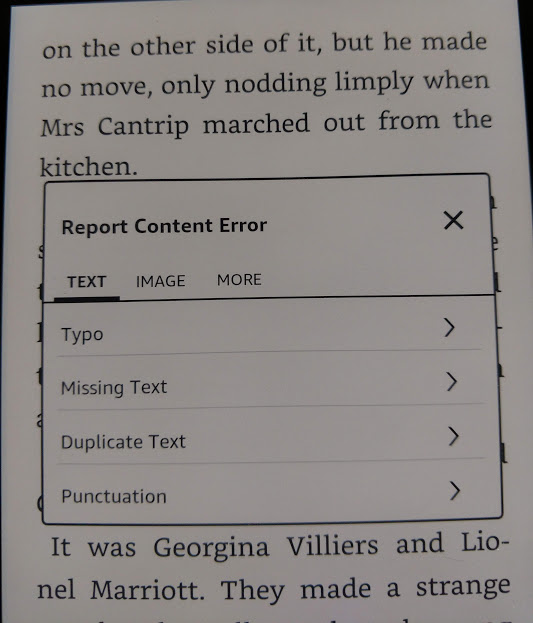
If you feel like it, you can send Amazon info about errors using the menu that pops up when you highlight text.  The example below is highly typical of the kind of errors you'll see in scanned books. "For two pins" was a common expression, but the scanner made it into "Pot two pins."


Once you tap the three dots to get the menu, you see an option to report a content error. 


Amazon now asks you to identify the error.


In this case, I tapped Typo.


This gave me a screen where I could input the correction. In a way, Amazon is making readers into proofreaders. 


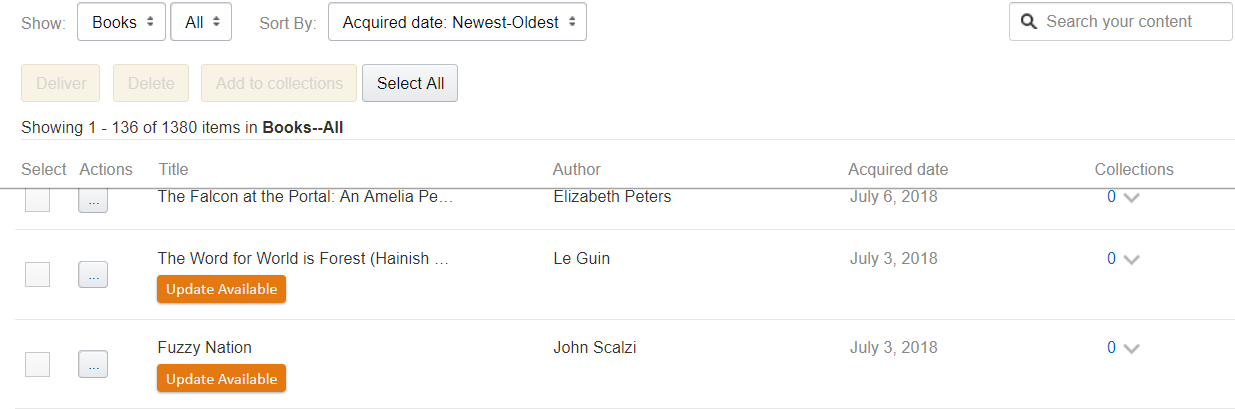
Once you click submit, you get a screen telling you the error will be submitted. But assuming that the publisher acts on these notices, how do you get a corrected file? Well, corrections and changes happen all the time, but Amazon doesn't automatically reload the book because doing so with no warning could wipe out a reader's notes and highlights and lose his place in the book. If a publisher has uploaded a corrected ebook that you bought from Amazon, that shows in your list of  Kindle books, accessible in your browser when you're on Amazon.com. The list appears under the heading  "Content and Devices"  and updates are obvious. 


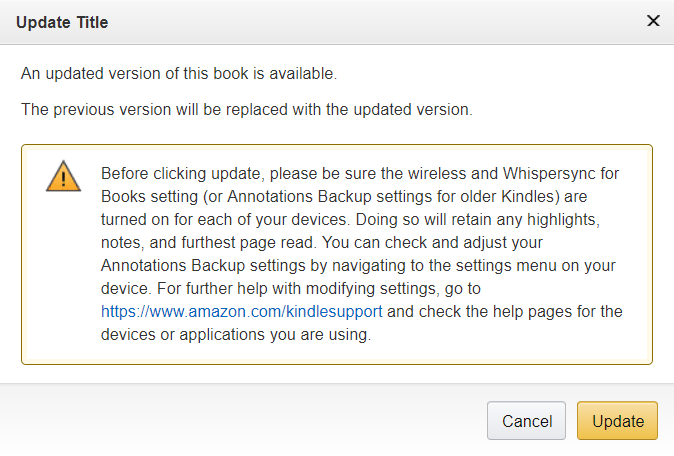
If you click the update button, Amazon first sends a warning. 


And there you have it. Good luck trying that with a printed book on your shelves! 


Monday, March 12, 2018

How my recent promotion illustrates ebook market share

The Sixth Discipline, the first book of my two-book Haven series is always free, thanks to price-matching. Smashwords lets authors make ebooks available for free, and since that platform can also be used to push the book to iBooks, Nook, and Kobo, as well as smaller vendors (but not Kindle or Google Play), that means self-publishers can make books free on those platforms (and Nook now allows free books to be published on their platform, too). When an ebook is free elsewhere, Amazon will price-match the Kindle version. As you can see by the results below, the Kindle version matters a lot!

The Sixth Discipline was published in 2011, and had its big run in 2013 when I got a BookBub promotion for it and gave away 20,000 copies. Since then, its distrbution numbers (you can't call them sales figures when the book is free) have slowly dwindled. There are a lot of free books, many of them newer, and in a good month, I had been giving away maybe 20-30 Kindle copies, and 10-20 on all other platforms, combined. 


Update:  B&N reporting was very slow and just came in, so I changed the numbers from the original post to reflect those "sales."

The promotion consisted of paying for an entry in The Fussy Librarian daily "free books" email. That email lists links for up to five vendors. The results are in, and for the day of the promotion and the day after, I gave away this many copies:

Kindle =  377
Nook = 8
iBooks = 32
Kobo = 0
Google = 19

A few things jumped out at me. The most obvious is the dominance of the Kindle market. I gave away six times more Kindle copies than all the others combined. The lack of Kobo copies wasn't really surprising since  have never had big numbers on Kobo, but only 8 copies for Nook was telling. I do't think B&N is doing at all well with the Nook.  Also interesting is that Google Books' total was more than double Nook's, while iBooks beat out Google and Nook combined.

And of course, the whole point of paying money to give away a book is that I hope to sell the sequel, No Safe Haven.  Time will tell how that goes.


Friday, August 18, 2017

A Kindle feature for writers

One thing my lovely Kindle Voyage doesn't do is read out loud. Older Kindle models can read aloud, though, and I keep an old Kindle Touch for just that reason. Because I'm my own production department, I sometimes make edits even after the copy editor has gone over the book. For one thing, some of her question/comments make it clear I need to re-write a sentence or even a paragrah. This means I can introduce new errors,

When I'm getting a book to the page-layout stage, I send a copy of the file to the Kindle Touch and then have the KT read the m.s. aloud to me, while I follow along in InDesign, the page-layout software I use. I find that proofing this way makes it much easier to identify mistakes. On the screen or even on paper, I can read a line like this:

"Yes," she said, "I do plan go with you,"

. . . and totally miss that the word "to" is missing! So long as the missing word is tiny, my brain just fills in whatever is left out. But when I hear that sentence read aloud, the mistake is completely obvious. In addition to errors, sometimes I realize I have used the same word too often, just from hearing it over and over. Whatever the problem, I stop the robot voice, make the correction and then go on.

Another advantage is, I get to hear how someone might pronounce any made-up words. I'm working on a new manuscript, a science fiction romance called Alien Bonds. It's a novel set on an alien world with a lot of made-up names and words. When the robot voice tries to pronounce my invented words, sometimes it's the way I would pronounce it and sometimes it's a little different. Sometimes I like it better, and sometimes I think it sounds totally wrong. But either way, it gives me information.

I assume that the reason the newer Kindles don't read aloud is that not enough Kindle owners were using that feature. It's by no means a substitute for audio books, by the way. The robot voice does not do a great job at inflection and pacing. It will recognize that a sentence ends with a question mark, and infect the proper questioning tone, but it won't pause at all before the next word. It will pause for commas and periods, just not question marks. Go figure!  Also, the robot voice has to guess whether to pronounce "read" as "reed or "red" and so on. There are a fair number of heteronyms, like bow (either a weapon or a polite action) which can make for humorous mistakes Sadly, I don't think Amazon will do any work on improving the robot voice. But they might add speakers to future Kindles if audio book sales pick up.

The robot voice is a  reasonably fast reader (you can control the pace) but it takes a lot of concentration so I work slowly. I will post a photo of the cover of Alien Bonds soon, as it's almost ready.

Saturday, August 5, 2017

Dueling promotions and Amazon lets me see the future!

I've been running two promotions this month, one to advertise that Turnabout is only 99¢ (for a few days only) and one to advertise that The Sixth Discipline is free.

One advantage to advertising a book, even a free one, is if you sell or give away enough copies it gets into Amazon's ranked groups (100 top free science fiction, e.g,), and folks who didn't get the email promotion notice it.  Turnabout did okay, It made it to:


But The Sixth Discipline jumped up to:
Even though the email promotion for T6D was Friday, it's still going strong; I've given away over 200 copies today.. But in checking for free downloads via the KDP interface,I discovered something I had never noticed. Using my phone (I was walking the dog and when we stopped to rest in the shade, I checked my numbers), the Sales Dashboard tab let me select tomorrow's date as part of my date range! And when I did that, I could see I already have 23 downloads, presumably from time zones where it's already August 6. 

The screen shot below was created in Firefox, as I discovered the Chrome browser didn't let me select a one-day future date, but the Firefox version did.  I highlighted the date range so you can see it's for those two days. I couldn't include Thursday because it had over 1,000 downloads and that would make tomorrow's 23 too small to show as more than a tiny blue line.


The really odd thing is, I was using Chrome for Android on my phone when I noticed this! 

Also note, these numbers are for Amazon only. iBooks and B&N take a little longer to report "sales figures" because I get them via Smashwords. 


Friday, May 26, 2017

TURNABOUT has launched!

So, Turnabout  is now available in paperback and on Kindle! I always launch first on Kindle only,as far as ebooks, because that way the book can participate in KDP Select, which allows Amazon subscribers to borrow the book. They pay a flat fee, and the author is paid based on the number of pages they read. The agreement lasts 90 days, at at the end of that time, I will decide whether to renew Kindle Select or launch on additional platforms.

Meanwhile, here's the blurb!


  • Jason Miller's biggest worries were keeping up with his homework, paying for his classic jazz habit,and hiding the fact that he carried a flip phone. But then one day he finds himself teleporting from place to place, a talent he can't control. It gets worse when he lands in an alternate world, one that has many, many more women than men. It sounds great until Jason learns the downside to being a precious commodity: Having a harem is no fun when you're the one who's locked up.


Cover by Alexander Von Ness

Friday, April 21, 2017

Formatting an ebook: New Amazon tool for self-published authors

If you want to self-publish ebooks, you need to learn some things about ebooks. Ebooks are really just files, and in those files the underlying format is HTML tagging. the same tagging that drives the web. There are two main sets of tagging schemes. Epub (sometimes written as ePub) works for iBooks, Nook, and pretty much all others bookstores. Amazon's Kindle, though, has its own format based on mobi. It still uses HTML tags, remember, but it's a different set of rules on which tags do what and how files are structured.

Amazon's KDP platform for self-publishing actually allows authors to upload a MS Word file. If you have a novel that is all text, and you use Word's formatting styles consistently, KDP does a good job of converting the files. If you want new chapters to start on a new screen, for example, you need to be sure the word style for the chapter name or number creates a new page in print. But of course, you can't really tweak the format easily. If you want to change something, you need to go back to Word, edit the file, reload it to KDP, and look at it again. If you have the kind of book that has fancy formatting or lots of images, this can be tedious.

As first reported by The Digital Reader, Amazon has launched  a beta version of a new tool called Kindle Create.  The Talking New Media blog checked it out, too, and reported on their first impressions.


The new tool is different because you download it and run it locally, o your PC or Mac, and then preview the results from within the app itself. It takes over 500 MB of disc space, but hard drives are pretty big these days. 

Although the Amazon page only mentions Word files, the program will accept PDFs, but there was some discussion in the comments on the Talking New Media post that suggetsed it wasn't really converting the PDF but just wrapping it in code that made it into a "print replica" not a true ebook. 

I'm not sure this new took will help me that much since I have started putting my books out in paperback, also. I now use Adobe's InDesign which can produce a print-ready PDF and also an epub file from the same input. But if you self-publish books with a tricky format and want to try this new tool,Amazon is actively soliciting feedback.

Sunday, January 24, 2016

Reading aloud — Is Alexa a better reader than the Kindle?

I love my new Kindle Voyage! It's very like the Paperwhite, except screen resolution is a tad better, and it has two spots in the bezel that you can depress to page forward and page backward, if you prefer that to swiping or tapping the screen (actually four spots, two each on the left and right sides, so it works whether you're left or right-handed).  But like the Paperwhite and unlike earlier Kindles, one limitation of the Voyage is that it cannot read aloud to you. I blogged about this when I was thinking about getting a Paperwhite, because I liked to use the read aloud feature for proofing manuscripts.

I assumed that Amazon killed this feature in the newer Kindles because their data showed that not many people were using it. Certainly, other e-ink readers never bothered with it.  Now, however, Amazon had enhanced their voice-activated personal assistant Echo, so that it can read your Kindle books to you.

If Alexa (the voice of the Echo) has the same limitations as the Kindle robot voice, this feature may not be that big a deal. The Kindle voice was not great at pausing in certain situations, like between paragraphs of dialog if the first one ended with a question mark. Also there was the problem of homographs. The robot voice could not tell from the context whether the word "bow" was pronounced with a long o, as in "bow and arrow," or a short o as in "take a bow."

Possibly, newer, more sophisticated programming has improved both pacing and assessing meaning from context. Or possibly not, depending on how much research and effort Amazon put into this. The reviews I have seen don't mention either problem, so it's possible it's much better. I don't know anyone who has an Echo, but if you do, please post a comment with any insight you might have. 

Saturday, January 16, 2016

A mystery about a mystery: How can two books have the same set of reviews?

I am quite fond of murder mysteries, especially British ones. One of my favorite authors is Dorothy L. Sayers, author of a series featuring Lord Peter Wimsey, the younger son of a duke, and an amateur detective. I've read all of them, some of them many times,  When we renovated our house, I donated 18 cartons of books, including all my Sayers copies to the local thrift shop. However, when Open Road Media started reissuing them as ebooks, I bought some of them, so I could reread them when I felt like it. I loved what a fantastic job OR did on them. I even wrote a post about it.


Now, however, someone else is publishing Dorthy L Sayers (presumably, it's out of copyright) and they are no Open Road. You can tell it's a different version because it not only has a different cover, it has a different ASIN (Amazon's unique stock number). The Open Road cover is shown above.

I got an email promotion for Clouds of Witness for only 99¢ (ASIN = B00LDSUTMC). There was no warning on the Amazon page saying "You bought this book on [date]" so I didn't realize I already had the Open Road version (ASIN = B008JVJKXK). I bought the 99¢ version and it was terrible. I have never seen an ebook with so damn many errors!  Most obviously, there were 25 instances of [garbled] and 26 of [missing] they had not bothered to clean up.

They looks like this:

“[Garbled] least--not [garbled] see him. But there was poor Denis's body,

“My lords, it is your happy privilege [missing] his grace the Duke of Denver these [missing] of his exalted rank. When the clerk [missing] address to you severally the solemn [missing] find Gerald, Duke of Denver, [missing] guilty or not guilty of the dreadful [missing] every one of you may, with a confidence [missing] any shadow of doubt, lay his hand and say, 'Not guilty, upon my honour.'“

There were also plenty of plain old typos:

“What did you say you found on that skin Bunter?” (this should say "skirt," not skin)
. . .and bunked Silly-ass thing to do . . . * (missing the period at the end of the sentence)
“The position of the fingers being towards the house appears, does it not, to negative the suggestion of dragging?” (should be "negate")

But because it turns out Amazon lumps the various editions together, there is one set of reviews. You see the same reviews for the Open Road version, the crappy, cheapo version, and the print version. People are giving the book one star because this version looks so bad!

 I didn't write a review, but I did email Amazon and ask for my money back. It had been more than the 7-day limit, but they credited me anyway. I wish they would make the seller take down the new version.  Formatting that could make me feel cheated after paying 99¢ is truly terrible formatting.

Monday, December 14, 2015

Print versus ebooks: it's still a debate

You might think that more than eight years after the Kindle launched*, the debate over print books versus ebooks would be settled, but it looks like it's not. CBS News recently weighed in with a post titled Books vs. e-books: The science behind the best way to read.

It gets some things right: it mentions that studies of e-reading interrupting sleep are about LCD screens, and that dedicated ereaders have non-light-emitting screens (although it never calls them e-ink screens). It talks about the advantages that controlling the appearance of the text can give to people with reading disabilities.  There's even link to a website where readers can try out that kind of feature to see if it helps.


Things the post gets wrong: The title implies one best way to read, and there isn't one! It also calls print books just "books." That's like saying "Cars vs. Electric Cars: Which Is Better?" They're all books! Way back when the codex replaced the scroll, it was just a new format for the same thing.


This post also sites a specific Australian study of students to make the claim that "avid readers also tend to prefer reading on paper." I find this bogus! I think if you made a point to include people who own dedicated e-ink ereaders, you would find they are some of the most voracious readers out there.  Furthermore, Australia doesn't have as mature an ereader market as the US.


* I know the Kindle was not the first ereader--not even the first e-ink ereader--but it was what launched the digital transition. The pre-Kindle market for ebooks was minuscule.

Sunday, October 25, 2015

Saronna's Gift makes a Barnes & Noble science fiction romance list!

How did I forget to post about this? Saronna's Gift made a list of 20 science fiction romance books on the Barnes & Noble sci-fi blog!

As the Brits say, I am chuffed to see my book on a list with the likes of books by Lois McMaster Bujold and Linnea Sinclair.


Interestingly, although the only links are to the print and Nook copies available from B&N, I had a much bigger sales bump from Amazon after the list came out than I did from B&N, which suggests readers are browsing the B&N blog but still buying the Kindle version.  

Sunday, October 18, 2015

Big Brother knows what you don't know

Assuming the reason people look up a word in their Kindle dictionaries is because they don't know its meaning, Amazon knows what it's customers don't know. They recently released a list of the most-looked-up words. I knew a lot of them, but some (see yellow highlighting) were unknown.


The built-in dictionary is a great feature of ereaders, but it's kind of creepy to think Amazon is tracking which words are looked up.

Saturday, July 4, 2015

What Amazon Knows

Digital vs. Print

The experience of digital reading is not fundamentally different from reading on paper, especially if you read on an e-ink device.  But digital purchasing is different.  If you walk into your local bookstore and put cash on the counter for the latest best seller, the retailer has no way to track who you are. With ebooks, the retailer always knows the buyer, because the transaction happens online and involves a credit card.

I don't know much about other ebook readers, because I have had a Kindle since 2007 (that's my latest, the new Kindle Voyage in the photo below), but Amazon has been adding features ever since they came out with the original Kindle. After they created Kindle apps, which works on phones, tablets, PCs, Macs, etc., one of the things they did was to allow you to sync your books across your devices. That is, if you like to read on your phone with a Kindle app while you're on the bus to work, and then switch to reading on your Kindle when you get home, Amazon keeps your place for you. Even audiobook versions are supported by this function, if you buy them from Amazon.


Amazon as Big Brother

Of course, for syncing to work, you have to be connected to Amazon's cloud. When you turn on the wireless connection (or in the new Kindle parlance, you turn off airplane mode), the function of checking for new new items also syncs. As part of that, an enormous database tracks information on every Kindle title you ever bought. Amazon records what devices you sent the books to, where you are in every book or document on every Kindle or app, what text you have highlighted, and any notes you have made. 

Keep in mind that Amazon isn't actually psychic. They don't really know what you have read, only what you have looked at. If you were to open a brand new book and use the Go To menu to go to the last chapter, that would mark that page that as the "last page read." On the Home screen (in List mode), the little dots under the title that track your progress in the book would jump almost to the end, even though you haven't read a word. Likewise, if you finish reading a book and go back to chapter one before connecting, Amazon's database will be marked as if you have just started that book. Of course, a reader usually has no reason to do this, which is why I feel confident in saying Amazon doesn't bother tracking every keystroke.

Further, Amazon only knows the new information after your Kindle has connected. E-ink Kindles have great battery life, but only if wifi and/or 3G are not on, so most people read with in airplane mode. Of course, with tablets and phones, people are used to charging them often, so they're usually connected all the time.  However, even with e-ink Kindles, sooner or later, the reader will need to connect to get a new book, and at that point, the cloud will database will be updated. 

Borrowing ebooks

This need for connectivity means that ebooks can easily support borrowing. Amazon can loan you a book, and then take it back later. In fact, they have two separate borrowing programs. The Kindle Owners Lending Library is an added benefit for people who a) pay the annual Prime membership fee and b) own a Kindle or a Kindle Fire (not just an app on a phone or a tablet). These folks can borrow one book a month, but only books that participate,

The second program is Kindle Unlimited (KU), which is Amazon's ebooks subscription service. KU readers pay a flat fee per month. They can use any Kindle device or app to borrow as many KU-participating books as they like but they can have only 10 out at once. This program is especially popular with romance readers, many of whom go through books like winos go through Two Buck Chuck. In fact, Scribd just pulled most romance titles from their subscription program for being too popular.  They weren't charging enough to be able to pay the authors, and let the readers get all the books they want. I don't understand why they didn't create a second program for romance, or make the first program multi-level, with a higher tier price for voracious readers. Amazon probably has a similar situation, but they took a different approach. 

How the author gets paid for borrowed books

When Amazon started  Kindle Unlimited, they decided that they would pay participating authors a sort of royalty as soon as a borrower got through 10% of the book.  I say "sort of royalty" because the fee was unrelated to cover price or length, and was determined after the fact by dividing up the pot of money Amazon had set aside for that purpose.  These rules meant a novella of 100 pages paid the author the same after the borrower read 10 pages as a 1000-page novel paid after the borrower read 100 pages.  

Guess what? Amazon has changed the rules. They have announced they will pay a per-page fee, based on the actual number of "Kindle Edition Normalized Pages" (KENP).  This shifts the compensation paradigm on its head. Now longer works will make more for the author (still regardless of cover price).  Some people have pointed out that this rewards authors for writing page-turners, which I think is true, and is not a bad thing.

As someone whose only Kindle Unlimited book is a full-length novel, I am fine with the new model. I do wonder what the fee will be. Since the old system paid about $1.40 per borrow, it would have to be at least $0.0028 per page to reward the author of a 500-page book at about the same level as before. There is speculation that it could be higher, and pay out twice as much as before, when the entire book is actually finished. I also wish Amazon would tell us how many copies are being read at once. Right now the report shows only total page count per marketplace (US, UK, Germany, etc), without any indication of how many readers are being counted. 

Conclusion

Amazon knows way more than who is buying which books. They know which books are read immediately, and which wait to be opened; which books are read slowly, and which are devoured on the same day they're purchased; which are abandoned midway through and never finished at all. This is information that print books can never provide.

You can think of Amazon as Big Brother, if you like, but they are far from alone in the corporate world.  We needed a new toilet recently, so I used Google to find photos and info online, so I would know what models the plumber was talking about. I now have toilet ads all over my Facebook feed. Google is pretty much the ultimate Biggest Brother, but they don't seem to be that good at selling ebooks, at least not my ebooks. On the other hand, the commenters on this post seem to have had some luck with Google Play; I wish they had mentioned their genres. If anyone out there has any info on how Google Books is doing generally, I'd love to know.

The writer, as usual, gets left out in terms of information sharing, However, I do like the thrill of checking the new Amazon report and seeing that someone is reading my book!


Tuesday, February 18, 2014

Hello, world!

I check my blog's stats every so often and a recent trend is that people are finding it by searching Google in other (non-US) countries. Recent hits have come from Bulgaria, Hong Kong and India, as well as the more expected UK, Canada and Australia.  My most popular posts are those that give Kindle tips, especially the ones on putting non-Amazon books on a Kindle, so I suspect that Kindles being sold in other countries are driving much of my blog traffic.

On the other hand, I actually see more diverse foreign sales from Apple iBooks (via Smashwords) than any other retailer. Between Kindle, Apple, and Sony, I have sold books in India, New Zealand, and Australia, as well as the UK, Canada, Austria, Germany, Spain, and the Netherlands. The French don't seem to be interested in my books, but then, I'm not French and I write in English, so no surprise there.

It's totally cool to think of having readers around the world!


Thursday, August 29, 2013

I was right! There is now a Kindle store for Mexico!


I knew it might be there, because a line for it showed up on my KDP report page again, and when I went to Amazon.com.mx, instead of getting redirected to plain old Amazon.com, I ended up at the page above.


Saturday, August 17, 2013

Is Kindle going "South of the Border, Down Mexico Way"?

I am so showing my age by knowing the title of that song!  On the KDP platform, when you check your sales reports they are separated geographically, for the Kindle stores in the US, the UK, Germany, France, Italy, Spain, Japan, India, Canada, and Brazil. When I checked it yesterday, I swear I saw an entry for "amazon.com.mx" which could only be Mexico. Right now there is no Kindle store in Mexico; if you type "amazon.com.mx" into a browser, it redirects you to the regular US-based amazon.com.

This morning the amazon.com.mx line is gone! Missing! I think someone goofed and released something early (or maybe they were testing, and it was deliberate) and this means Amazon will open a Kindle store in Mexico.  I wish I had thought to take a screen shot!

The good thing about self-publishing is you own worldwide rights to your own work, so you can publish worldwide from any platform that supports global sales. Olé!