Tuesday, March 19, 2019

KDP Print versus Nook Press

One of my most popular blog posts is from 2016, when I compared using Amazon's CreateSpace to using Barnes & Noble's Nook Press Print. CreateSpace is gone now, replaced by KDP Print, but I recently published Tribes as a paperback on both KDP Print and on Nook Press, so below is a comparison of print publishing via Amazon and Barnes and Noble using the versions of those platforms in use today.

Both platforms have fully integrated print and ebook publication. Each title appears once in the author's list of Projects (B&N) or on the Bookshelf  (KDP), with the ability to add it in a second format and neither one makes you create the ebook first.. Basically, most of the features/options below apply to both ebook and print formats.

Pre-order

Nook Press offered the choice of putting the book on sale now or using pre-order but it didn't give me a chance to say when it would be available. After processing finished, I saw this message on my projects page.

  • Your pre-order print book Tribes has a publication date of March 26, 2019. You must upload your final files by March 11, 2019. If you’re unable to do so, you must push your publication date or your book will go off sale.

And that was that! So pre-ordering was available on B&N but without a lot of options.

With KDP, pre-ordering is an option only for Kindle books. It does let you set the date, though. In fact, the pre-order option is the only way you can launch the book with the X-Ray feature enabled from the start. 

Categories:

KDP only allows two categories but it was very easy to add both.

Nook says it allows 5 categories but after I added the first, I could not figure out how to add more.  Also, selecting a category required me to specify three levels: category, subcategory, and sub-subcategory.


ISBN:

Both KDP Print and Nook Press provide free ISBNs for print books, but if you use their ISBN, it cannot be used anywhere else. I always buy my own ISBNs and register them to my imprint, Cracked Mirror Press. I want the paperback to have one single ISBN.

In the past, B&N has rejected the ISBN I used on Amazon KDP, but this time  I had not yet clicked publish on Amazon when I set up the Nook version. Also, I didn't select "expanded distribution" on KDP, which causes Amazon to make the book available on other online bookstores such as Barnes & Noble, Consequently, I was able to use my own ISBN for the Nook Press version.

Formats:

Both platforms offer paperback, but Nook Press can also do hardback. I have no idea of the requirements because I have never used that option, but it is there.

One advantage B&N has is the "Buy online, pick up in store" option that shows up on the product page. It's only really an advantage if a reader lives near a store with an Espresso Book Machine to print the book, but it's there.

Pricing:

Amazon stated my cost to print (which is the cost of author copies) as $4.44 and B&N estimated it as $5.00. This does not cover shipping, of course.

Proof copies:

Both platforms allow you to order a proof copy; the one from KDP had a "Not for resale" stripe on the front cover, but the Nook one did not.

Linking the print and ebook versions:

Both platforms allow you to create a new version of an existing title in a new format just by clicking a button on the entry for the existing format. I had, in fact, pulled the Nook Press version of Tribes from sale before I published the Nook press paperback, but it was still in the system (it was, in fact, still for sale, because before I published it to B&N directly, I made it available to B&N via Smashwords; this was years ago, well before I published it directly on Nook Press, I had quite a time getting that version pulled from sale). .Anyway, B&N automatically added the Nook book description and other details about the ebook when I clicked the link to create the print book .On the B&N product page, it showed one entry for Tribes but with two formats. So, linking product pages was no problem on the Nook end.

On Amazon, for some reason even though I created the paperback by clicking the "Create paperback" button on the Kindle version's entry, it did not link the product pages. If you searched Amazon for the title and author without specifying Kindle, it showed both formats but with two entries, like this:
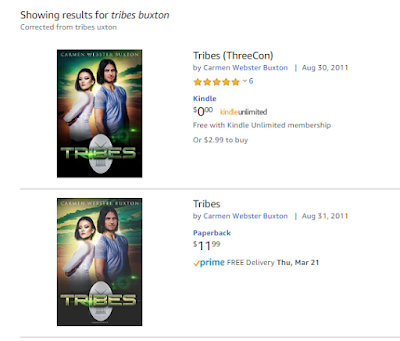


If you limited the search to the Kindle store, you would see only the Kindle version, with no indication a paperback exists. Likewise, clicking one entry brings up that product page with no link to the other version. Amazon claims linking will happen automatically within 72 hours, but I have always had to ask them to link the books, which is what I had to do for Tribes. It didn't take them long and now it looks like this:


Conclusion

In terms of ease of use, the two platforms are actually pretty similar. Also of note is that the PDFs for the interior and the cover worked fine on both platforms. Of course, in both cases, I had selected white paper instead of cream, which I suspect is why the covers worked for both.


Monday, March 11, 2019

TRIBES is now available in paperback and through Kindle Unlmited!

My ThreeCon novel Tribes, which is set on Mariposa, a world started as a penal colony, is now available in paperback! The new cover emphasizes the romance at the core of the story, and as romance readers appear to be the bulk of Kindle Unlimited subscribers, I also pulled the ebook from other platforms so that I could add the book to Kindle Unlimited.


Also, if you buy the paperback from Amazon, the ebook is free through Kindle Matchbook  Here is the buy link for the paperback on Amazon.

I'm also publishing Tribes as a paperback via Nook Press from Barnes & Noble; Here is the pre-order link for B&N.

This makes the seventh title I have in print. When Alien Skies comes out, it will be my 12th ebook and my 8th paperback. It was interesting to use the two different platforms for paperback publishing.  I will soon be updating my blog post comparing the two. 

Friday, March 8, 2019

Updated info on sending files to a Kindle

I've noticed that Amazon has changed some of their pages, so here are updated directions for how to email files to a Kindle. You can send an MS Word file, an ASCII text file, a PDF, or a *.mobi file to your Kindle if you first do this one-time set up procedure:
  1. Log on to Amazon and hover the cursor over Account & Lists
  2. This makes several lists appear. 
  3. About 2/3 of the way down on the far right column, click Your Content & Devices 
  4. On the Manage Your Content & Devices page, click the Preferences tab 
  5. Scroll down to Personal Document Settings and click that.
  6.  A list of your Kindle devices should appear with the email address for each shown. 
  7. Make a note of the address for the Kindle you plan to use.
  8. Next, scroll down to where it says Approved Personal Document E-mail List and add the email address you will use to send the file; if you don't add the address, then nothing will reach your Kindle via email
Now all you have to do any time you want to put a file on your Kindle is to create an email to the Kindle's email address, attach the file, and click Send. Note that if you attach a PDF it will arrive as a PDF, unless you put the word "convert" on the subject line of the email. This will convert it to reflowable text and you can then change the font size  on the Kindle, if needed. 

Important Notes: Unless the file is mobi, the file name will become the document name. Also, regardless of format, once the file is on the Kindle, it is considered a "personal document" and not a book. If you set your home screen to show only "books" you will only see those Kindle books you bought from Amazon. If you're sending a PDF, the subject line should be the the word "CONVERT," or the PDF file will end up as a PDF on the Kindle;  that is, it won't be a normal book, but rather a series of images. 

Very important note

There is no charge for emailing documents UNLESS you are using a 3G connection. Be sure you are using wifi when you email a file, to avoid per/MB charges to your account.

Addendum added February 2021

In response to Kindle-hacking, Amazon now sends an email asking you to verify that you sent the file. You have to click the blue box or the file will not be delivered. See below for an illustration.

Kindle Logo
Hi ,

We received a request to send the following document to your Kindle account:
* Drifters.docx


Click below within 48 hours to verify this request.


Verify Request

Thank you for reading with Kindle!

Monday, March 4, 2019

Do you have to buy champagne for a relaunch?

Because of a family medical situation, work on Alien Skies is behind schedule. The manuscript is with the copy editor now, so hopefully it won't be too much longer until it's ready to go.

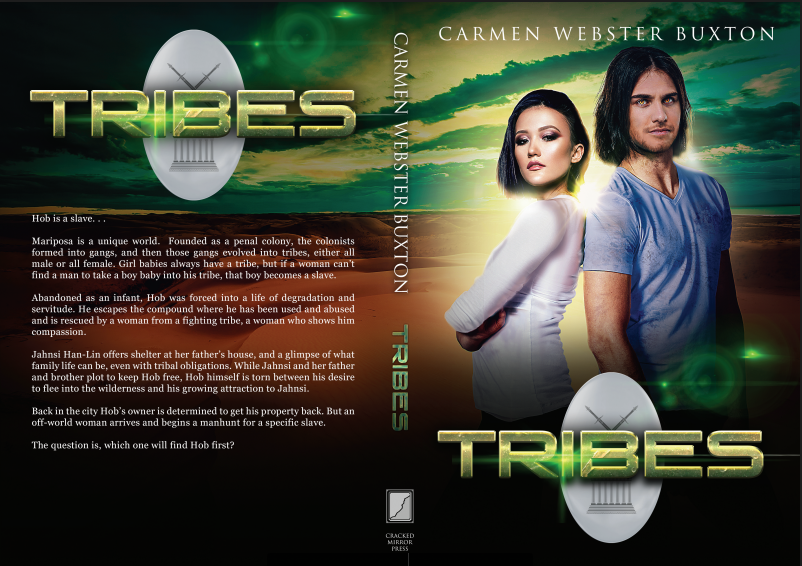
However, in the meantime, I had decided to re-launch of one my ThreeCon novels, Tribes, as a science fiction romance. I didn't write it as one, but the love story in it starts on page 3,continues to the last page, and is central to the plot, so I think it will fly as a science fiction romance. In addition, I am issuing a paperback version at the same time. I commissioned a new cover for it, from the same studio that did Wakanreo books 2 and 3.

Here's the new cover! It will be available as a paperback as well as an ebook.


I'll post the paperback link as soon as it's available.

Sunday, March 3, 2019

It's Read an eBook Week! Half price ebooks!

Smashwords is having a sale celebrating Read an eBook Week! . All my books are either half price at $1.50 or free (click here for the list)! Lots of authors are participating, so check it out!

The main page has the participating books featured and you can filter them by genre, length, etc. 

Tuesday, January 1, 2019

Happy New Year! Also, Smashwords sale is ending today!

Happy New Year everyone! We had something of a medical emergency in my family, which pretty much consumed December, but I am hoping to get back to Alien Skies and release the Kindle and paperback versions on Amazon in February.

Meanwhile, the Smashwords Winter Sale is ending today! All my books are either half price or free.


Thursday, November 8, 2018

Cover reveal: ALIEN SKIES

I'm still working on the final draft of Alien Skies, book 3 in the Wakanreo trilogy. but I went ahead and commissioned the cover because I wanted to catch the artist when she had a free slot in her schedule.

Tada! Here's the cover for book 3!


I really like that you can tell from the covers that book 1 is about Kuaron and Dina and books 2 and 3 are about Yulayan and Kamuhi. 

Tuesday, October 30, 2018

You can reach the world via Google Books

To be frank, I don't sell very many ebooks via Google Books. I give away about 6-10 copies of The Sixth Discipline (free almost everywhere) every month, through Google Books, but it has been a while since I broke double digits on annual sales.

But what's amazing is, where the books go. Through Google Books I have found readers in the US and the UK, but also in Poland, Lesotho, Indonesia, India, Myanmar, the Philippines, New Zealand, Colombia, South Africa, and  Romania. That's amazing!  My words have traveled a lot farther than I ever did.


Monday, October 8, 2018

ALIEN BONDS Price Reduction!

Now that my second Wakanreo book ALIEN VOWS is out, I have reduced the price of ALIEN BONDS to $2.99!  The paperback version has not changed price and is still .$12.99.


Saturday, September 15, 2018

An Update on Moving Books to KDP Print

So, Amazon appears to have finally worked things out. As I mentioned in my earlier post, I had moved three of my print titles over to KDP Print from CreateSpace. I moved them one at a time, using the Create Paperback link on KDP, and I was able to keep the same ISBNs (I own the ISBNs for all my books; I purchased them from Bowker). The reason I could keep the ISBNs is that the interface asked me if they were published on CS and gave me a chance to enter the ISBN. Amazon has changed that protocol so that the KDP Create Paperback button didn't allow using an existing ISBN.

Amazon was working on a way to move all a writer/publisher's CS titles to KDP in a single step. They had a link for it on the KDP bookshelf weeks ago, but it didn't work! Apparently, they unplugged one way to move titles before making sure the new way worked. After a while, they took that link away, but it returned a couple of days ago, and I was able to use it successfully, if not seamlessly.

At the point in time I clicked the link, I had five titles in CS. One was in draft because I am having problems with that cover and I cannot fix them myself. One of the five I had approved for sale recently, even though the cover needs work because they are things I can fix, and I wasn't sure it would move to KDP if it was still in draft. The other three had all been for sale for sometime and were properly linked to their Kindle versions on their Amazon product pages.

So, once I clicked the "Move my titles" link on the KDP bookshelf, I got the page with the three buttons: validate my CS account, validate my KDP account, and move the books. This time all three buttons seemed to work!  When it was done, everything disappeared from CS. The account was still there, but there were NO books listed.

In KDP, results were less uniform. One of the titles moved over perfectly, and was already linked to the Kindle version. The other titles have moved over but had not linked automatically.  When a book exists in KDP in two formats, if they are properly linked, there is only one entry on the bookshelf, like this:


Each format has its own menu to edit content, details, etc., but they are one title.  If there is only one format, the entry on the bookshelf looks like this:


If the book is a Kindle book, the links are for creating or linking a paperback, and if it's a paperback, the links are for creating or linking a Kindle version. For four of the five books I moved over in one step, KDP created a second entry on the bookshelf instead of linking them. When I tried to link them myself, using the Link to Existing Paperback on the Kindle bookshelf entry, it did not work, but when I used the Link to Existing Kindle version on the newly-created paperback entries, it worked fine. I was very pleased that the draft CS title with the problematic cover came over just fine, as a draft entry in KDP. And for the one that's in better shape, but isn't really ready for prime time, I was able to pull it off sale by using the Unpublish option on the paperback menu.

My books are all now moved over. Goodbye, CreateSpace. It was nice knowing you,