Showing posts with label X-Ray. Show all posts

Wednesday, January 24, 2018

ALIEN BONDS has launched!

Alien Bonds is now for sale in the  Kindle store and in trade  paperback! If you're a Kindle Unlimited subscriber, it will be available for free for at least the next 90 days.

I'm very excited to launch this book with the new X-Ray feature available on the Kindle because it's the kind of book that can really make use of X-Ray


Once I was sure the X-Ray feature would work with the many Wakanrean terms I had added to it, I put a note at the front of the Kindle version of the book to mention it to readers.  You can see how it looks above, from the "Look Inside" view of the Kindle book. 

A lot of publishers don't bother with doing X-Ray setup because most readers don't use it. And most readers don't use it because they don't know it's there. I think one reason Amazon doesn't do more to inform Kindle users about it is because so many books don't have it available. They don't want to get readers excited about a new feature only to find out it's not there more than half the time. It's the classic chicken-and-egg situation!  I wish Amazon would alert readers whenever they open a new book with x-Ray enabled. This would solve the problem and maybe the X-Ray chicken would lay a lot more eggs! 


Saturday, January 20, 2018

ALIEN BONDS is available for pre-order!

If you want to buy it now, go here The book will be delivered to your Kindle or Kindle app on Tuesday. To begin with, it will only be available as a paperback and as a Kindle book, but after a few months I will launch on other platforms.

In ALIEN BONDS, two lives are changed in an instant. Industrial chemist Dina Bellaire travels all the way to the planet Wakanreo to advance her career. Her carefully planned life goes up in flames the second she meets Kuaron Du, a Wakanrean who makes his living singing ancient songs in a dead language. Both of them know they can’t go back to the way they were before they met. They just have to convince the rest of the universe that what happened to them is real.


I have never used the Amazon pre-order status before, and in fact I am only using it now because of one thing: the X-Ray feature.

The X-Ray feature isn't available to use until a book exists and is on the author's "bookshelf." By making it available for pre-order, I am able to work on the X-Ray set up but no one can buy the book until I am done with it. I am putting a lot of the Wakanrean words in the story into the X-Ray feature to help readers figure out what they mean. I'll post more about that later, but I am too busy doing the set up to explain now.

Saturday, December 9, 2017

My X-Rays are in!

I finished the X-Ray set up for all my titles! It was actually a fair amount of work, not difficult but a little tedious. Electronic housework, in fact.

As I blogged about earlier, Amazon's Kindle Direct Publishing (KDP) platform has a new tool for indie authors and small publishers (possibly they have something similar for big publishers). The tool creates an X-Ray file for a Kindle book and enables that function for that book.

X-Ray is a very useful feature, especially in certain kinds of books. If you're reading a sprawling fantasy trilogy that has dozens of characters, spreads over a decade or two, and has six viewpoint characters, and suddenly a vaguely familiar character's name pops up, your reading pace can stall as you try to figure who the heck this new elf or mage is.

The feature isn't supported in all versions of the Kindle app. Kindle for PC still doesn't have it, but the Android and iOS versions do. And of course, the newer Kindles all have it (not entirely sure about the ones before the Kindle Touch).

How X-Ray Works

Here's what it looks like on my Voyage when I highlight a character's name:


Here's the same function on my Android tablet: About the only difference is in the menu that lets you create colored highlights, impossible (naturally) on an e-ink Voyage screen. 


You'll notice the source is listed at the bottom as Shelfari. The new X-Ray tool allows the author/publisher to either write custom descriptions for characters and "terms" or to link to Wikipedia articles. However, before there was a tool, Amazon would use the information that authors and publishers could list in Shelfari, a book-lovers site Amazon bought. I had done that for The Sixth Discipline, and when I had a BookBub promo and gave away 14,000 copies of The Sixth Discipline, Amazon created an X-Ray file from the Shelfari info I had entered. I have since edited and added a lot of the info using the new tool, but I can't see those changes unless and until Amazon support staff push the changes to my copy of T6thD.

Here's what it looks like when I pull up the menu and Select X-Ray (next to Go To):


You can see from the menus that you can get a list of characters or terms on the page, with references to where they appear in the text (clips). I couldn't find a way to use this part of X-Ray from Kindle for Android, but I don't know if that's because it isn't there or I couldn't figure it out

For any other authors out there thinking of using the new tool, I will say that you should always go back into the tool after you publish your changes, because either it is easy to miss something, or sometimes the changes I had marked did not actually get published. Also, the sorting features are very helpful in looking for variations of names and terms.

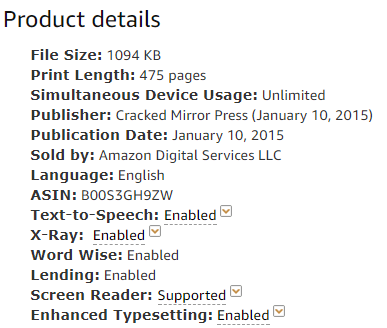
So now, anyone who looks at my book descriptions in the Kindle store will see X-Ray enabled!  Here's Saronna's Gift, to illustrate:


Questions?

Any authors who want more info on how to do this, or readers who want to know how to use it, feel free to comment!

I'm really looking forward to launching Alien Bonds with this feature enabled from the get-go! 


Monday, October 16, 2017

I'm Becoming an X-Ray Technician!

Not really. I mean, I won't be x-raying people. But Amazon's KDP platform now offers the ability to create ae edit X-Ray files for Kindle books. X-Ray is a cool feature in Kindle books that lets you find out about characters and terms (places, organizations, etc) used in the story. It's handy especially for books with a huge cast of characters.

I blogged about X-Ray before, when Amazon created the file necessary to create that feature for my first book The Sixth Discipline. That method relied on my having created the set-up in Shelfari, but I don't think that site even exists anymore. It was absorbed by GoodReads. Now, however, I don't need to rely on Amazon creating X-Ray for me, because KDP has given me the tools to do it myself. I've already created and published files for several books.


KDP has a pretty good write-up on what to do in their help section. The only thing that wasn't clear to me is that you need to click the "Item Reviewed" link for every character or term you edit and are ready to publish. I really do like that you don't have to have done all the characters to publish. And the program that creates the list that you work from is pretty good. It captures pretty much all the characters names; if anything it errs on the side of too much rather than too little, at least when it comes to terms.

I'm excite to think that when Alien Bonds comes out, it will have X-Ray from the get-go!

Tuesday, May 14, 2013

The Sixth Discipline just got X-Rayed!

The X-Ray feature on Kindle is really handy for epic books with a large cast of characters or those stories that span years, where a character can disappear for pages and pages and then pop back in again. X-Ray give you a idea how important the character is, and who they are, but it only works if the publisher has gone the extra step and provided Amazon with a file to use to generate the X-Ray.

In addition to the newly-purchased Goodreads, Amazon also owns social reader site Shelfari, and one of the things this means is that on Shelfari, the author or any reader can create lists of characters and places in the book. Those lists are then available to view on the bottom of the product page on Amazon.


It looks like Amazon might be planning to spin this function off into creating X-Ray files for KDP books, because my book just got a whole bunch of characters added by someone known as "X-Ray," who has also added characters to a boatload of books!

It would be cool if it's true!

Update:  I just downloaded this book again and it now has the X-Ray feature!  Yay!