Showing posts with label ebooks. Show all posts

Wednesday, July 20, 2022

Advice for anyone looking to make the jump to digital reading

The original now clunky-looking Kindle came out in 2007, and since then ebooks and ereaders have exploded. Technology and publishing have changed a lot since then, so here is my most up-to-date advice if you have never tried reading ebooks.

The basics:

All ereaders and ereaders apps offer similar functions like being able to change the font size and search through the text of the book. The early adopters of ebooks were mostly older women who read a lot but wanted an easy-t0-read format. 

Kindle 1
Original Kindle


However, there is a difference between a tablet and an ereader. An ereader is a single purpose device; it's made for reading. The e-paper or e-ink screen (two names for the same thing) is a very light gray with dark gray to black text. Color e-ink is currently not well developed as yet, although it is improving.  A tablet is multi-use, very much like a  really large smart phone, but without the ability to make phone calls. It has a backlit screen with the same kind of colors on a PC screen.

The advantages to reading on an ereader:

No screen glare, even in bright sunlight

Much less eyestrain. 

No distracting emails, texts, or other app notifications. In a way, the single use device is an advantage if you want to read without interruptions. 

The advantages to using a tablet as an ereader:

Because tablets are multiuse, you can run other apps like email, browsers, calculators, word processing, games, etc., without needing to pay for additional hardware.

In addition, you can use multiple ebook apps. all major ebook sellers offer free apps for Android and iOS. You might have to buy your ebooks in a browser and then upload it to the tablet as both Apple and Android don't allow apps to sell products unless they use their payment method (Apple Pay and Google Pay, respectively). 

New Kindle Oasis

Kindle, Apple, Google Books, and Kobo are the major players as far as ereaders and ereader apps. 

First steps:

I recommend if you already own or can borrow a tablet, that you use an app (Kindle, Apple, Nook, etc) to see if you like digital reading.  Try it out, and if you notice any eyestrain or glare issues, then look into getting a dedicated reader. Decide where you will most likely buy your ebooks. Note that Google does not, as yet, have its own ereader hardware. 

Also note that erearers and sometimes ereader apps offer  special functions  such as getting the definition of a word or translating foreign language text. The Kindle offers a function called X-Ray, which works only if the publisher has enabled it, that lets the reader see characters and places and other specifics of the book. You should check out what the ereader can do before you invest in hardware. 


Wednesday, August 8, 2018

eBooks can be corrected and Kindle books often are!


Any book can have errors, but one book that's almost bound to have errors is an old, out-of-print (or even out-of-copyright) title that is published as an ebook by scanning the printed pages and then converting the resulting file into epub or Kindle format without carefully proofing every word. It might be because the pages weren't in great shape or it might be because the scanner wasn't the latest and greatest, but those kinds of books almost always have some errors. Sometimes they have many errors.

A lot of readers probably pay no attention, but in fact Kindle books are often updated after publication. This could be for reasons other than errors; the publisher might have added content, or enabled a new feature like X-Ray. But since the  Kindle interface provides a way for the user to report content errors, I'm guessing the most common reason is fixing a typo or several typos.  [Note: This only works on an actual Kindle. The Kindle app on my Android phone, my PC, and my tablet do not have this function. I don't know about the iPhone and/or iPad versions. If you know, please leave me a comment.]

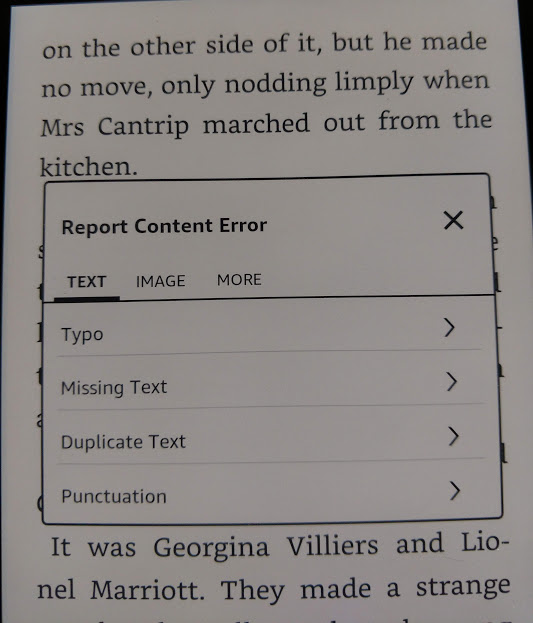
If you feel like it, you can send Amazon info about errors using the menu that pops up when you highlight text.  The example below is highly typical of the kind of errors you'll see in scanned books. "For two pins" was a common expression, but the scanner made it into "Pot two pins."


Once you tap the three dots to get the menu, you see an option to report a content error. 


Amazon now asks you to identify the error.


In this case, I tapped Typo.


This gave me a screen where I could input the correction. In a way, Amazon is making readers into proofreaders. 


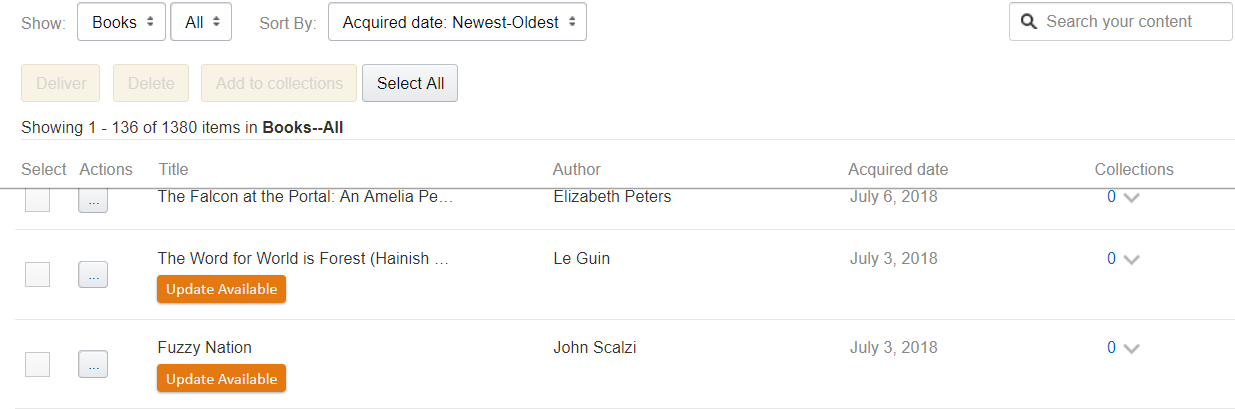
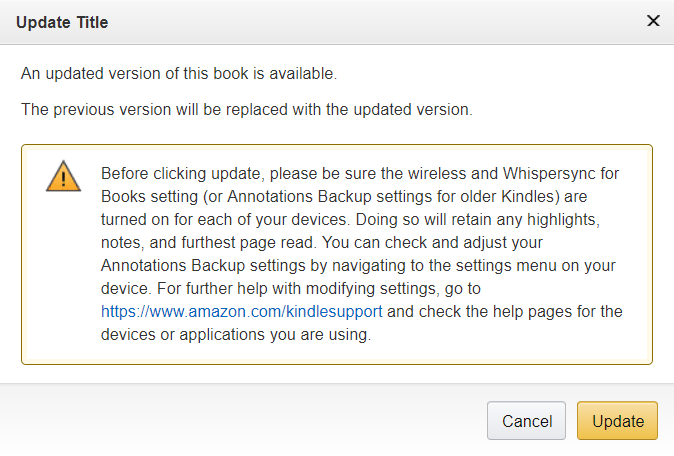
Once you click submit, you get a screen telling you the error will be submitted. But assuming that the publisher acts on these notices, how do you get a corrected file? Well, corrections and changes happen all the time, but Amazon doesn't automatically reload the book because doing so with no warning could wipe out a reader's notes and highlights and lose his place in the book. If a publisher has uploaded a corrected ebook that you bought from Amazon, that shows in your list of  Kindle books, accessible in your browser when you're on Amazon.com. The list appears under the heading  "Content and Devices"  and updates are obvious. 


If you click the update button, Amazon first sends a warning. 


And there you have it. Good luck trying that with a printed book on your shelves! 


Monday, April 2, 2018

Microsoft eBooks is a thing?

I own a laptop with Windows 10 and a tablet with Android. I have the Kindle app on both, but I almost never use it unless I want to look at a picture book or other book with color illustrations. For actual reading I much prefer the e-ink experience on my Kindle Voyage.

However, when I clicked the Start button on my laptop the other day, on the list of apps, right after Most Used and before the alphabetical list of all apps, a little rectangle appeared labeled "Suggested" and it said "Explore ebooks, Save on popular titles."

I had totally forgotten Microsoft sold ebooks!


I clicked the link, which took me to the MS Store and a display of books on sale, mostly for under $4. In fact, $1.99 seemed like the most popular price. Lots of them were nonfiction. I didn't really want to read an ebook on my laptop or even on my tablet, but I wanted to see how ebooks worked in Windows, so I bought The Maple Syrup Cookbook for $1.80. It took me a moment to remember my password to the Microsoft store, but I completed the purchase and got it downloaded. It said the file was epub and it would have DRM and could be read on 6 devices. 

Microsoft has no dedicated app to read ebooks; they simply tacked ebook functionality on to their Edge browser. The cookbook loaded in Edge just fine. I could flip pages and use the ebook menus, which look like this: 


On left: Table of contents, bookmarks,  find/search/   
On right: Options (font, display), read aloud, create bookmark,

The tricky part was going back and reading the book later, after I had closed out Edge and then reloaded it. I could not find where Microsoft had put the book!  I could access it by finding it in my browser history, but that didn't seem like a good way to rely on reading a book, because eventually it would move out of history. I did notice when the book was displayed in Edge that the URL was shown as: microsoft-edge:books:FGQPF3H08GQW

By searching for FGQPF3H08GQW as a filename, I found this location, but it didn't seem to have the book when I listed the files there:


Eventually, by hunting around in Edge, (MS Help was NO help!) I discovered that clicking the Star/Hub icon in Edge displayed some other menus, including one that looked like a bookshelf. Clicking that menu lists your MS books. Mystery solved!  Just to be sure the book was actually downloaded, I tried accessing it while I was offline and it worked fine. 


But seriously, why was this so damn hard! And why the mystery about where the file is on your PC? No wonder Microsoft eBooks haven't caught on! 


Monday, February 26, 2018

Amazon Exclusivity: What does it buy you?

The answer is, it depends. Mostly, in my experience it depends on your book. If you're self-publishing in the US, your biggest single market will almost certainly be the Kindle store. This is not to say that other markets should be ignored. Barnes & Noble (Nook), Apple  iBooks, Kobo, Google Play, and Smashwords sell plenty of ebooks.

Pricing and Countdown Deals

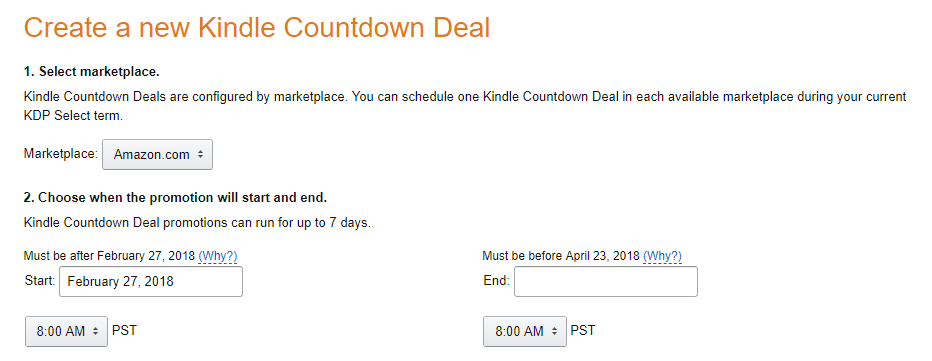
However, selling a book is not always as simple as slapping a price on it and saying "For Sale." Amazon limits the minimum price for a Kindle book sold via KDP to 99¢. It encourages you to price the book between $2.99 and $9.99 by offering the maximum royalty percentage for books in that range. If you enroll your book in the KDP Select program, it means you cannot sell it in ebook form anywhere except the Kindle store (This doesn't apply to print sales). It also means Amazon offers incentives not otherwise available.  Specifically, you can run Kindle Countdown Deals where for the limited number of days specified, the book is available at a sale price (US or UK only). As opposed to you simply lowering the price yourself (which you could do at any time) the regular price still shows up, but it will be crossed out to show the book is on a limited time sale.


Kindle Unlimited (KU)*

The other big benefit is that your book is available in the Kindle Unlimited subscription program. KU subscribers are Amazon customers who pay a monthly flat fee. This allows them to read any book they want in the KU program. There's a limit to how many they can have at once, but not how many they can read. Amazon pays the author not a flat royalty per book, but a per-page-read fee. The amount is not guaranteed, but lately for the US KU market it has been running about 0.0048¢ per "Kindle edition normalized page"**. It is usually less in the foreign KU markets, but the US is usually the biggest one anyway. 


Genre, length, and readability will affect how much money your book can make in the KU program. My experience is limited since I have had only three books in this program. The enrollment is not a marriage; you don't have to keep the book exclusive forever. When you sign up, it's for a 3-month period and then you can renew again every 3 months, if you wish. If you don't renew, your book is no longer in KU and you can't run price promotions. With Saronna's Gift, which is a science fiction romance, I made enough with KU borrows to make it worthwhile to say in for two full periods, that is, 6 months. With Turnabout, a YA science fiction novel that is in no way a romance, I never made much in the KU program so I let it expire after the first 3-month period. Note that Turnabout is also considerably shorter-- only about 80,000 words, which meant less money per KU reader.

To sum up, I would expect a book that was a page turner, a romance, and fairly long would do very well in KU. And, for what it's worth, here's my advice:

  • Always start in KDP Select to see how the book does
  • Set a goal for KU borrows (say a third or maybe half of what the royalties are) and drop out when you go below your goal.
  • Once you're out of KDP Select, go for every market you can! 

Footnotes:
* I am aware that KDP Select also gets your book into the Kindle Owners Lending Library, but frankly, I don't think this is nearly as big a deal as KU so I didn't spend any time talking about it.
** Amazon calculates pages in its own way, but Alien Bonds was 128,000 words and Amazon said it had 658 KENP pages. That's approximately 195 words per KENP page.

Saturday, March 11, 2017

Print vs ebook: Amazon Giveaways

I recently used an Amazon feature called "Hosting a giveaway." If you look at the product page of a book, below the reviews and just above the "What Other Items Do Customers Buy After Viewing This Item?" section, you will see a link to create a giveaway.

Amazon offers this feature on a lot of items, not just books. Basically, whoever "hosts" the giveaway pays for the items, including delivery. It can be anyone, not just an author, but for books, it's usually hosted by the author. Until just about a year ago, you could give way print books but not Kindle books, but now it works for both formats.

Setting up a print giveaway

The set-up process lets the host determine number of prizes, odds of winning (e.g., 1 in 1000, 1 in 500,etc), and what users have to do to enter (e.g., watch a video, or follow the author's Amazon page).

The process also allows some control over who can share the link. If you want to give away copies a part of your own promotion, you might want to use this option to limit how the giveaway was accessed. On the other hand, if you just want more readers and hope for reviews, you would wanted wider distribution not narrower,

What you don't get is a way to contract the winners. You can see their Amazon user names, but not contract them. But Amazon handles picking the winners, so it's guaranteed to be fair.

I have run giveaways in the past, but this time Amazon had added a new button that let them distribute the link for you. It sounded good,so I went for it.

Based on prior experience, I set the odds at 1 in 150, and since it was for print books, I limited the prizes to two. I created my welcome message, my congrats to the winner (with a plea for a review), my sorry you lost message (with a reminder that I have another book free, in Kindle format), and clicked the button.

I was waiting for the email to tell me that the giveaway was live, so I could post the link. I never got it. The giveaway ended in 16 minutes. A total of 282 people entered and, of course, two of them won.   I was astounded.

The ebook giveaway

A couple weeks later, I tried a giveaway that was as identical as I could make it, but this time with the same title in Kindle format, and three copies as prizes. I used the button to make Amazon distribute the link, and since it was a test, I didn't mention the giveaway here or anywhere else until after I gave away two kindle copies. That took 18 hours!

Once the second copy was given away, I advertised the link but even then, the number of entrants slowed to a trickle. I will be curious to see if the third copy is claimed before the giveaway end date of March 15.

So it looks like, as a prize, a print book is still much more valuable than a Kindle book.


Friday, May 20, 2016

GoodReadsBub?

I occasionally blog about book promotion, especially in reference to free books, but also about how hard it is to get a book in front of folks who might want to read it.  One service I've mentioned often is BookBub, the gold standard of email promotion for ebooks, They have a website, but their marketing power comes form their massive email subscriber list. None of the other services compare in scope, and for this reason, BookBub is now extremely popular with traditional publishers who are running sales of ebooks. It's difficult for self published authors to get a slot in the BookBub list.

Now, the mighty BookBub might be getting some real competition. Today I got an email from GoodReads, the popular reader-centric site, which was bought by Amazon a few years ago. It looks like GoodReads will be offering a daily email of books for sale.


Once I logged on to try it, I was able to choose specific authors as well as genres, and also specify my preferred ebook platforms (Kindle, Nook, iBooks, etc), so they are not just offering Kindle deals.

What I don't know is, how does GoodReads know about these deals? Are they getting paid by someone to list the books, or do they just scour the web looking? Certainly they will money on every Kindle books sold, but what about non-Kindle deals?  Or maybe they figure if they can cut into BookBub's business, they won't have to pay associate fees to sell the books. 

One feature GoodReads has always offered is a "want to read" list. You can tag a book as "want to read," and now GoodReads will tell you when it's on sale.  Likewise, they can tell you if an author you follow has a promotion running. 


I wonder if GoodReads will expand this service to cover print books. While ordering a print book online night not have the immediacy of getting an ebook download, if you rely on online ordering for your print book needs, knowing about special offers, and price reductions could still be a great thing for you. But then Amazon probably already does that directly, based on your buying history. 

Sunday, April 10, 2016

The self-publishing process: Should I do print?

If you've made the decision to self-publish, the next think you need to decide is whether to publish print books or ebooks or both.

POD

To self-publish in print, almost the only viable option, unless you are rich enough to invest the money needed to print several thousand copies of your book, is to use a POD service. POD stands for print on demand, a process that takes advantage of new technology that melds a high speed printer/copier machine with a book binder. So far as I know, the only commercially available one is called the Espresso Book Machine. Some bookstores have invested in these machines, but they are expensive, so they are not generally affordable for a small business. But several online companies are out there, including Lulu and CreateSpace (from Amazon) and Barnes and Noble, that provide a way to print and sell your book using their POD machines and their websites.


However, even the POD process requires that you format the manuscript properly, and create a PDF of the book interior that looks like a typeset book, with all the correct information on the title page (front and back) and with proper headers and footers, including page numbers. That is much harder than it sounds! Some people use MS Word templates from companies like Joel Friedlander's Book Design Templates. Other use desktop publishing software, like Adobe InDesign (which can also produce an epub file for the ebook version). But InDesign is complex and not free, so that's a real investment of time and money.  There are commercial services that will format print books, just as there are for ebooks, but all of them have the same limitation: correction workflow. If you give a commercial services a word processing file, and they give you the a PDF to publish from, how do you correct that if you find an error later? Generally, unless you can edit PDFs, you have to ask them to make the correction for you.

Obviously, everything should be proofed carefully before you hand over the m.s., but it's difficult to be sure you got every single tiny typo.  Correction workflow should be factored into your decision on how to produce the PDF.

Cover

You will need a full-color PDF of the entire cover (front, back, and spine), not just a front cover image, like you do for an ebook. The cover is even more important for print than for ebooks, so you will need to be sure it looks good. There are tons of graphic artists who will work for reasonable rates, but be sure you are dealing with a reputable one before you give them your money.  Most of my covers were done by relatives with graphic design experience, but I have also used Nessgrahica. They are based in Croatia, so you would need to send the payment via Western Union, which you can do online.

Pricing

The per copy costs involved in producing a print book mean that you can't price it as competitively as you can an ebook. Amazon will let you set the price on a Kindle book as low as 99¢, but because they have to pay for paper and ink, they will not let you price a CreateSpace POD book at a loss; generally, a POD book will cost about the same as a commercially-published trade paperback. This is a significant drawback if you're starting out. One reason self-published ebooks sell as well as they do is that they are so much cheaper than ebooks from traditional publishers, who price them high to protect hardcover sales.

Selling

Another limitation is that POD books are not generally found in bookstores,. Even the B&N POD books are only at  few B&N stores that have Espresso machines. This means online sales are your only retail outlet, unless you want to go around to bookstores and persuade the owners to carry your books on a consignment basis. Some people do this successfully, others not. Some authors carry extra copies of their books to conventions and sell them to people they meet. You need to decide what you're willing to do to sell your books.

The Payoff

Quite frankly, most self-published titles don't sell well in print unless they are by an author who was already well established before the self-published titles came out. However, even if you don't sell that many copies, having a print version of your book is an advantage. You can give away free copies as promotions and (hopefully) get reviews, and if you make contacts at conventions or readings, you have something available for those folks who just don't want ebooks. And you can hold book signings!

n.b. Updated 9/23/16

Thursday, May 22, 2014

Publishers: Be bold or go bust

Amazon and Hachette, a Big-5 publisher, are having a very public spat over terms.  Amazon has always operated with very tight (for years nonexistent) profit margins, keeping prices low in order to gain customers. This kind of trade-off of short-term profit for long-term growth can work in a big corporation, but sooner or later, investors want dividends, and that money has so come from somewhere, so Amazon has decided to try squeezing the middle man, which in this case is a publisher.

As this Publishers' Weekly post makes clear, lots of people have a dog in this fight. Authors feel threatened, agents are wary, and publishers and booksellers are all claiming Amazon is the bad guy who is out to destroy them. As a self-published writer, I'm less affected by this; my dog is more of Tamagotchi.

The PW article says publishers are worried about bookstores, but I doubt that comes from their goodness of their hearts. Basically, everyone is worried about their own best interests. The real problem publishers have is that they need their enemy. They can't refuse to do business with Amazon because that's a huge percentage of the market. At the same time, what's clear to me is that in the very long term (as in 20 years into the future), things may be very different.

Until the web came along, print books have always been sold almost entirely in retail stores. This was true of other goods, too--furniture, clothes, pet supplies--but now consumers can order books and other things while sitting at home or travelling on a bus or anywhere else they can pull up a browser or an app and click a button.

Some goods are less vulnerable to online erosion. I have not had much luck buying shoes on the web because I have a high instep. On the other hand, brand name pet supplies are the same thing whether I drive all the way to the store or order them online. Some products, like books, are ripe for online selling; there are so many, many titles a bookstore has to stock, that it's hard to compete on price and selection when the competition is a series of giant warehouses. eBooks have upped the ante considerably, but even before the Kindle, bookstores had a handicap.

The digital transition made things worse for bookstores, and to some extent publishers, but for publishers, there is some light at the end of the tunnel if only they could be more agile and less resistant to change.  Jeff Bezos, love him or hate him, is a true visionary. He recognized very early on that the internet was going to radically change the way business is conducted, and he jumped in with both feet. Publishers have (so far) mostly refused to leave their comfort zones. What they should realize is that change also brings opportunity.

Being a retailer of digital books takes money and expertise, but it does not take the same amount of capital as huge chains of bookstores. eBooks provide publishers with a chance to finally, at long last, make the reader their customer. Right now Amazon and Barnes & Noble and smaller bookstores are their customers. They have no way of knowing who the readers of their books are.

But they could. If they dare.


Saturday, January 25, 2014

A survey by any other name?

The Pew Research Group recently released the results of their study of reading habits of Americans. The Pew post was headlined "E-Reading Rises as Device Ownership Jumps." The first sentence of their overview pretty much sums up the results: "The proportion of Americans who read e-books is growing, but few have completely replaced print books for electronic versions."

The study got a lot of web coverage, but interestingly, the same study produced many different headlines:

Just Four Percent of Americans Read eBooks Only (Motherboard)

eBooks surge as devices multiply but print holds firm (NBC)

In this age of ebooks, print still alive (Des Moines Register)

Americans prefer print over ebooks (PBS)

Pew, Princeton study shows e-reading up (Teleread)

eReading is Risng But It's Not Replacing Print, Pew Research (Galleycat)

Headlines are, of course, meant to grab the reader's attention, but it is interesting to me that these headlines are so different, with the Motherboard one giving only a single stat, the PBS headline flatly ignoring the increase in e-reading, and the Teleread headline ignoring any preference for print. Of course, all of them have more info in the posts than in the headlines

I find it interesting that the Des Moines Register calls today "the age of ebooks." Personally, I think the real age of ebooks will start in 10 to 20 years from now. Until then I agree that print is still going to be necessary for true sweeping success, which is why, as I said in my last post, I plan to move to print and ebook publishing.


Monday, July 29, 2013

Amazon adds a great new feature to Kindle: automatic delivery of corrections


I went to my "Manage Your Kindle" page on Amazon today, to send a copy of the J.K. Rowling/Robert Galbraith mystery novel The Cuckoo's Calling to my husband's iPad, and I noticed something new.  There was a notice above the section with the list of my books that said I could sign up for automatic updates when a corrected version of an ebook comes out. Naturally, I clicked OK!

A big advantage of ebooks over print is they can be corrected if errors (typos as well as formatting errors) are found. Newer Kindles even offer a way to report these kinds of mistakes (in the More menu that comes up when you highlight a phrase).  But once the publisher has fixed the mistakes, someone who has already bought that book won't see that fix unless they download the book again.  Amazon will email buyers if the mistake is significant, but then they buyer has to request a new copy. This new feature is a "sign up once, and it's automatic from then on" thing, which is much better.

The number of errors in ebooks from self-publishers is widely variable, depending on the author's attention to detail. The number of errors in traditional books used to be just awful, mostly because of workflow issues, but they have (mostly) gotten better. I have found a couple of typos in The Cuckoo's Calling, though (an excellent book, by the way!). I will have to report them and see how well this new feature works!


Tuesday, June 25, 2013

An interesting case

An interesting point about ebooks is that their use is not governed merely by the technology available but by the marketplace. Sony had a very nice e-ink reader before Amazon came out with the first gen Kindle (which looked a little clunky in comparison), but Sony didn't have much of a bookstore, and its Reader never got much traction in the marketplace. Amazon was the first company to successfully deal with the chicken-egg problem: no one would buy an ereader unless there were lots of ebooks to read, and one one would publish in ebook form unless there were lots of folks with ereaders. Their success gave them a solid head start in the ebook race.

To establish the Kindle as a viable reading platform, Amazon not only created apps for other devices (iPhones, iPads, PCs, Android), they discounted the price of ebooks so that best sellers were rarely more than $9.99. They could do this because publishers sold ebooks at wholesale rates; they set a price, and Amazon paid them that amount. Amazon then turned around and set its own retail price at whatever it wanted, sometimes less than it had paid for the book.

It was the Kindle's success that made the publishers fear it. In case you haven't been following it, there is a case in federal court right now that relates to the struggle for the ebook market. The Department of Justice is suing Apple about possible price fixing and antitrust aspects of its agreements with five of six of the major publishers; those agreements called for agency pricing where the publisher sets the retail price and the retailers gets a set percentage of it when the book is sold. The five publishers, who made Amazon accept agency pricing, too, have all already settled.

Apple has a lot of (very good) lawyers, so I am wondering how this lawsuit will come out. A judge is hearing it, not a jury, so there won't be any kind of deadlock. But I do wonder if Steve Jobs were still alive if they would call him to the witness stand.

The case is awaiting a decision and speculation is rife on the internet.

Tuesday, May 7, 2013

Writing to make a connection

When people ask me why I write, I say it's because I was born a storyteller. I have a tin ear and two left feet, so music and dance were out as a way to tell stories. I can draw a little, but not enough to do what I would want to do. Telling stories in person is fun, but finding an audience is hard to do. That leaves writing. Putting a story down on (real or virtual) paper gives me the best opportunity to reach people. I want to make a connection; I want to tell a story and make people care about how it ends; I want to create characters and make them come alive in other people's heads.

Self-publishing is a fantastic breakthrough because in the past, unless an editor thought your story was marketable, it went nowhere. Notice I didn't say “good,” I said “marketable.”  Editors are in the business of buying books from authors that they think readers will buy from them. RandomHouse didn't buy Fifty Shades of Gray from E.L. James because they thought it was great literature; they bought it because they knew people would buy it. Thousands of people were already buying it from online sellers because the author had self-published it. An editor might think a book is beautifully written, but if he doesn't think anyone will buy it, he won't buy it either.

Self-publishing has been around a long time, but in the print world, it costs a lot of money to do. In addition, a self-published print book had no good path to get into bookstores.  There were a few authors who started that way, but not many. eBooks were a game changer not only because they were cheaper to produce, but because because their distribution is online, and not controlled by companies that deal only with publishers.

One nice benefit of technology is that online sites like Goodreads and online retailers like Amazon allow readers to post their thoughts on the books they have read. Admittedly, not all reviews are positive, but still, enough are that I can get a good buzz of connectivity, and know that I suceeeded.  I'll take that deal!


Wednesday, February 27, 2013

What he said

Well, this is turning into a bad habit! Just like my last post, this post is all about someone else's recent blog post. In this case, it's one by Nathan Bransford, formerly a literary agent, now a children's book author. The post is titled “Will Books Lose Out in a Tablet World?” and the reason I'm posting about it is because it points out succinctly that ebooks are not the enemy of books or publishers. Whether a book is physical or digital, someone has to write it, and lots of people can read it. People who buy and read ebooks are every bit as much readers and book lovers as people who buy and read print books.

But, as Nathan says, people who read on tablets (as opposed to e-ink ereaders like the Kindle, Nook, or Kobo) do have other entertainment options quite literally in their hands. They can browse the web, check email, play games, and watch movies. This multipurpose functionality is the primary reason tablets are growing in popularity.  It remains to be seen whether this danger will in fact hurt books and authors, but it's definitely as issue.

Nathan points a finger at high ebook prices as part of the problem, and I think he's right. Publishers need to look long term and stop worrying about protecting hardcover sales by pricing ebooks so high that no one will buy them; they could win the battle and lose the war, which would be a sad thing for readers.

Friday, October 12, 2012

I'm guest blogging today!

I have a post on The Serious Reader blog today! It's all about what causes the many errors we (sadly) still find in ebooks. The site also has lots of reviews as well as my post. Check it out!


Monday, August 27, 2012

The bits and bytes of books

Today while I was waiting in my doctor's office for an appointment, I was reading a book on my Kindle. You'll notice I didn't say I was reading my Kindle. You read on a Kindle because there are books and other works on it. The receptionist mentioned that she had been thinking of asking for one for Christmas.

When I first got a 1st gen Kindle back in 2008, people would constantly ask me what it was. Now, even if someone doesn't own an ereader, they recognize one when they see it.

Mike Shatzkin is a publishing industry consultant who literally grew up in the book business, as his father was a book seller. His blog is called The Shatzkin Files, and today's post looks at the global ebook picture. He makes a lot of good points and one thing he points out is that the poorest countries may be quicker to go totally digital because they can't afford the costs of print books. He also thinks e-ink readers like the Kindle and the Nook might have a very limited lifespan if tablets can ever reduce glare and eyestrain enough.

Coincidentally, today I saw a post about Levar Burton on the MediaBistro blog. Burton was the host of the Reading Rainbow series on PBS, and in passing during an interview he mentioned that he doesn't see cutting down trees to make books as being sustainable.

I think it's going to be a long time before print goes away or even becomes rare. I do think bookstores and online booksellers will start to rely on print-on-demand (PoD) technology, especially because it will get better and cheaper and the number of titles will grow.

Once the digital revolution starts, it's really hard to stop it. Just ask the music industry.

Friday, August 17, 2012

Writing a book is a lot like giving birth

I'm not the first writer to compare producing a book with producing a baby. I once heard Dan Simmons say that publishing a book was like putting your baby into a carriage and parking it on the sidewalk for passersby (in this case, book reviewers) to revile it and call it names.

A big difference is that babies generally take nine months to produce while books can take anywhere from several weeks to many long years. When you are an aspiring author with a finished manuscript, your “baby” is not only unborn, it is still highly mutable. If you change your mind about a character or a plot point, or you think of something you want (or even need) to add, you can do it. Thanks to the wonders of word processing, the only difficulty in making changes is keeping track of versions.

But once you publish, either traditionally publish or self-publish, the baby is out there for all to see. The other day I had a sudden insight into a situation in Shades of Empire that would be helped by adding a mention of something about the protagonist's motivation. Immediately, it occurred to me that I could not easily add that in as I have already published the book!

Now of course, with ebooks, I could edit and reload the book, but for anything less than mortifying mistakes, that way lies madness. What if you fix or add one thing and then think of something else? When would it stop? Besides, if you're like me and you rely on a conversion house to produce the Kindle and epub versions, you might need to pay for every edit. There are also folks who make the argument that editing a story post-publication is unfair to reviewers whose comments may no longer apply. Really, you shouldn't be publishing a book unless it's “done.”

That said, there are times when the ease of digital changes come in handy. A major part of today's ebookstore “stock” consists of yesterday's books, the backlists of published authors. In some cases, the publisher has (or negotiates) ebook rights, and in others the author self-publishes his or her backlist. But in either instance, some of these books are decades old. YA fantasy author Diane Duane recently decided to republish her 1980's fantasy So You want to Be a Wizard as an ebook, but first she updated it in a bunch of ways. She has named the new version the New Millenium Edition to make it clear there is a difference.

Again, there are trade-offs. As this post on Teleread points out, people get miffed at the idea that they have to pay for the book again to get the “director's cut.” On the other hand, the new edition might offer a better chance of reaching new readers. As always, new technology makes work easier and faster to do, but that doesn't mean it's always a good idea to use it.

Monday, August 6, 2012

On giving away ebooks: How much is “free” worth?

One question I get asked frequently, mostly by other writers, is “Is it worth it to give an ebook away for free?” It sounds so counter-intuitive to say that the way to sell books is to give them away to as many people as you can, and yet I have to say, the answer is, for an unknown author, yes, it's definitely worth it.

There are several factors that influence the success of a giveaway as a tool to sell books. The first is what platform are you giving your book away on? If you post a book on your blog and allow folks to download it for free, that will help you get readers only if your blog already has a ton of followers; and if you post it in Mobi or epub format, you will only get readers who also know how to side-load a book to their ereader. Putting the book somewhere that people go to find books is a much better plan. Smashwords makes it really easy to make a book free, and Apple iBooks and Barnes & Noble Nook will price match that, so you get more bang for your non-buck than you would just from Smashwords. Sony used to price-match, but it doesn't look they they're still doing that. Generally speaking, the Kindle store will usually yield the best numbers, in terms of a giveaway, but even with a book being free in the Kindle store, you need to advertise it, especially because unlike Smashwords, Amazon doesn't make it easy. You can only make a Kindle book free if it's in the KDP Select program (which means it only be sold as an ebook through the Kindle store), and it can be free only five days out of 90.

So many people have taken this route that it is actually difficult to give away a book in huge numbers. You should advertise the book being free on your blog, on Twitter and Facebook, and anywhere else you can find. There are lots of site to do this on, but be aware that many of them either charge up front or ask for donations.

I have made three books free in the last year or so, at different times. I launched my two most recent books on KDP Select and made them both free on different days. I gave away several hundred copies of each book, and after it was free, I did find I got more reviews and more sales after the books came off being free. I didn't try to make my first three books free on Kindle via KDP Select because there were already out there on many platforms and it is often difficult to get smaller vendors to pull books back when you “unpublish” from Smashwords. I did make my first book free on Smashwords, and after iBooks and Nook stores showed it as free, Amazon price-matched it to zero (although only in the US Kindle store)*, and I have now given away well over 2,000 copies of it! The big advantage to me is that my first book The Sixth Discipline has a direct sequel called No Safe Haven. NSH has only one review on Amazon, and yet it is now my best selling book! The increase in sales to NSH from making TSD free is much greater than the increase to the other two books that were free for a time.

Even if you only have one book out there, making it free in the Kindle store helps by getting your book into many readers' buying history (“People who bought this item also bought . . .”). It can also increase your chance of getting reviews.

Things to keep in mind when doing a promotion:
  • Not everyone who gets your book for free will read it.
  • Not everyone who reads it will like it; it's always possible you could get a negative review from a free copy, especially if the book doesn't live up to (or match) the blurb.
  • There are tons and tons of free books out there, so you need to get the word out!
  • The market size of your book still applies, even when it's free; check out the top 100 free Kindle books to see the genres and authors that are doing best.
* Important note! You cannot count on Amazon price matching Barnes & Noble for free books.

Friday, June 22, 2012

Borrowing books from the Kindle Owners Lending Library

Amazon has some interesting benefits for Amazon Prime members.  Amazon Prime is a membership program that costs $79 a year. The most-often used benefit is that you get free 2-day shipping on physical items you order from Amazon—print books, DVDs, whatever—so long as it's sent to you by Amazon and not a retail partner.   There are also movies and TV shows you can watch online for free, and there is the Kindle Owners Lending Library (KLL or KOLL).

The KOLL is more limited because it can only be used by Prime members who also own Kindles (either e-ink Kindles or a Kindle Fire). I think one reason a lot of Kindle owners don't know about KOLL is that not that many of them have Prime; when your books are digital, you don't care about 2-day shipping. Also, borrowing books is one of the few functions that can't be done from the web; you must initiate borrowing from the Kindle itself.

If you are browsing or searching the Kindle store and you see a prime symbol  like the one above, that tells you that the book can be borrowed for free by Kindle-owning Prime members. To borrow the book, you will have to find it in the Kindle store from the Kindle itself.

To browse the KOLL (assuming you qualify)  do the following steps:
  1. Turn on the wireless on your Kindle
  2. Go to the Kindle storefront
  3. Select the Browse — All Categories option
  4. That brings up a pick-list; select the last item, Kindle Lending Library
  5. Once you are in the Kindle Lending Library, you can browse by genre and then sort by what's new or what's popular; be prepared for a huge amount of porn if you don't pick a specific genre
  6. You can also search as usual using the search bar and specifying an author or title.
Once you find the book you want, if it's in the KOLL there should be a Borrow for Free option next to the Buy button. Select that, and the book will then be downloaded to your Kindle.  The limitations are that you can only borrow one book per month and you can only borrow books that are permitted to be in the KOLL by the publishers; however, you can take as long as you need the read the book. All the Happy Potter books are included, as well as any book that participates in the Kindle Select program.  Also, Amazon will keep any notes and highlighting, so if you buy a book after borrowing it, you won't lose your notes.

Of my books, only Shades of Empire and Where Magic Rules are in the KOLL. If you're eligible, check them out (literally!).  Did I mention Amazon pays the author a fee every time the book is borrowed?

Note:  As of March, 2013, only my latest book King of Trees is in the KOLL. I don't leave books in the KDP Select program forever because to do that, I would have to not sell them anywhere else. 

Wednesday, June 20, 2012

Diesel catches up!

The Sixth Discipline is now free in the Diesel bookstore, too! That puts them in third place in the price-matching race, behind iBooks and Nook (only one day later than Nook). No change yet on Kobo, Sony or Blio.  Blio is so new, I don't know if they will price match if the book is free on Smashwords. Sony will, but they seem to take a while to make changes.  But considering I made the book free on Smashwords on June 11, I think this is a vast improvement over what response time was last year.  I don't know if it was Smashwords or the vendors who made the changes, but it is definitely faster now.


Wednesday, May 30, 2012

My books are back on Diesel!

Actually, I don't know if they were ever gone;  I think Diesel simply changed their search syntax as far as author names. When I searched for "Carmen Webster Buxton" in quotes I got nothing, but when I searched for the books by title there were there.  Next I tried searching on my name without the quotes and all three books showed up!

Now if I can just get No Safe Haven to go to Blio I will be happy.