Showing posts with label print books. Show all posts

Tuesday, March 19, 2019

KDP Print versus Nook Press

One of my most popular blog posts is from 2016, when I compared using Amazon's CreateSpace to using Barnes & Noble's Nook Press Print. CreateSpace is gone now, replaced by KDP Print, but I recently published Tribes as a paperback on both KDP Print and on Nook Press, so below is a comparison of print publishing via Amazon and Barnes and Noble using the versions of those platforms in use today.

Both platforms have fully integrated print and ebook publication. Each title appears once in the author's list of Projects (B&N) or on the Bookshelf  (KDP), with the ability to add it in a second format and neither one makes you create the ebook first.. Basically, most of the features/options below apply to both ebook and print formats.

Pre-order

Nook Press offered the choice of putting the book on sale now or using pre-order but it didn't give me a chance to say when it would be available. After processing finished, I saw this message on my projects page.

  • Your pre-order print book Tribes has a publication date of March 26, 2019. You must upload your final files by March 11, 2019. If you’re unable to do so, you must push your publication date or your book will go off sale.

And that was that! So pre-ordering was available on B&N but without a lot of options.

With KDP, pre-ordering is an option only for Kindle books. It does let you set the date, though. In fact, the pre-order option is the only way you can launch the book with the X-Ray feature enabled from the start. 

Categories:

KDP only allows two categories but it was very easy to add both.

Nook says it allows 5 categories but after I added the first, I could not figure out how to add more.  Also, selecting a category required me to specify three levels: category, subcategory, and sub-subcategory.


ISBN:

Both KDP Print and Nook Press provide free ISBNs for print books, but if you use their ISBN, it cannot be used anywhere else. I always buy my own ISBNs and register them to my imprint, Cracked Mirror Press. I want the paperback to have one single ISBN.

In the past, B&N has rejected the ISBN I used on Amazon KDP, but this time  I had not yet clicked publish on Amazon when I set up the Nook version. Also, I didn't select "expanded distribution" on KDP, which causes Amazon to make the book available on other online bookstores such as Barnes & Noble, Consequently, I was able to use my own ISBN for the Nook Press version.

Formats:

Both platforms offer paperback, but Nook Press can also do hardback. I have no idea of the requirements because I have never used that option, but it is there.

One advantage B&N has is the "Buy online, pick up in store" option that shows up on the product page. It's only really an advantage if a reader lives near a store with an Espresso Book Machine to print the book, but it's there.

Pricing:

Amazon stated my cost to print (which is the cost of author copies) as $4.44 and B&N estimated it as $5.00. This does not cover shipping, of course.

Proof copies:

Both platforms allow you to order a proof copy; the one from KDP had a "Not for resale" stripe on the front cover, but the Nook one did not.

Linking the print and ebook versions:

Both platforms allow you to create a new version of an existing title in a new format just by clicking a button on the entry for the existing format. I had, in fact, pulled the Nook Press version of Tribes from sale before I published the Nook press paperback, but it was still in the system (it was, in fact, still for sale, because before I published it to B&N directly, I made it available to B&N via Smashwords; this was years ago, well before I published it directly on Nook Press, I had quite a time getting that version pulled from sale). .Anyway, B&N automatically added the Nook book description and other details about the ebook when I clicked the link to create the print book .On the B&N product page, it showed one entry for Tribes but with two formats. So, linking product pages was no problem on the Nook end.

On Amazon, for some reason even though I created the paperback by clicking the "Create paperback" button on the Kindle version's entry, it did not link the product pages. If you searched Amazon for the title and author without specifying Kindle, it showed both formats but with two entries, like this:
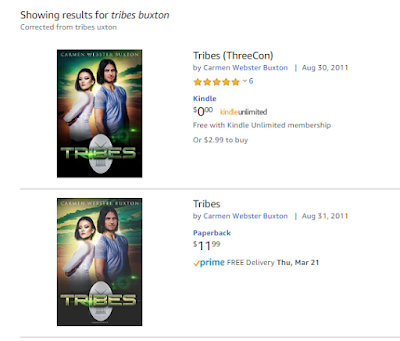


If you limited the search to the Kindle store, you would see only the Kindle version, with no indication a paperback exists. Likewise, clicking one entry brings up that product page with no link to the other version. Amazon claims linking will happen automatically within 72 hours, but I have always had to ask them to link the books, which is what I had to do for Tribes. It didn't take them long and now it looks like this:


Conclusion

In terms of ease of use, the two platforms are actually pretty similar. Also of note is that the PDFs for the interior and the cover worked fine on both platforms. Of course, in both cases, I had selected white paper instead of cream, which I suspect is why the covers worked for both.


Saturday, September 15, 2018

An Update on Moving Books to KDP Print

So, Amazon appears to have finally worked things out. As I mentioned in my earlier post, I had moved three of my print titles over to KDP Print from CreateSpace. I moved them one at a time, using the Create Paperback link on KDP, and I was able to keep the same ISBNs (I own the ISBNs for all my books; I purchased them from Bowker). The reason I could keep the ISBNs is that the interface asked me if they were published on CS and gave me a chance to enter the ISBN. Amazon has changed that protocol so that the KDP Create Paperback button didn't allow using an existing ISBN.

Amazon was working on a way to move all a writer/publisher's CS titles to KDP in a single step. They had a link for it on the KDP bookshelf weeks ago, but it didn't work! Apparently, they unplugged one way to move titles before making sure the new way worked. After a while, they took that link away, but it returned a couple of days ago, and I was able to use it successfully, if not seamlessly.

At the point in time I clicked the link, I had five titles in CS. One was in draft because I am having problems with that cover and I cannot fix them myself. One of the five I had approved for sale recently, even though the cover needs work because they are things I can fix, and I wasn't sure it would move to KDP if it was still in draft. The other three had all been for sale for sometime and were properly linked to their Kindle versions on their Amazon product pages.

So, once I clicked the "Move my titles" link on the KDP bookshelf, I got the page with the three buttons: validate my CS account, validate my KDP account, and move the books. This time all three buttons seemed to work!  When it was done, everything disappeared from CS. The account was still there, but there were NO books listed.

In KDP, results were less uniform. One of the titles moved over perfectly, and was already linked to the Kindle version. The other titles have moved over but had not linked automatically.  When a book exists in KDP in two formats, if they are properly linked, there is only one entry on the bookshelf, like this:


Each format has its own menu to edit content, details, etc., but they are one title.  If there is only one format, the entry on the bookshelf looks like this:


If the book is a Kindle book, the links are for creating or linking a paperback, and if it's a paperback, the links are for creating or linking a Kindle version. For four of the five books I moved over in one step, KDP created a second entry on the bookshelf instead of linking them. When I tried to link them myself, using the Link to Existing Paperback on the Kindle bookshelf entry, it did not work, but when I used the Link to Existing Kindle version on the newly-created paperback entries, it worked fine. I was very pleased that the draft CS title with the problematic cover came over just fine, as a draft entry in KDP. And for the one that's in better shape, but isn't really ready for prime time, I was able to pull it off sale by using the Unpublish option on the paperback menu.

My books are all now moved over. Goodbye, CreateSpace. It was nice knowing you,


Monday, August 27, 2018

I made the jump to KDP print! (well, halfway, anyway)

UPDATE, Sept. 9, 2018: Amazon has changed things. They have cut off being able to input the ISBN and move the files from CreateSpace, so at present, if you have your own paperback ISBN, you cannot move your books from CS to KDP.  There was a link at the top of the KDP bookshelf to move all your books from CS to KDP, but it did not seem to work (at least not for me) and now it's gone. Hopefully, Amazon will restore it once it works properly.
------------------------
So, I keep hearing that Amazon will shutter CreateSpace, their separate self-publishing arm for physical "printing" (they do CDs and DVDs as well as paperback books) and make everyone use KDP, which now has an option to "Create Paperback."

In the past I stuck with CreateSpace because it had some functions not offered in KDP Print but it looks like those are pretty well accounted for now.  In additon, if the book already exists in CreateSpace, Amazon has made it very easy to move the book over to KDP. When you click the link in the KDP database (illustrated here with a title I have not yet published in print) to create a paperback, you get a form to fill out that's partly filled in from the Kindle version.


If you answer yes to the question "Have you published this book on CreateSpace?" it gives you a place to enter the ISBN (whether it's an ISBN CreateSpace assigned or one you own). Once you do that, KDP retrieves the PDFs of the interior and the cover so you don't even have to load them again. One quirk I found was that if you had loaded your book to CreateSpace but didn't actually publish it, this process won't work; you need to complete publication on CS, and then move the book over to KDP Print. You still have an option to get a draft copy from KDP if you want to be sure. I notice that instead of merely marking "proof" on an inside page, KDP puts a Not for Resale banner on the draft copy's cover,


Once the paperback version exists in KDP, the entry for that book includes a separate set of options for that version. The menu there is where you can order author copies and make changes, if needed. 


So far I have moved over three out of my six print titles. One thing I thought was better is, KDP let me price the books a couple of bucks cheaper than CreateSpace did. Now, this could have been because CS lowered their prices, too, but didn't notify authors they could change prices on existing  books, but I thought it was positive. It's much harder to compete with traditional publishing in print because you can't undercut them on cost like you can with ebooks.

Anther advantage is, your print sales (once they are shipped) show up in the same Sales Dashboard bar graph as your Kindle sales. Free ebooks "sales" are blue, regular ebook sales are gold, and print sales are gray. The Month to Date spreadsheet-style chart has a button to select paperback or ebook format.

The final advantage is, the paperback version of Alien Vows was linked to the Kindle version within 24 hours, without my doing anything to request it.

At present, I have three titles in KDP Print and three still in CreateSpace. When I get ready to publish my other five ebooks in print, I will start with KDP.


Saturday, March 11, 2017

Print vs ebook: Amazon Giveaways

I recently used an Amazon feature called "Hosting a giveaway." If you look at the product page of a book, below the reviews and just above the "What Other Items Do Customers Buy After Viewing This Item?" section, you will see a link to create a giveaway.

Amazon offers this feature on a lot of items, not just books. Basically, whoever "hosts" the giveaway pays for the items, including delivery. It can be anyone, not just an author, but for books, it's usually hosted by the author. Until just about a year ago, you could give way print books but not Kindle books, but now it works for both formats.

Setting up a print giveaway

The set-up process lets the host determine number of prizes, odds of winning (e.g., 1 in 1000, 1 in 500,etc), and what users have to do to enter (e.g., watch a video, or follow the author's Amazon page).

The process also allows some control over who can share the link. If you want to give away copies a part of your own promotion, you might want to use this option to limit how the giveaway was accessed. On the other hand, if you just want more readers and hope for reviews, you would wanted wider distribution not narrower,

What you don't get is a way to contract the winners. You can see their Amazon user names, but not contract them. But Amazon handles picking the winners, so it's guaranteed to be fair.

I have run giveaways in the past, but this time Amazon had added a new button that let them distribute the link for you. It sounded good,so I went for it.

Based on prior experience, I set the odds at 1 in 150, and since it was for print books, I limited the prizes to two. I created my welcome message, my congrats to the winner (with a plea for a review), my sorry you lost message (with a reminder that I have another book free, in Kindle format), and clicked the button.

I was waiting for the email to tell me that the giveaway was live, so I could post the link. I never got it. The giveaway ended in 16 minutes. A total of 282 people entered and, of course, two of them won.   I was astounded.

The ebook giveaway

A couple weeks later, I tried a giveaway that was as identical as I could make it, but this time with the same title in Kindle format, and three copies as prizes. I used the button to make Amazon distribute the link, and since it was a test, I didn't mention the giveaway here or anywhere else until after I gave away two kindle copies. That took 18 hours!

Once the second copy was given away, I advertised the link but even then, the number of entrants slowed to a trickle. I will be curious to see if the third copy is claimed before the giveaway end date of March 15.

So it looks like, as a prize, a print book is still much more valuable than a Kindle book.


Sunday, May 15, 2016

Conquering InDesign

Considering that my husband calls me a “Kindle evangelist,” I have spent a lot of time lately working on printing books. I just finished a semester-long class at my local community college. The course title was Desktop Publishing but really it was How to Use InDesign.

InDesign is an Adobe product that will handle page layout, and also allow you to export an ePub (ebook) file,. As I found out from the course, it will also export simple Adobe Flash files, for say, a series of click-through screens. And, it can export interactive PDF, if I ever need to do that. It's a very powerful but complex product, and I had had no luck in learning it on my own, which is my usual method with new software. InDesign has an incredible number of functions and as a result, the menus often have long list of unrelated options. Also, it use “tools.” That is, you change the function of what the mouse cursor does by picking a tool from a list.

The basic function is selecting things, but the software doesn't stop you from using menus if you have a tool other than the Select tool in use. This can get you in trouble! For example, I discovered that if you're using the Type tool when you place (paste in) a graphic file, InDesign creates that image as an anchored graphic that won't budge, no matter how much text you add in front of it,  Who knew? I'm sure it's that way to provide a shortcut for people who know what they are doing with InDesign. Until recently, that was not me.


As you can see by the above image of a full print cover, I started small, with my only novella, Where Magic Rules. Because it's so short, I didn't even try to put text on the spine, but I'll do that with the next book.  Once I have WMR ready to go, it will join Saronna's Gift as a paperback for sale on Amazon.

And of course, InDesign does the page layout beautifully. You can quickly and easily impose proper book format, with the first page of a chapter having its own unique layout. I love it!

Monday, December 14, 2015

Print versus ebooks: it's still a debate

You might think that more than eight years after the Kindle launched*, the debate over print books versus ebooks would be settled, but it looks like it's not. CBS News recently weighed in with a post titled Books vs. e-books: The science behind the best way to read.

It gets some things right: it mentions that studies of e-reading interrupting sleep are about LCD screens, and that dedicated ereaders have non-light-emitting screens (although it never calls them e-ink screens). It talks about the advantages that controlling the appearance of the text can give to people with reading disabilities.  There's even link to a website where readers can try out that kind of feature to see if it helps.


Things the post gets wrong: The title implies one best way to read, and there isn't one! It also calls print books just "books." That's like saying "Cars vs. Electric Cars: Which Is Better?" They're all books! Way back when the codex replaced the scroll, it was just a new format for the same thing.


This post also sites a specific Australian study of students to make the claim that "avid readers also tend to prefer reading on paper." I find this bogus! I think if you made a point to include people who own dedicated e-ink ereaders, you would find they are some of the most voracious readers out there.  Furthermore, Australia doesn't have as mature an ereader market as the US.


* I know the Kindle was not the first ereader--not even the first e-ink ereader--but it was what launched the digital transition. The pre-Kindle market for ebooks was minuscule.

Saturday, May 31, 2014

Self-publishing in print: Biting the technology bullet

From Wikimedia Commons: by Daniel Maclise_-Caxton Showing the First Specimen of His Printing to King Edward IV at the Almonry, Westminster


I recently (as in yesterday!) retired from a legal and regulatory publishing company where I worked in systems support. I also recently attended Balticon, where I attended panels on self-publishing.

The thing about self-publishing is, the author is the "publisher" but not generally the distributor. He or she decides on the content of the book, but rarely does he sell it directly to readers. For self-publishing in ebook form, there are many places on the web that an author can go to to upload their book for sale to the public. Amazon, Barnes & Noble, Kobo, Smashwords, and iBooks all have platforms that allow an author (or someone with rights to publish) to create an account, upload a file, and start selling ebooks. I have used Amazon KDP, B&N Nook Press, and Smashwords, and they were all pretty easy. Smashwords also pushes the book out to the other other retailers, as most of their authors sell more books on those platforms than on Smashwords itself. I have heard good things about Kobo Writing Life but I have never used it because my Kobo sales are so small it hardly seems worth it. My understanding is that Apple is the most difficult to deal with because for one thing, it requires you to download their ebook producer app, which runs only on a Mac. I am also ignorant of Google Books, which seems to be a thing unto itself. Even Smashwords cannot publish to Google Books.

On all platforms, what the author has to provide to publish an ebook successfully is usually a file with the text of the book (the formats accepted vary) and a file for the cover, plus assorted bits of information collectively known as metadata (data about the book), such as author, title, ISBN (in some cases), and genre/tags.

If you're willing to accept the platform's standard conversion, some platforms allow you to upload your book in MS Word, but the problem with that is, the conversion is not great at maintaining the style and features you want. The standard format for ebooks is ePub, which, like Mobi (the format on which Kindle books are based) is simply a set of HTML tags that are used in an agreed-upon standard way. Even KDP will accept ePub, although Amazon does not like advertising that fact. I have been relying on a conversion house to produce the files I needed; the ebooks look great-- nice style for scene breaks, consistent chapter title pages, and working table of contents-- but they are not that cheap and they can only be edited by going into the HTML, which is tedious.

To self publish in print and sell on the web easily, (Lighting Source and Amazon CreateSpace are the two most popular venues), what an author/publisher needs is a PDF of a file laid out in pages, with headers (and possibly footers) and all the standard info a book needs about copyright and such. Strictly speaking, you can do this layout in MS Word, but that is not only incredibly painful, it's also very time-consuming, as Word tends to decide what it wants to do in some circumstances, and wresting control from it takes knowledge and the kind of patience of a Dalai Lama.

Having decided to take the publishing plunge and move into print (now that I have more time), I just ordered a copy of Adobe InDesign, the premier desktop publishing application, which will produce well formed pages, and also ePub files. The advantage to doing this is that I pay for it once, and then I can also use it will all my books. Adobe also offers a cloud-based monthly subscription service, but they had something of a security scandal with that, so I don't want to go that route.

Assuming I can learn to use the software, I am hoping it will provide a solution to the problem of corrections. Once I put a book into InDesign, I will proof from paper copy, make corrections, and then make the software spit out the ePub file. I realize I might have to do a few tweaks in ePub, but it should still be better than my current workflow. And this way, I get two birds with one stone; you can never have too many dead birds!

Saturday, January 25, 2014

A survey by any other name?

The Pew Research Group recently released the results of their study of reading habits of Americans. The Pew post was headlined "E-Reading Rises as Device Ownership Jumps." The first sentence of their overview pretty much sums up the results: "The proportion of Americans who read e-books is growing, but few have completely replaced print books for electronic versions."

The study got a lot of web coverage, but interestingly, the same study produced many different headlines:

Just Four Percent of Americans Read eBooks Only (Motherboard)

eBooks surge as devices multiply but print holds firm (NBC)

In this age of ebooks, print still alive (Des Moines Register)

Americans prefer print over ebooks (PBS)

Pew, Princeton study shows e-reading up (Teleread)

eReading is Risng But It's Not Replacing Print, Pew Research (Galleycat)

Headlines are, of course, meant to grab the reader's attention, but it is interesting to me that these headlines are so different, with the Motherboard one giving only a single stat, the PBS headline flatly ignoring the increase in e-reading, and the Teleread headline ignoring any preference for print. Of course, all of them have more info in the posts than in the headlines

I find it interesting that the Des Moines Register calls today "the age of ebooks." Personally, I think the real age of ebooks will start in 10 to 20 years from now. Until then I agree that print is still going to be necessary for true sweeping success, which is why, as I said in my last post, I plan to move to print and ebook publishing.