Showing posts with label Barnes and Noble. Show all posts

Friday, February 14, 2020

The Ins and Outs of My Recent Fussy Librarian Promotion

First, Happy Valentine's Day! I hope someone gave you a valentine.

Second, if you're not familiar with ebook promotional newsletters, basically, a company creates an email list of ebook buyers (subscribers have to opt in, but it's free to them) and then charges authors and publishers to include their books in a daily email to subscribers. There are many of these services now. BookBub is the biggest name (and the hardest to get into), but there are others, including Book Gorilla, Bargain Booksy/Free Booksy (they separate free books and cheap books into their two emails and if you want both, you have to subscribe to both.), The Fussy Librarian, and Ereader News Today (ENT). When books are on sale but not free, the email entry has an affiliate link and the company gets a small cut from the sale.

On February 8, I ran a Fussy Librarian promotion for The Sixth Discipline (a free ebook!) . The results were pretty good. I had not used FL in a while, so I didn't know what to expect.

I gave away hundreds of copies, mostly on Kindle. And of course, even though the email itself usually generates "sales" for the one day it runs, Amazon's online algorithms push popular books to readers so increased "sales" continues for a few days. As you can see in the screen snap below, the promo offered links to the the book on Kindle, Nook (B&N), Apple, Kobo and Google Play. The results in the list below the screen snap are "sales" for the day of the promo plus three days after.


Vendor:           No. of Copies given away February 8, 9, 10, and 11

Amazon Kindle: 277 (plus 5 paid*), 88 (plus 2 paid*), 28 (plus  1 paid*), 21 (none paid*)
Google Books: 20, 3, 2, 0
iBooks/Apple Books: 19, 0, 0, 0
Barnes & Noble 0, 0, 0, 0
Smashwords: 0, 1, 2, 0 (note: their link was not listed in the ad; these are normal numbers for comparison)
Kobo 0, 0, 0, 0

* The Kindle version wasn't free in all Amazon bookstores so the paid numbers represent foreign sales.

Note that The Sixth Discipline was my first published title, and it came out in 2011. It is free on Amazon only because Smashwords lets an author make a book free, and because Smashwords is a distributor as well as an e-tailer, the book is thus free on other platforms as well. Amazon practices price matching (which is why you see "Tell us about a cheaper price" links on a book's Amazon page);  if you make the book free elsewhere, Amazon will make the Kindle version free also. These days, I usually give away from zero to three Kindle copies every day, so promotions are helpful to boost "sales."

I think in a way, these numbers do a good job of representing how well each vendor is doing at ebook sales. Amazon is way ahead of the pack; its second day number beat all the others' first day totals combined. But Google and Apple both have a significant ebook presence, On the other hand, Barnes & Noble is pretty much dead in the water, and Kobo is going nowhere (at least in the US; it is more popular overseas where Amazon is less dominant). This explains one of the main reasons Amazon can tempt authors and publishers into enrolling their books in Kindle Unlimited: they give up small sales numbers on other platforms in return for money from KU borrows.

Right now both The Sixth Discipline and its sequel No Safe Haven are available only in ebook form but I am having new covers made, and formatting the books for print. I hope to have paperback versions available in a month or so. I might run another promotion after that, as a test of the new covers.

A word to other authors: Giving away this book makes some sense because there is a direct sequel that is not free, and I always see increased sales of it after a promotion of the first book. Giving away a standalone book is not usually as good an idea.  For one thing, a huge number of free ebooks are never read. Making a book free eliminates the cost barrier, so a lot of readers download a free book first, and then look to see if they want to read it. If you have books that are very similar, it can still be a good idea to make a book free for a day or two, in that it can drive up your sales numbers on Amazon temporarily and thus get the book in front of a lot of readers through the "customers also bought" function. That's another benefit of Kindle Unlimited; authors can make their books free or discounted for short periods of time.


Tuesday, March 19, 2019

KDP Print versus Nook Press

One of my most popular blog posts is from 2016, when I compared using Amazon's CreateSpace to using Barnes & Noble's Nook Press Print. CreateSpace is gone now, replaced by KDP Print, but I recently published Tribes as a paperback on both KDP Print and on Nook Press, so below is a comparison of print publishing via Amazon and Barnes and Noble using the versions of those platforms in use today.

Both platforms have fully integrated print and ebook publication. Each title appears once in the author's list of Projects (B&N) or on the Bookshelf  (KDP), with the ability to add it in a second format and neither one makes you create the ebook first.. Basically, most of the features/options below apply to both ebook and print formats.

Pre-order

Nook Press offered the choice of putting the book on sale now or using pre-order but it didn't give me a chance to say when it would be available. After processing finished, I saw this message on my projects page.

  • Your pre-order print book Tribes has a publication date of March 26, 2019. You must upload your final files by March 11, 2019. If you’re unable to do so, you must push your publication date or your book will go off sale.

And that was that! So pre-ordering was available on B&N but without a lot of options.

With KDP, pre-ordering is an option only for Kindle books. It does let you set the date, though. In fact, the pre-order option is the only way you can launch the book with the X-Ray feature enabled from the start. 

Categories:

KDP only allows two categories but it was very easy to add both.

Nook says it allows 5 categories but after I added the first, I could not figure out how to add more.  Also, selecting a category required me to specify three levels: category, subcategory, and sub-subcategory.


ISBN:

Both KDP Print and Nook Press provide free ISBNs for print books, but if you use their ISBN, it cannot be used anywhere else. I always buy my own ISBNs and register them to my imprint, Cracked Mirror Press. I want the paperback to have one single ISBN.

In the past, B&N has rejected the ISBN I used on Amazon KDP, but this time  I had not yet clicked publish on Amazon when I set up the Nook version. Also, I didn't select "expanded distribution" on KDP, which causes Amazon to make the book available on other online bookstores such as Barnes & Noble, Consequently, I was able to use my own ISBN for the Nook Press version.

Formats:

Both platforms offer paperback, but Nook Press can also do hardback. I have no idea of the requirements because I have never used that option, but it is there.

One advantage B&N has is the "Buy online, pick up in store" option that shows up on the product page. It's only really an advantage if a reader lives near a store with an Espresso Book Machine to print the book, but it's there.

Pricing:

Amazon stated my cost to print (which is the cost of author copies) as $4.44 and B&N estimated it as $5.00. This does not cover shipping, of course.

Proof copies:

Both platforms allow you to order a proof copy; the one from KDP had a "Not for resale" stripe on the front cover, but the Nook one did not.

Linking the print and ebook versions:

Both platforms allow you to create a new version of an existing title in a new format just by clicking a button on the entry for the existing format. I had, in fact, pulled the Nook Press version of Tribes from sale before I published the Nook press paperback, but it was still in the system (it was, in fact, still for sale, because before I published it to B&N directly, I made it available to B&N via Smashwords; this was years ago, well before I published it directly on Nook Press, I had quite a time getting that version pulled from sale). .Anyway, B&N automatically added the Nook book description and other details about the ebook when I clicked the link to create the print book .On the B&N product page, it showed one entry for Tribes but with two formats. So, linking product pages was no problem on the Nook end.

On Amazon, for some reason even though I created the paperback by clicking the "Create paperback" button on the Kindle version's entry, it did not link the product pages. If you searched Amazon for the title and author without specifying Kindle, it showed both formats but with two entries, like this:


If you limited the search to the Kindle store, you would see only the Kindle version, with no indication a paperback exists. Likewise, clicking one entry brings up that product page with no link to the other version. Amazon claims linking will happen automatically within 72 hours, but I have always had to ask them to link the books, which is what I had to do for Tribes. It didn't take them long and now it looks like this:


Conclusion

In terms of ease of use, the two platforms are actually pretty similar. Also of note is that the PDFs for the interior and the cover worked fine on both platforms. Of course, in both cases, I had selected white paper instead of cream, which I suspect is why the covers worked for both.


Monday, March 12, 2018

How my recent promotion illustrates ebook market share

The Sixth Discipline, the first book of my two-book Haven series is always free, thanks to price-matching. Smashwords lets authors make ebooks available for free, and since that platform can also be used to push the book to iBooks, Nook, and Kobo, as well as smaller vendors (but not Kindle or Google Play), that means self-publishers can make books free on those platforms (and Nook now allows free books to be published on their platform, too). When an ebook is free elsewhere, Amazon will price-match the Kindle version. As you can see by the results below, the Kindle version matters a lot!

The Sixth Discipline was published in 2011, and had its big run in 2013 when I got a BookBub promotion for it and gave away 20,000 copies. Since then, its distrbution numbers (you can't call them sales figures when the book is free) have slowly dwindled. There are a lot of free books, many of them newer, and in a good month, I had been giving away maybe 20-30 Kindle copies, and 10-20 on all other platforms, combined. 


Update:  B&N reporting was very slow and just came in, so I changed the numbers from the original post to reflect those "sales."

The promotion consisted of paying for an entry in The Fussy Librarian daily "free books" email. That email lists links for up to five vendors. The results are in, and for the day of the promotion and the day after, I gave away this many copies:

Kindle =  377
Nook = 8
iBooks = 32
Kobo = 0
Google = 19

A few things jumped out at me. The most obvious is the dominance of the Kindle market. I gave away six times more Kindle copies than all the others combined. The lack of Kobo copies wasn't really surprising since  have never had big numbers on Kobo, but only 8 copies for Nook was telling. I do't think B&N is doing at all well with the Nook.  Also interesting is that Google Books' total was more than double Nook's, while iBooks beat out Google and Nook combined.

And of course, the whole point of paying money to give away a book is that I hope to sell the sequel, No Safe Haven.  Time will tell how that goes.


Monday, February 26, 2018

Amazon Exclusivity: What does it buy you?

The answer is, it depends. Mostly, in my experience it depends on your book. If you're self-publishing in the US, your biggest single market will almost certainly be the Kindle store. This is not to say that other markets should be ignored. Barnes & Noble (Nook), Apple  iBooks, Kobo, Google Play, and Smashwords sell plenty of ebooks.

Pricing and Countdown Deals

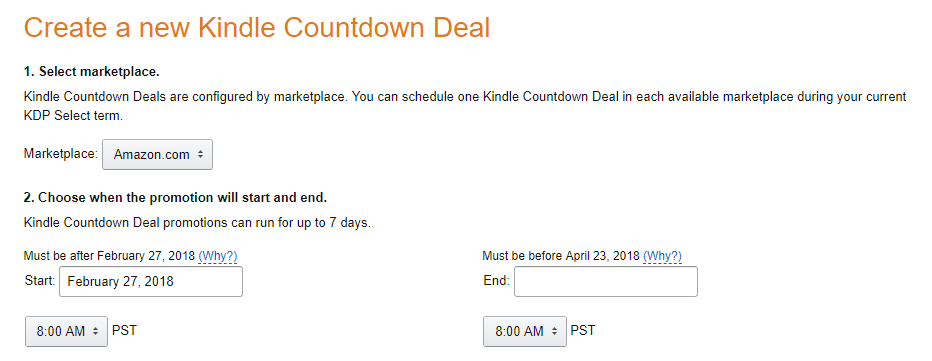
However, selling a book is not always as simple as slapping a price on it and saying "For Sale." Amazon limits the minimum price for a Kindle book sold via KDP to 99¢. It encourages you to price the book between $2.99 and $9.99 by offering the maximum royalty percentage for books in that range. If you enroll your book in the KDP Select program, it means you cannot sell it in ebook form anywhere except the Kindle store (This doesn't apply to print sales). It also means Amazon offers incentives not otherwise available.  Specifically, you can run Kindle Countdown Deals where for the limited number of days specified, the book is available at a sale price (US or UK only). As opposed to you simply lowering the price yourself (which you could do at any time) the regular price still shows up, but it will be crossed out to show the book is on a limited time sale.


Kindle Unlimited (KU)*

The other big benefit is that your book is available in the Kindle Unlimited subscription program. KU subscribers are Amazon customers who pay a monthly flat fee. This allows them to read any book they want in the KU program. There's a limit to how many they can have at once, but not how many they can read. Amazon pays the author not a flat royalty per book, but a per-page-read fee. The amount is not guaranteed, but lately for the US KU market it has been running about 0.0048¢ per "Kindle edition normalized page"**. It is usually less in the foreign KU markets, but the US is usually the biggest one anyway. 


Genre, length, and readability will affect how much money your book can make in the KU program. My experience is limited since I have had only three books in this program. The enrollment is not a marriage; you don't have to keep the book exclusive forever. When you sign up, it's for a 3-month period and then you can renew again every 3 months, if you wish. If you don't renew, your book is no longer in KU and you can't run price promotions. With Saronna's Gift, which is a science fiction romance, I made enough with KU borrows to make it worthwhile to say in for two full periods, that is, 6 months. With Turnabout, a YA science fiction novel that is in no way a romance, I never made much in the KU program so I let it expire after the first 3-month period. Note that Turnabout is also considerably shorter-- only about 80,000 words, which meant less money per KU reader.

To sum up, I would expect a book that was a page turner, a romance, and fairly long would do very well in KU. And, for what it's worth, here's my advice:

  • Always start in KDP Select to see how the book does
  • Set a goal for KU borrows (say a third or maybe half of what the royalties are) and drop out when you go below your goal.
  • Once you're out of KDP Select, go for every market you can! 

Footnotes:
* I am aware that KDP Select also gets your book into the Kindle Owners Lending Library, but frankly, I don't think this is nearly as big a deal as KU so I didn't spend any time talking about it.
** Amazon calculates pages in its own way, but Alien Bonds was 128,000 words and Amazon said it had 658 KENP pages. That's approximately 195 words per KENP page.

Tuesday, December 6, 2016

Google is now making web cards for books!

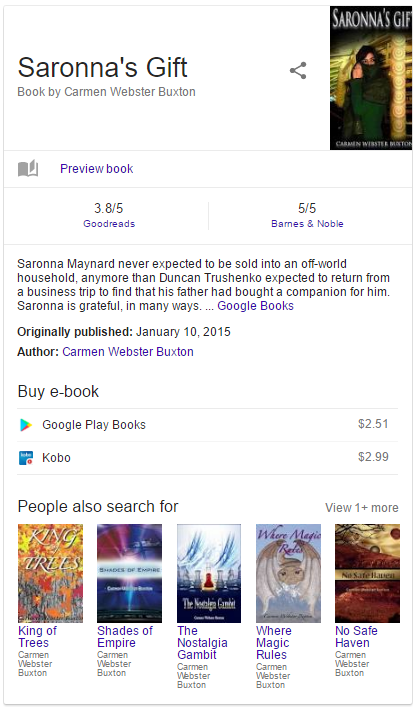
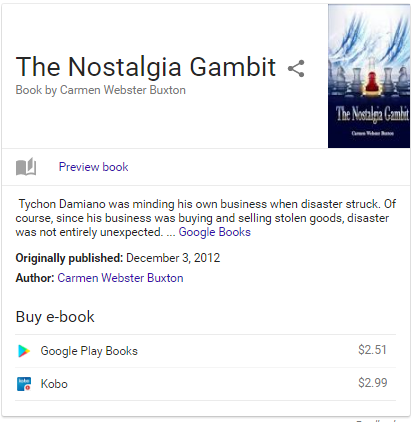
A recent post on The Digital Reader blog (also on Facebook, if you prefer to follow it that way), describes how Google is creating "knowledge panels" (I always just called them web cards, although I suppose they are a special kind of web card) for books when you search on the book title.

See below for examples from two of my books, the first being one with both print and ebook formats and the second for an ebook-only title.


Naturally enough, the "Preview book" link takes you to Google Books. This is true whether there is a print version or not. There is no mention that I can find of Smashwords, Amzon/Kindle or any vendors other than Google, Barnes & Noble, and Kobo, except that the GoodReads site is owned by Amazon and always includes their links.  


The only title I don't have on Google Books is Where Magic Rules, and its web card doesn't get a preview link at all. Maybe I need to load that one onto Google Books, too?

Monday, November 28, 2016

Is POD about to change publishing?

The Digital Reader blog has a post about a new Amazon feature called Amazon Print on Demand (available only on Amazon UK, as far as can be determined. Correction: a later commenter identified four such sites, in the UK, Germany, Japan, and the US). It's very much like CreateSpace, Amazon's service for self-publishing in print, but it's intended for publishers. According to the post, there are some small and one large publishers signed on to use it in the UK.


Here's why I find this potentially exciting. Right now a publisher takes a risk in publishing a book. They have to guess how many copies they should print. Print too many, and the books take up space in a warehouse; don't print enough, and bookstores run out, and (potentially) sales are lost if the reader can't get the book when they want it. Having the book available for sale online via POD means the customer can always get the book but there are not unsold copies lying around. This could mean publishers would be more willing to risk publishing books by new and unknown authors.

Of course, the downside is, it pushes more sales to online, which publishers don't like because they don't want Amazon to control even more of the market. This may considerably slow down the adoption of POD for big publishers. Publishers could always sell direct, of course, but they don't have much of a built-in online customer base compared to Amazon.

Barnes & Noble has their own POD online service for self-publishing called Nook Press Print. I wonder if this could push Barnes & Noble to either create a publisher version or add more Espresso Book Machines to their brick & mortar stores?  Or both?

We live in interesting times.


Sunday, October 16, 2016

Barnes & Noble Nook Press Print vs Amazon CreateSpace

I have used CreateSpace, Amazon's print-on-demand (POD) service to publish three of my books in paperback. The way CreateSpace works is, you upload files for the interior of the book and for the cover, and Amazon then sells the books online. Unlike traditional publishing, they don't print multiple copies and wait for them to sell; they print single copies using an Espresso Book Machine only once someone has ordered a copy. However, the author/publisher can order bulk copies at a lower price directly from CreateSpace (not from Amazon.com) and sell those copies themselves. This also makes it cheaper to get print copies for contest giveaways and to give reviewers.

Smackdown

Recently, Barnes & Noble decided to get into the act and announced that Nook Press would also let you create a POD book that would then be for sale on the Barnes & Noble online store.  I decided to try it. I uploaded virtually the same files for King of Trees that I had used on CreateSpace (I did have change to make the cover file a teensy bit smaller) and was able to publish using Barnes & Noble's Nook Press Print.


CreateSpace copy on left. B&N on right.
I ordered a copy from each vendor, and as you can see, the difference in appearance between the two is minimal. In real life as opposed to this not-that-great photo, the gold lettering on the B&N cover was a little brighter than it was in the CreateSpace cover. The only other concrete difference was in the back cover, which I thought was cleaner-looking on the Amazon copy. Note the bar code area on the back of the book.  CreateSpace does not print the price and Nook Press does.

Amazon left; B & N right

Some differences I observed:

  • On both platforms, the vendor sets a minimum price you can charge for the book, based on size, but interestingly, it was almost $1.50 lower on Barnes & Noble than on Amazon.  Of course, the royalty per book is lower, too, by almost the same amount. And, because of shipping costs, a customer might well pay more on B&N, as Amazon make CreateSpace books eligible for free shipping for Prime members. 
  • Both vendors let you do bulk orders at a lower price, but B&N sets a 125 copy minimum. Possibly, they use a different press for those orders, and not the Espresso. CreateSpace lets you "bulk" order as few copies as you like, but the shipping costs make it cheaper than retail only if you get at least 8 or 10. 
  • CreateSpace will distribute to Amazon in some other countries, and to other vendors, including B&N. Note that you make a teeny-tiny royalty for non-Amazon sales.  Nook Press only goes to B&N online. 
  • CreateSpace lets you order an actual print proof copy before you put the book up for sale on Amazon. If Nook Press does that, I could not find out how to do it. The only preview I could see was online. 
  • Amazon is better at tweaking the PDF files for you if there is a minor problem. Nook Press just states the problem and tells you to fix it.
  • I would give the Create-Space interface the edge over Nook Press, partly because I could not figure out a way to bulk order; there is a tab for Orders in the Nook dashboard, but all that happens when you click it is you get an empty screen that says "No orders yet." Because of that, I cannot compare the bulk order prices. Not that I would actually order 125 copies, but I would have liked to initiate the process to at least find out the per copy price. Update: I found the Order link! It was right near the Edit link. In spite of what the FAQ said (as I understood it), you can in fact oder just one copy; 125 is the maximum number, not the minimum. The bulk order price for KoT on B&N Nook is $6.92, versus $5.00 on Kindle. 
  • On the other hand, Nook Press does let you link the print book to an existing ebook during the publishing process, which CreateSpace doesn't do. Amazon does link the two copies up after a few days, but it's annoying that you have to wait and hope it happens. 
  • Nook Press was very slow to actually put my book on sale; it spent about a week in pending status. On the other hand, replacing the front cover of the Nook ebook (I got a new cover when I decided to do print) was really quick, but Amazon took several days to disseminate the new cover for the Kindle version after I had changed it in KDP.  That's not really a print book issue, but it's only fair to mention it.
  • I did not see any indication that B&N offers anything like Kindle Matchbook, which lets you give away (or sell really cheaply) the Kindle version of the book to anyone who buys the paperback.

From the help screens, it looks like if a Nook Press Print book sells enough copies, you can ask B&N to carry it in stores, but it doesn't say how many copies that is.

If you want to check King of Trees out online, here's the link for B&N, and for Amazon.

Friday, August 5, 2016

Where Magic Rules has launched in print!

My fantasy novella Where Magic Rules is now available as a paperback as well as an ebook. The paperback is $5.99 but if you buy it, the Kindle version is free. If you buy the Kindle version alone, it's 99¢.


Note that the paperback is also available on Barnes & Noble for the same price, but that does store not offer the ebook version for free.

Here's a quote from my celebrity review of WMR by singer/songwriter Janis Ian:

"The story hooked me pretty quickly, which is no great feat in an experienced writer. However, it kept me hooked, which IS difficult when you have an omnivorous reader looking at your work with a jaundiced eye. I've downloaded so many books lately that start off well, but disintegrate a little ways in - it's a real joy to discover a new author who holds her ground throughout."

Sunday, October 25, 2015

Saronna's Gift makes a Barnes & Noble science fiction romance list!

How did I forget to post about this? Saronna's Gift made a list of 20 science fiction romance books on the Barnes & Noble sci-fi blog!

As the Brits say, I am chuffed to see my book on a list with the likes of books by Lois McMaster Bujold and Linnea Sinclair.


Interestingly, although the only links are to the print and Nook copies available from B&N, I had a much bigger sales bump from Amazon after the list came out than I did from B&N, which suggests readers are browsing the B&N blog but still buying the Kindle version.  

Saturday, August 10, 2013

iBooks sales versus Barnes & Noble Nook sales

In an earlier post about my use of a BookBub promotion  back in May, I mentioned that I was guessing that Apple didn't seem to report how many free books they give away any more, but actually, they do. It's just it takes a lot longer to get free book numbers from Apple than it does sales numbers. Interestingly, since my May and early June sales of No Safe Haven (the sequel to the free book) were higher for iBooks than for B&N, I was assuming that I had given away more free copies of The Sixth Discipline on that platform than on B&N. Not so! I actually gave away noticeably fewer (only a little over 2,500 in iBooks, versus 4,000 on B&N). So what does that mean?

I could hypothesize either that there are more free books on the iBooks platform, which makes it harder for an unknown author to stand out, or that there are simply fewer iBooks customers. But either way, iBooks readers have a higher follow-through on actually reading books they get for free. I know from my own experience and from anecdotal evidence that lots of books downloaded for free are never even opened, let alone read. You'll notice I'm assuming that sales of the sequel will be higher for folks who read the first book!

On the other hand, in July, I had higher sales numbers on Nook than on iBooks, so go figure.

Monday, February 6, 2012

Sales figures from other retailers: slow is better than not at all

Like the KDP and PubIt platforms, Smashwords reports sales on their own platform very quickly. For all three of them, you see any and all sales within hours or even minutes.

For sales via Smashwords other retailers though, reporting time varies tremendously. I've copied the chart (below) that I see in the Smashwords Sales and Payment Report to show you what I mean. Note the second column in the table, which shows the date for which sales are reported for that retailer. Barnes & Noble is the quickest, followed by Sony and Kobo, but Apple and Diesel are way behind, with Amazon bringing up the rear (except of course I'll never see Amazon numbers in this table because I'm selling direct via KDP). The fourth column shows actual dollar amounts for any sales not already reflected in my Smashwords balance (i.e., money that will be due to me from Smashwords after they get it from the retailers).  All data is as of today, but I've zeroed out all the last column numbers.

When I looked at the sales and payment report in my Smashwords Dashboard, below this chart is a much longer and more detailed one showing sales by date and by vendor. It's actually pretty informative in terms of what titles are selling well, and in some cases, where.  Apple and Kobo show the country where the sale was made.and all of them give you the price paid and the date.


Smashwords pays quarterly, assuming you have enough royalty coming to you. If you're at all interested, you should check out their Payment and Royalties FAQ.