Showing posts with label self-publishing. Show all posts

Tuesday, October 12, 2021

For self-published authors: What is Kindle Unlimited and should I put my books into it?

Amazon, or the Zon, as some call it, has by far the lion's share of the ebook market. They also have an audiobook platform called Chirp, but I'm not going to talk about that. Today's post is about only about ebooks.

eBooks & eReaders

Amazon calls its ebooks Kindle books, because its ereader is called a Kindle. However, you can read Kindle books using the free Kindle app on almost any PC, Mac, tablet or phone. Basically, Amazon's market consists of anyone who has an Amazon account and some kind of reading device, including iPads and iPhones. 

Apple Books, however, can only be bought via an iOS device, an iPhone, Mac, iPad, etc. There are ways to move them over to Windows but it is not the effortless transaction that most Mac users are looking for.  Kobo and Barnes and Noble both offer a dedicated ereader but also have an app that runs on tablets and other devices. 

So, why does this matter to self-published authors? As an author or publisher, you can upload your books into the self-publishing platforms of Amazon (Kindle Direct Publishing), Barnes & Noble (Nook Press) Google (Google Play Books Partners Center), Apple Books and others, either directly or by using Smashwords or Draft2DIgital. But if you load them only into KDP and opt for the KDP Select designation, your books will be available to borrowers via an Amazon subscription service called Kindle Unlimited. The author is paid based n the pages read, not on the borrow, an important distinction.

Basically, by putting his or her books in Kindle Unlimited (an ironic name in a way, since all KU books are limited only to Kindle), an author promises not to put them in any other ebook store (print versions have no affect in KU status). How can this possibly benefit an author? 

A lot of times, it doesn't. In my experience, whether or not KU is profitable for a book depends on three factors: genre, book length, and ebook price. 

Genre

The only genre I personally have had any success with in Kindle Unlimited is romance, which in my case is actually science fiction romance, Romance readers are voracious. They read so much, it is worth it to them to pay the KU subscription fee. There may be other popular KU genres, but I have not found them. Certainly my YA books never went anywhere in KU. If you have books doing well in a KU, please let me know what genre they are! 


Book Length

Because the author is paid based on pages read, a longer book automatically earns more money than a short one, assuming the reader finishes the book. Of course, if the book is truly short--a novella or a novelette--it probably sells for less, too. But length is something to keep in mind when deciding on KU, yes or no,

Price

If you price your ebook modestly (none of mine are more than $3.99), and the book is long enough, you may well make more money from a KU borrow and full read than from a sale. Of course, price will also have some impact on sale rates, too, so it's all balancing act.

Things to Remember

An important thing to remember is, the Kindle Unlimited signup is for 90-day blocks of time. You can take the book out of KDP Select after 90 days, or you can sign up for another 90 days. I usually launch with the book signed up or KDP Select but pull it out after 90 days if it's not getting enough KU reads to make it worthwhile. 

Also, one benefit to keeping the book in KDP Select status is, you can run a sale or even make the book free for a select number of days per 90-day cycle. The advantage to just changing the price yourself is, the book looks like it's on sale. The regular price appears, but is struck through and the sale price shows as discounted.

You should be aware that Amazon makes no future promises on the per-page rate for KU borrows. It sets aside a chunk of money to pay KU authors/publishers, and then pays out at a rate determined by the number of reads. Right now the rate is approximately $0.004 per Kindle Edition Normalized Page.  My book Alien Bonds is a tad under 130,00 words and that translates to 649 KENP pages. I made about $2.60 on the last full read. At $3.99 retail I make $2.72 in royalties on a sale, which is 12 cents more than the KU borrow. On book 2 of the Wakanreo trilogy, which is shorter, I make less on KU but on book 3, the longest book, I make more from a KU full-read than I do from a sale. 

A non-financial benefit of KU is you can tell when people are actually reading your book because the page count shows on a daily basis. 

And once your pull your book from KDP Select, it is no longer in KU, and then you can load onto every platform available. There is no reason not to! But always, do what's best for your particular book! 


Wednesday, September 29, 2021

A few words on pricing ebooks

If you are planning to self-publish, unless you plan to concentrate on print publishing, you will need to look into your options on pricing ebooks.

In my opinion, ebooks are the reason self-publishing took off as it did. First off, ebooks are relatively easy to create, and second the per copy cost to replicate them, once you have the files in place, is zero. This means that if you are not a well known author, you can price your book very competitively (as low as 99) and thus compete with better known but more expensive writers. The big publishers seem to want ebooks not to sell especially well, at least when they are new, because they price them so high.  Quite often the ebook version is more expensive than the paperback version, defying industry past practice that a higher price meant a more expensive to produce product.

The image above is a the Amazon page for the best seller, Golden Girl, by Erin Hilderbrand,  As you can see the hardcover price is very slightly more expensive than the trade paperback at $17.40 and the Kindle version is priced at  $14.99, less than $2.40 in difference. Well of course, this is a brand new book, But what happens when it has been out for a decade or more? 

Here's the Amazon page for Twilight, a best seller first published in 2006. The hardcover is way more expensive at $22.49 but the Kindle book is more expensive, at $10.99 than the paperback is at $9.43! And by the way, the ebook price is the same on Barnes & Noble and Google Books

Publishers fought with Amazon to be able to control the price of their ebooks. Publishers wanted to be able to protect hardcover sales, which are very profitable. Amazon lost that battle, but you will notice Kindle books usually say "price set by publisher." 

The good news is, if you're self-publishing, you (mostly) control the price! On Amazon, you get the best deal on royalties by pricing your book between $0.99 and $9.99, which is frankly, the range it's best to be in unless you're already a best-selling  author. 

You also control when the price changes, which means you can experiment with different prices.  Be aware that Amazon price matches, so if your book is cheaper in other ebook stores than it is on Kindle, Amazon will drop the price of your Kindle version to match the others' lower price. That is, by the way, the method used to make a Kindle book free on a long-term basis. A book that is in Kindle Unlimited can be free for up to five days every three months, but except by using price matching, you cannot make a Kindle book always free,  It is only because other bookstores allow free ebooks that price-matching can work to make a Kindle book free.


Wednesday, July 7, 2021

Self-Publishing 101: W is for Workflow

The thing about self-publishing is, it's up to the author to establish a viable workflow, either by paying competent people, doing the work himself, or some combination of the two. To be clear, by workflow, I don't mean writing the book, I mean turning a manuscript into a printed book and/or or an ebook. I won't talk about audiobooks because I haven't created any.

I worked in publishing for almost 30 years, and those years saw a lot of change. As I was working for a publisher of legal and regulatory information rather than fiction, it was a very different workflow from producing novels. Over that span of time, my company's focus changed from print to digital because our customers were better served by information that could be delivered faster, updated more easily. and accessed from multiple places, as opposed to having to open a book or a binder on a shelf. 

Espresso Book Machine

In fiction publishing, that transition hasn't happened as thoroughly. Print is still very viable, but there is also a digital market—both ebook and audio. But the biggest change in fiction publishing has been the advent of self-publishing. Print-on-demand technology allows booksellers to print a book only when it has been ordered. The availability of ereaders (such as the Kindle), tablets, and even cell phones have created a market for ebooks, which are delivered via the web. Because of these two developments, self publishing has taken off. And now, individual authors are learning things abut producing books that traditional publishers have known for a long time . 


Workflow is a huge part of publishing. If your book is published by a major publisher, your part of its workflow will consist mostly of  turning in your manuscript, and reviewing and approving edits and the cover.  There may be a lot of back and forth between you and the editor and publisher but that won't involve you creating the print or digital pages. With self-publishing, unless you hire someone to do workflow for you, you are on your own. The one part of workflow I always hire out is doing the cover, because in additon to artistic talent, it takes a lot of specialized skills I don't have. Page layout and ebook production are, for me, much easier tasks than creating a good-looking, marketable cover. 

The thing to remember about publishing a book is, it's never going to be perfect the first time! You need to be able to make edits, right up to and even  after publication. And since you are publishing in multiple formats, you need to consider how those edits will be made. If you format the print edition yourself, you need to be able to create headers and possibly footers and paginate the main part of the book separately from the front and back matter. After some frustrating efforts to do page layout for my books with MS Word, I have been switched to Adobe InDesign for formatting my paperbacks (and two hardbacks!) partly because it can also output an epub file as well as PDF.  InDesign is not easy to learn and you can no longer buy a copy outright, but it is available on a subscription basis per month.  I find it useful because in addition to formatting books, it can create web page banners and similar files. It cannot edit individual images in the way that Adobe Photoshop does, but it lets you place one or more images on a page (print or digital) and add text and color. Also, once you know how, formatting a book in InDesign is very fast.


Again, I cannot emphasize enough that whatever workflow you use must allow for making edits. If you hand off your m.s. to someone who will do the page layout and/or convert your m.s. to ebook format, then you need to be sure either you can edit the files they send to you, or that they have a way to do it for you (either may well be an extra expense, so get that straight up front!). 

The publisher I worked for created an in-house system that had the authors and editors working in files that were stored in SGML (standard generalized markup language), which uses tags to identify what something is, not what you want it to look like. The tag names were things like "story", "headline""annotated,case" and "subhead. SGML also imposes rules to be sure the document you are creating has a specified structure. Then, when the document was printed or sent to the web or put onto a CD it could be reliably transformed into whatever format was required. This was called single-source publishing, and it it is very efficient, but it is harder to do on your own. The problem is that the epub file that you output from the print files might not come out exactly as you want it; you might in fact, need to edit the epub version. 

A good discussion and outline of how to create ebooks, including software recommendations,  is included in this post from Jane Friednman's blog

Good luck!

Addendum:  this post on using Kindle Create, a free app from Amazon, has a lot of good information.  Amazon says Kindle Create can also format a paperback version, but I can't speak to how good a job it does at that, as I have never used it for a print book.


Saturday, March 20, 2021

Self-publishing 101

 Decades ago, if you wanted to get a book published, you had to be able to produce a clean, readable  manuscript. Then you sent it off, either to agents or directly to one or more publishers who accepted unsolicited manuscripts. And finally, you waited for the rejection letters to pour in. 

If you got nowhere with traditional publishing and decided to self-publish your book, you needed a good chunk of money. Once you had a clean manuscript (which if you were wise, you paid someone to edit), you had to get someone to layout your book in the proper format and then pay someone else to print and bind a large number of copies-- hundreds, at least. And then you needed storage space--a garage, a dry basement, a rented storage locker--so that you had somewhere to store all those cartons of books. And finally, you needed to be able to visit bookstores and persuade the store owners to sell your book

Technology has changed all that. Word processing makes it easier to produce a clean, tidy m.s. and even to format the book (although it's fairly tedious to do it with a regular word processor like MS Word).  The invention of the Espresso Book Machine (like a photocopier and book binder rolled into one) made it possible to print a book only when someone ordered a copy of it. Online services like IngramSpark and Amazon's KDP meant that you no longer needed a garage or even a bookstore to sell a self-published printed book.

An Espresso Book Machine


And then there were ebooks, Ebooks are basically a file coded with HTML tagging using a predefined set of rules for what tags to use. If you've never seen HTML (it's what makes the web possible), it's full of tagging like this:  <p>This is a paragraph of text</p>. Most tags with begin and end tags <tagname></tagname> are actually containers that contain text and/or other tags, Tags can have attributes that define how the content appears, like this: <p style="text-align:right">Text inside this tag will be aligned right.</p>

If it all sounds terribly technical, be aware that there are software programs such as Calibre (free download, but please make a donation if you find it useful) that can create epub (the most used ebook format) and other formats from MS Word files. It can even edit them, but you have to know how to edit HTML. 

Calibre ebook management software

I first self-published a book (The Sixth Discipline) in 2011. My 18th title (Worlds Apart) releases in May of this year.. All but two titles are available in paperback as well as ebook form. Nine of them are in Kindle Unlimited, which means the ebook version is only available from Amazon. This Amazon subscription-based service allows users to borrow your book and then pays royalties to the author based on pages read. If an ebook is reasonably priced, to compete with tradstionally-pubslished ebooks, and long enough, the author can make more from KU readers than from sales. However, some genres do not do well in KU, so I always launch there but move the book to wider distribution in 90 days (when the first term expires), if I don't get enough KU pages read to make it worthwhile to keep the books exclusive to Amazon. Be aware that this Amazon KU limitation does not affect printed versions of books, only ebooks. 

To me, the toughest aspect of self-publishing is what happens shortly before and then after the book is published: Marketing!  I'm not going to give any advice on that because frankly, I'm not especially good at it. If anyone has any advice to chip in, feel free to leave a comment. Ditto if you have a question.


Wednesday, January 13, 2021

Amazon and Self-publishing: Start to Finish, Good and Bad

Some people would argue otherwise, but I say that the self publishing revolution started with the introduction of the Kindle in 2007. Amazon was selling their own line of hardware, and they needed a plentiful supply of inexpensive ebooks to make buying a $400 device seem reasonable. Publishers were alarmed when Amazon priced the Kindle version of their books mostly at $9.99 and they revolted and now control the Kindle price which is usually at least as much if not more than the paperback. One side effect is, this made more reasonably priced self-published books more attractive to Kindle owners.

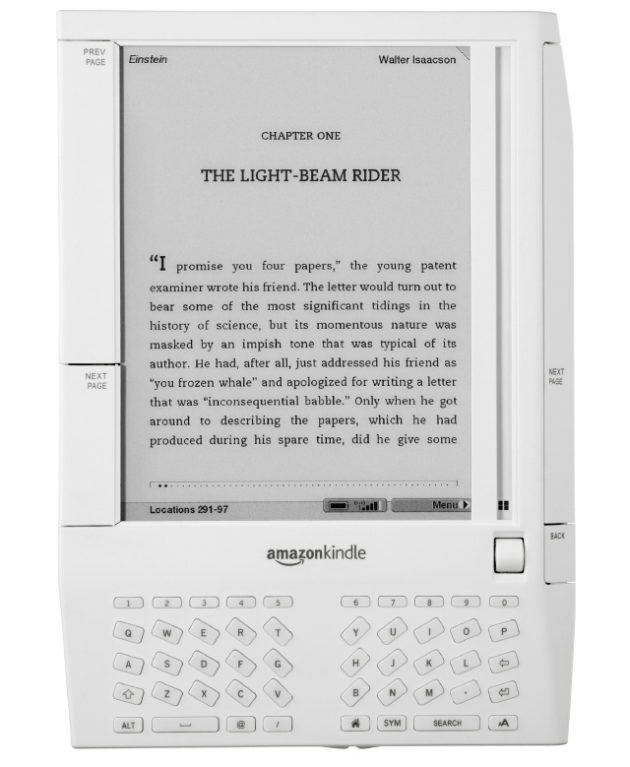
Kindle 1


The Kindle price came down, and the Kindle line expanded from one basic model with 3G connectivity and an e-ink screen to several different models with different features, including wifi and front lighting. The Fire tablet was added to provide color and multi-use functions, but the e-ink versions are still sold. Lots of people read on tablets or even smart phones now.  I refer e-ink, but to each his own.

In 2008, my son was in the hospital for a week or so, and while I sat by his bedside, I read books on my Kindle 1. No one knew what it was back then. It's a new world now, and ereaders are everywhere. Also, self-publishing has benefited from ereaders and tablets. It's difficult to compete on price in print publishing, but it's easy to do with ebooks. Amazon still dominates ebook sales, as every self-published author knows. The Kindle Unlimited (KU) problem requires that authors a) only have that ebook for sale on Amazon and b) be paid by pages read rather than per title. A lot of authors, me included, often make more on KU than on sales. This and the smaller number of non-Amazon sales make KU attractive, for certain genres. especially romance.

Amazon may be a soulless giant corporation bent on dominating the market, but they made self-publishing possible. 


Friday, April 19, 2019

Guest blogging today on NO WASTED INK

I've got a guest blog post today on the No Wasted Ink site. It's about how easy—or how hard—it is to make money self-publishing. Note that it's written for folks who know little or nothing about publishing.


Tuesday, March 19, 2019

KDP Print versus Nook Press

One of my most popular blog posts is from 2016, when I compared using Amazon's CreateSpace to using Barnes & Noble's Nook Press Print. CreateSpace is gone now, replaced by KDP Print, but I recently published Tribes as a paperback on both KDP Print and on Nook Press, so below is a comparison of print publishing via Amazon and Barnes and Noble using the versions of those platforms in use today.

Both platforms have fully integrated print and ebook publication. Each title appears once in the author's list of Projects (B&N) or on the Bookshelf  (KDP), with the ability to add it in a second format and neither one makes you create the ebook first.. Basically, most of the features/options below apply to both ebook and print formats.

Pre-order

Nook Press offered the choice of putting the book on sale now or using pre-order but it didn't give me a chance to say when it would be available. After processing finished, I saw this message on my projects page.

  • Your pre-order print book Tribes has a publication date of March 26, 2019. You must upload your final files by March 11, 2019. If you’re unable to do so, you must push your publication date or your book will go off sale.

And that was that! So pre-ordering was available on B&N but without a lot of options.

With KDP, pre-ordering is an option only for Kindle books. It does let you set the date, though. In fact, the pre-order option is the only way you can launch the book with the X-Ray feature enabled from the start. 

Categories:

KDP only allows two categories but it was very easy to add both.

Nook says it allows 5 categories but after I added the first, I could not figure out how to add more.  Also, selecting a category required me to specify three levels: category, subcategory, and sub-subcategory.


ISBN:

Both KDP Print and Nook Press provide free ISBNs for print books, but if you use their ISBN, it cannot be used anywhere else. I always buy my own ISBNs and register them to my imprint, Cracked Mirror Press. I want the paperback to have one single ISBN.

In the past, B&N has rejected the ISBN I used on Amazon KDP, but this time  I had not yet clicked publish on Amazon when I set up the Nook version. Also, I didn't select "expanded distribution" on KDP, which causes Amazon to make the book available on other online bookstores such as Barnes & Noble, Consequently, I was able to use my own ISBN for the Nook Press version.

Formats:

Both platforms offer paperback, but Nook Press can also do hardback. I have no idea of the requirements because I have never used that option, but it is there.

One advantage B&N has is the "Buy online, pick up in store" option that shows up on the product page. It's only really an advantage if a reader lives near a store with an Espresso Book Machine to print the book, but it's there.

Pricing:

Amazon stated my cost to print (which is the cost of author copies) as $4.44 and B&N estimated it as $5.00. This does not cover shipping, of course.

Proof copies:

Both platforms allow you to order a proof copy; the one from KDP had a "Not for resale" stripe on the front cover, but the Nook one did not.

Linking the print and ebook versions:

Both platforms allow you to create a new version of an existing title in a new format just by clicking a button on the entry for the existing format. I had, in fact, pulled the Nook Press version of Tribes from sale before I published the Nook press paperback, but it was still in the system (it was, in fact, still for sale, because before I published it to B&N directly, I made it available to B&N via Smashwords; this was years ago, well before I published it directly on Nook Press, I had quite a time getting that version pulled from sale). .Anyway, B&N automatically added the Nook book description and other details about the ebook when I clicked the link to create the print book .On the B&N product page, it showed one entry for Tribes but with two formats. So, linking product pages was no problem on the Nook end.

On Amazon, for some reason even though I created the paperback by clicking the "Create paperback" button on the Kindle version's entry, it did not link the product pages. If you searched Amazon for the title and author without specifying Kindle, it showed both formats but with two entries, like this:


If you limited the search to the Kindle store, you would see only the Kindle version, with no indication a paperback exists. Likewise, clicking one entry brings up that product page with no link to the other version. Amazon claims linking will happen automatically within 72 hours, but I have always had to ask them to link the books, which is what I had to do for Tribes. It didn't take them long and now it looks like this:


Conclusion

In terms of ease of use, the two platforms are actually pretty similar. Also of note is that the PDFs for the interior and the cover worked fine on both platforms. Of course, in both cases, I had selected white paper instead of cream, which I suspect is why the covers worked for both.


Monday, November 28, 2016

Is POD about to change publishing?

The Digital Reader blog has a post about a new Amazon feature called Amazon Print on Demand (available only on Amazon UK, as far as can be determined. Correction: a later commenter identified four such sites, in the UK, Germany, Japan, and the US). It's very much like CreateSpace, Amazon's service for self-publishing in print, but it's intended for publishers. According to the post, there are some small and one large publishers signed on to use it in the UK.


Here's why I find this potentially exciting. Right now a publisher takes a risk in publishing a book. They have to guess how many copies they should print. Print too many, and the books take up space in a warehouse; don't print enough, and bookstores run out, and (potentially) sales are lost if the reader can't get the book when they want it. Having the book available for sale online via POD means the customer can always get the book but there are not unsold copies lying around. This could mean publishers would be more willing to risk publishing books by new and unknown authors.

Of course, the downside is, it pushes more sales to online, which publishers don't like because they don't want Amazon to control even more of the market. This may considerably slow down the adoption of POD for big publishers. Publishers could always sell direct, of course, but they don't have much of a built-in online customer base compared to Amazon.

Barnes & Noble has their own POD online service for self-publishing called Nook Press Print. I wonder if this could push Barnes & Noble to either create a publisher version or add more Espresso Book Machines to their brick & mortar stores?  Or both?

We live in interesting times.


Sunday, May 15, 2016

Conquering InDesign

Considering that my husband calls me a “Kindle evangelist,” I have spent a lot of time lately working on printing books. I just finished a semester-long class at my local community college. The course title was Desktop Publishing but really it was How to Use InDesign.

InDesign is an Adobe product that will handle page layout, and also allow you to export an ePub (ebook) file,. As I found out from the course, it will also export simple Adobe Flash files, for say, a series of click-through screens. And, it can export interactive PDF, if I ever need to do that. It's a very powerful but complex product, and I had had no luck in learning it on my own, which is my usual method with new software. InDesign has an incredible number of functions and as a result, the menus often have long list of unrelated options. Also, it use “tools.” That is, you change the function of what the mouse cursor does by picking a tool from a list.

The basic function is selecting things, but the software doesn't stop you from using menus if you have a tool other than the Select tool in use. This can get you in trouble! For example, I discovered that if you're using the Type tool when you place (paste in) a graphic file, InDesign creates that image as an anchored graphic that won't budge, no matter how much text you add in front of it,  Who knew? I'm sure it's that way to provide a shortcut for people who know what they are doing with InDesign. Until recently, that was not me.


As you can see by the above image of a full print cover, I started small, with my only novella, Where Magic Rules. Because it's so short, I didn't even try to put text on the spine, but I'll do that with the next book.  Once I have WMR ready to go, it will join Saronna's Gift as a paperback for sale on Amazon.

And of course, InDesign does the page layout beautifully. You can quickly and easily impose proper book format, with the first page of a chapter having its own unique layout. I love it!

Sunday, April 10, 2016

The self-publishing process: Should I do print?

If you've made the decision to self-publish, the next think you need to decide is whether to publish print books or ebooks or both.

POD

To self-publish in print, almost the only viable option, unless you are rich enough to invest the money needed to print several thousand copies of your book, is to use a POD service. POD stands for print on demand, a process that takes advantage of new technology that melds a high speed printer/copier machine with a book binder. So far as I know, the only commercially available one is called the Espresso Book Machine. Some bookstores have invested in these machines, but they are expensive, so they are not generally affordable for a small business. But several online companies are out there, including Lulu and CreateSpace (from Amazon) and Barnes and Noble, that provide a way to print and sell your book using their POD machines and their websites.


However, even the POD process requires that you format the manuscript properly, and create a PDF of the book interior that looks like a typeset book, with all the correct information on the title page (front and back) and with proper headers and footers, including page numbers. That is much harder than it sounds! Some people use MS Word templates from companies like Joel Friedlander's Book Design Templates. Other use desktop publishing software, like Adobe InDesign (which can also produce an epub file for the ebook version). But InDesign is complex and not free, so that's a real investment of time and money.  There are commercial services that will format print books, just as there are for ebooks, but all of them have the same limitation: correction workflow. If you give a commercial services a word processing file, and they give you the a PDF to publish from, how do you correct that if you find an error later? Generally, unless you can edit PDFs, you have to ask them to make the correction for you.

Obviously, everything should be proofed carefully before you hand over the m.s., but it's difficult to be sure you got every single tiny typo.  Correction workflow should be factored into your decision on how to produce the PDF.

Cover

You will need a full-color PDF of the entire cover (front, back, and spine), not just a front cover image, like you do for an ebook. The cover is even more important for print than for ebooks, so you will need to be sure it looks good. There are tons of graphic artists who will work for reasonable rates, but be sure you are dealing with a reputable one before you give them your money.  Most of my covers were done by relatives with graphic design experience, but I have also used Nessgrahica. They are based in Croatia, so you would need to send the payment via Western Union, which you can do online.

Pricing

The per copy costs involved in producing a print book mean that you can't price it as competitively as you can an ebook. Amazon will let you set the price on a Kindle book as low as 99¢, but because they have to pay for paper and ink, they will not let you price a CreateSpace POD book at a loss; generally, a POD book will cost about the same as a commercially-published trade paperback. This is a significant drawback if you're starting out. One reason self-published ebooks sell as well as they do is that they are so much cheaper than ebooks from traditional publishers, who price them high to protect hardcover sales.

Selling

Another limitation is that POD books are not generally found in bookstores,. Even the B&N POD books are only at  few B&N stores that have Espresso machines. This means online sales are your only retail outlet, unless you want to go around to bookstores and persuade the owners to carry your books on a consignment basis. Some people do this successfully, others not. Some authors carry extra copies of their books to conventions and sell them to people they meet. You need to decide what you're willing to do to sell your books.

The Payoff

Quite frankly, most self-published titles don't sell well in print unless they are by an author who was already well established before the self-published titles came out. However, even if you don't sell that many copies, having a print version of your book is an advantage. You can give away free copies as promotions and (hopefully) get reviews, and if you make contacts at conventions or readings, you have something available for those folks who just don't want ebooks. And you can hold book signings!

n.b. Updated 9/23/16

Sunday, March 20, 2016

Is Google serious about its ebook platform?

Almost a year ago, I blogged about starting to load my books onto Google Play/Google Books.  I just got Saronna's Gift loaded yesterday. I've had very few sales on Google Books, but I figured it couldn't hurt to expand. For a while there was a major hold-up in loading new books because Google Books had no filter to stop people from pirating other people's work. I'm not sure when that was resolved, because they're not good at communicating. When the new book would not load all the way, I didn't get any message as to why; it turned out there was an epub problem, but I had never gotten a notice about it.

I have to say, Google has not made a lot of (or maybe even any!) improvements in the "Books Partner Center" in the last year. The interface is still clunky, and seems to be designed by geeks, for geeks. I guess you could call it the UNIX of book platforms; but unlike UNIX, there's no graphical interface available to make it easier.  One of the things that takes up a lot of room on the report screen is the pie chart it draws to show you the percentage of books that are live and for sale.


That's a lot of screen real estate for something that will usually be 100%. 

Features that are still clunky or problematic:

  • You have to download a new CSV file every time you want to see your sales figures. There is no way to generate a report on screen.  This is my single biggest complaint. What a pain! Even Barnes & Noble is better than this.
  • Reporting is erratic. I checked every day after I ran my last promotion, and it took a full week for the books I had given away to show up in the sales transaction report. On the other hand, I often see sales and giveaways the next day.
  • If you want to run a Google Books promotion, you have create a CSV file and upload it. For every book, you need to provide the following info:  Identifier, Title, Currency, Amount, and Countries. Except that their program doesn't actually use the title column, so you can leave it blank. And you can say WORLD for country if you want it everywhere. 
The message you see on loading a book is the reason it's still worth it.

This book is live in the Google Play store in the following regions: AR, AS, AT, AU, BE, BG, BO, BR, BY, CA, CH, CL, CO, CR, CZ, DE, DK, DO, EC, EE, ES, FI, FR, GB, GR, GT, GU, HK, HN, HR, HU, ID, IE, IL, IN, IT, JP, KG, KR, KZ, LT, LU, LV, MH, MP, MX, MY, NI, NL, NO, NZ, PA, PE, PH, PL, PR, PT, PW, PY, RO, RU, SE, SG, SI, SK, SV, TH, TR, TT, TW, UA, US, UY, UZ, VE, VI, VN, ZA. It is also listed on Google Books.

Of course, if you need all those country codes explained, you'll need to look it up elsewhere. Google is a huge company. I expected better from them, so this makes me wonder if they really care about Google Books or not. 

Tuesday, January 13, 2015

What I Learned from Self Publishing: My Love/Hate Relationship with Amazon

Amazon is certainly not the only player in the self-publishing game, but it is dominant, and it does offer a print option, which is rare. Smashwords is a great way to get into ebook publishing on every platform except Kindle, but they don't deal with print. Barnes and Noble recently announced they would also offer print on demand via Nook Press. It will be interesting to see if that goes anywhere. Unlike CreateSpace, B&N offers a hardcover option as well as paperback.

Kindle Direct Publishing (KDP) is pretty easy to use, and I have put out eight books with it. CreateSpace is the name of their print self-publishing platform, and I have used it only once for my latest book Saronna's Gift. CreateSpace is possible because of print on demand (POD) technology; the book is uploaded to a database, and when someone shopping on Amazon orders a copy, that copy is printed individually and mailed to the customer. Authors can also order multiple copies directly from CreateSpace to sell themselves, or to give to reviewers.

The two platforms have separate set-up requirements, although you can publish a CreateSpace book to Kindle, with no additional set-up, if you're willing to convert the PDF. I don't recommend that, by the way. PDFs are difficult to convert reliably. For one thing, you can end up with excess hyphenation. Also, using the print PDF doesn't allow for a a difference in the elements in the ebook. Because ebooks can't be flipped through in the same way print books are, it's important to offer a clickable table of contents as a navigation aid, whereas in print, it's not that big a deal for novels—especially if the chapters only have numbers and not titles. Also, because of the free sample feature, you might want acknowledgements, blurbs, and lists of your other books in the back of the ebook, instead of in the front.

My Amazon wish list:

  • Add a way to connect KDP and CreateSpace so that the author can specify that the two books are the same thing. This would not have to be automated. It could just notify Amazon to do whatever linking up they do, but at least it would save having to send an email, and hopefully it could happen faster than it does now. Alternatively, the CreateSpace set-up could let you load the digital file that KDP currently uses, instead of using the PDF.
  • Stop requiring ebook exclusivity for almost every marketing benefit (making a Kindle book free or on sale, participating in Kindle Unlimited, etc.)
  • Add a button to the CreateSpace set-up pages to include the “Look Inside the Book” feature; Amazon already gets the PDF, so this should be easy to do
  • Change the set-up protocol for CreateSpace so that you can switch between glossy and matte covers without having to upload the PDF again. 
  • Add X-Ray to KDP. I know from having had it happen to The Sixth Discipline that Amazon can create the file needed for the X-Ray feature to work by using the Book Extras information (lists of characters names and descriptions, places, etc). Currently, this info is entered via Shelfari (accessible from each author's Author Central pages). It would be nice if the author could create the X-Ray file info this way and click a button to submit it. The X-Ray feature is something only Kindle has, so it would make sense to do this.

What I liked about Amazon:

Conversion: In the past, when I had a day job, and time was more of an issue than money, I relied on paying a conversion house to create the ebook digital file, and didn't bother with print at all. Now that the time/money equation is reversed, I decided to try print, and to experiment with creating my own ebook file. I tried using Scrivener and Calibre to convert the MS Word file, and was not happy with either result. Scrivner offers the advantage of being able to keep the book elements (title page, contents, dedication, chapters, etc) as separate things and assemble them different ways, but I didn't like the look of the resulting ebook file. Calibre creates valid files, but it doesn't translate any of the print style features. Imagine my suprise when I tried loading the MS Word file directly to KDP, and found that their conversion had radically improved! 

Kindle Bookmatch: Finally, a feature that doesn't require Kindle exclusivity! If you publish your print book via CreateSpace and have the same book in the Kindle store, you can opt to have the Kindle version be free or very, very cheap to anyone who buys a print copy.  As soon as they order the print, they get a button to download the ebook.

No DRM: Some people seem to think that all Kindle books have DRM because Amazon requires it, but in fact, they don't all have DRM. It's a publisher's option, not a requirement. All KDP authors have the option to leave the DRM off. 

So you see, I love that Amazon makes it possible to publish my books, and to reach readers, I just don't like everything about Amazon. 


Tuesday, December 30, 2014

Happy New Year! Looking forward to 2015

End of year sale on MS Word templates

If you are interested in self publishing in print, you really should check out the sale at BookDesignTemplates.com. When you buy a Word template from them, you not only get the templates, with all the necessary styles and fonts needed, you get really good written instructions on how to use the template to create a PDF that can be used for a print book. The only thing I don't think was included in the directions was a reminder to change the hyphenation settings, if needed. The first time I generated a PDF, the hypenation was funky (e.g., fa-ther). MS Word lets you set a length for minimal hyphenation, and also control how many consectuive lives can end in hyphenation. Changing that setting really made my book look better. 

The templates are incredibly useful for printed book, because the styles handle things like making the page layout different on the first page of a new chapter. Unless you're a real expert in Word, it's a total lifesaver.

The sales ends 12/31/2014, so check it out NOW!


Saronna's Gift has been proofed!

I have the report back from the proofer and will be ordering a new proof copy soon. I think I will try the glossy cover this time, to see which one I like better. 

I have discovered I am terrible at proofing, so it was a good thing I had help. Also, if you're interested in procnostication, this site has some predictions for self publishing in 2015. We'll see in a year how they did. 

Happy New Year, everyone! 


Saturday, May 31, 2014

Self-publishing in print: Biting the technology bullet

From Wikimedia Commons: by Daniel Maclise_-Caxton Showing the First Specimen of His Printing to King Edward IV at the Almonry, Westminster


I recently (as in yesterday!) retired from a legal and regulatory publishing company where I worked in systems support. I also recently attended Balticon, where I attended panels on self-publishing.

The thing about self-publishing is, the author is the "publisher" but not generally the distributor. He or she decides on the content of the book, but rarely does he sell it directly to readers. For self-publishing in ebook form, there are many places on the web that an author can go to to upload their book for sale to the public. Amazon, Barnes & Noble, Kobo, Smashwords, and iBooks all have platforms that allow an author (or someone with rights to publish) to create an account, upload a file, and start selling ebooks. I have used Amazon KDP, B&N Nook Press, and Smashwords, and they were all pretty easy. Smashwords also pushes the book out to the other other retailers, as most of their authors sell more books on those platforms than on Smashwords itself. I have heard good things about Kobo Writing Life but I have never used it because my Kobo sales are so small it hardly seems worth it. My understanding is that Apple is the most difficult to deal with because for one thing, it requires you to download their ebook producer app, which runs only on a Mac. I am also ignorant of Google Books, which seems to be a thing unto itself. Even Smashwords cannot publish to Google Books.

On all platforms, what the author has to provide to publish an ebook successfully is usually a file with the text of the book (the formats accepted vary) and a file for the cover, plus assorted bits of information collectively known as metadata (data about the book), such as author, title, ISBN (in some cases), and genre/tags.

If you're willing to accept the platform's standard conversion, some platforms allow you to upload your book in MS Word, but the problem with that is, the conversion is not great at maintaining the style and features you want. The standard format for ebooks is ePub, which, like Mobi (the format on which Kindle books are based) is simply a set of HTML tags that are used in an agreed-upon standard way. Even KDP will accept ePub, although Amazon does not like advertising that fact. I have been relying on a conversion house to produce the files I needed; the ebooks look great-- nice style for scene breaks, consistent chapter title pages, and working table of contents-- but they are not that cheap and they can only be edited by going into the HTML, which is tedious.

To self publish in print and sell on the web easily, (Lighting Source and Amazon CreateSpace are the two most popular venues), what an author/publisher needs is a PDF of a file laid out in pages, with headers (and possibly footers) and all the standard info a book needs about copyright and such. Strictly speaking, you can do this layout in MS Word, but that is not only incredibly painful, it's also very time-consuming, as Word tends to decide what it wants to do in some circumstances, and wresting control from it takes knowledge and the kind of patience of a Dalai Lama.

Having decided to take the publishing plunge and move into print (now that I have more time), I just ordered a copy of Adobe InDesign, the premier desktop publishing application, which will produce well formed pages, and also ePub files. The advantage to doing this is that I pay for it once, and then I can also use it will all my books. Adobe also offers a cloud-based monthly subscription service, but they had something of a security scandal with that, so I don't want to go that route.

Assuming I can learn to use the software, I am hoping it will provide a solution to the problem of corrections. Once I put a book into InDesign, I will proof from paper copy, make corrections, and then make the software spit out the ePub file. I realize I might have to do a few tweaks in ePub, but it should still be better than my current workflow. And this way, I get two birds with one stone; you can never have too many dead birds!

Sunday, March 30, 2014

The self-publishing lottery

Digital Book World writer Jeremy Greenfield, who is also a Forbes contributor posted an interesting, and I think revealing list on Forbes.  DBW compiles weekly lists of ebook bestsellers, and Greenfield went back and compiled those lists into totals of bestsellers for last year.  Counting newly-merged Penguin and Random House as one entity, and all self-published authors as one entity, this is what he came up with:


1. Penguin Random House — 478 best-sellers
2. Hachette — 258 best-sellers
3. Self-published — 99 best-sellers
4. HarperCollins — 91 best-sellers
5. Simon & Schuster — 72 best-sellers
You might think this list reveals that self-publishing is going great guns, and I think it is. But what the list doesn't show is almost as important as what it does. It doesn't say how many books were published in total, by each publisher/entity. If a batter hits 100 home runs out of 10,000 times at bat, it's not that great a home run average. But if he hits 100 out of 1,000, he's doing a lot better, and 100 out of 500, he's probably in the majors. 

So, that's my point. The list looks great until you count the at-bats for self-published authors. I'm not pushing doom and gloom, mind you, just realism. Know the odds, but do it if you want it badly enough. My motto is, even a tiny chance is better than no chance. 

Sunday, February 9, 2014

eBook Self-publishing Platforms: go wide or go narrow?

Barnes & Noble has not done that well with their Nook ereader and tablet sales, certainly not compared to Kindle sales. Of course, like Amazon, they offer an app version for reading on other devices, like PCs, iPads, Android tablets, and phones. The Windows 8 version I have on my laptop is actually pretty nice, once you figure out that you have to right-click to get to the menus.  Interestingly, Nook sales of my books have crept up lately, and they're now about the same (or sometimes better) than my Kindle sales, which was surprising in light of the reported recent bad Nook news.

Barnes & Noble now offers a nice direct-to-Nook self-publishing platform in Nook Press.  One thing it offers is the ability to edit the epub file, and republish a corrected version if you need to. Amazon offers something similar, but only if you uploaded an HTML file, not if you uploaded a Kindle-formatted *.azw file. Some of my B&N books are actually coming from Smashwords, because before Nook Press, the B&N platform didn't offer much of an advantage. Ergo, only No Safe Haven, Tribes, and King of Trees are on the Nook Press platform itself; the others are being published  to the Nook store via Smashwords, which lets you push your books to many vendors. And of course, The Sixth Discipline has to stay as a Smashwords book because that's why it can be free.  Like Amazon's KDP platform, B&N's Nook Press won't let you make a book free forever. Smashwords does, and B&N and most other retailers make their price whatever the Smashwords price is, even if that price is zero cents.  

The one self-publishing platform I have not tried is Kobo's Writing Life. My Kobo sales via Smashwords have never encouraged me to make the effort to check them out. But whether you use individual retailers' platforms or Smashwords, I would urge all self-published authors to consider carefully before sticking with any one platform exclusively, even Kindle. The more outlets you have, the better your chances are of finding readers, and that's why we're all in this game.  

Sunday, June 9, 2013

BookBub promotion: second wave of numbers

The one drawback to using Smashwords as a portal to other retailers (iBooks store and the Nook store are my biggest non-Kindle markets, but they also cover Sony and Kobo, and a few others) is that it takes a while to get the sales numbers back. Smashwords just recently updated the May numbers both Apple iBooks and Barnes & Noble Nook sales reports. When it came to giveaways, Nook was a winner, at least for me. I gave away over 4,000 Nook copies of The Sixth Discipline! That doesn't compare to the 15,000 copies I gave away in May on the Kindle, but it's still a lot more books than I ever gave away before on any other non-Kindle platform. Sales figures for No Safe Haven, the sequel to the free book, were pretty good for the Nook, but about 20% higher for Apple. I wish I had some giveaways stats for iBooks, but it seems like Apple no longer bothers to report “sales” for free books, so I don't have much to go on in comparing, but since the Kindle and Nook giveaway-to-sales ratios are very similar, I think I probably gave away about 5,000 iBooks copies. Since I don't know for sure, I will go with Nook as the giveaway winner.


Tuesday, May 7, 2013

Writing to make a connection

When people ask me why I write, I say it's because I was born a storyteller. I have a tin ear and two left feet, so music and dance were out as a way to tell stories. I can draw a little, but not enough to do what I would want to do. Telling stories in person is fun, but finding an audience is hard to do. That leaves writing. Putting a story down on (real or virtual) paper gives me the best opportunity to reach people. I want to make a connection; I want to tell a story and make people care about how it ends; I want to create characters and make them come alive in other people's heads.

Self-publishing is a fantastic breakthrough because in the past, unless an editor thought your story was marketable, it went nowhere. Notice I didn't say “good,” I said “marketable.”  Editors are in the business of buying books from authors that they think readers will buy from them. RandomHouse didn't buy Fifty Shades of Gray from E.L. James because they thought it was great literature; they bought it because they knew people would buy it. Thousands of people were already buying it from online sellers because the author had self-published it. An editor might think a book is beautifully written, but if he doesn't think anyone will buy it, he won't buy it either.

Self-publishing has been around a long time, but in the print world, it costs a lot of money to do. In addition, a self-published print book had no good path to get into bookstores.  There were a few authors who started that way, but not many. eBooks were a game changer not only because they were cheaper to produce, but because because their distribution is online, and not controlled by companies that deal only with publishers.

One nice benefit of technology is that online sites like Goodreads and online retailers like Amazon allow readers to post their thoughts on the books they have read. Admittedly, not all reviews are positive, but still, enough are that I can get a good buzz of connectivity, and know that I suceeeded.  I'll take that deal!


Friday, November 16, 2012

Going a little crazy here

I feel like a juggler who has launched one ball too many into the air. The main level of my house is being renovated, so we're camping out in the basement for several weeks. We're using a picnic cooler as a desk/coffee table, and I'm making the copyeditor's revisions to King of Trees while crouched over my laptop.

At the same time, I'm waiting for the converted file for the The Nostalgia Gambit and the final cover for King of Trees. As soon as I get TNG back, I need to load it onto my Kindle for final proofing; the conversion is generally very smooth, but sometimes quote marks don't convert correctly or it turns out there was weird stuff in the Word file that came through in the epub/Kindle versions.

And, of course, with home renovation, things never go as smoothly as you had hoped. Do the words "termite damage" and "rotten floor joist" sound as scary to you as they did to me?

At least tomorrow the floors should be done, and we will be able to bring the cat home from kitty jail. Now if I can just keep him from walking on my keyboard . . .

Wednesday, October 24, 2012

I finished the copy edits on The Nostalgia Gambit!

I finished editing The Nostalgia Gambit, based on the marked-up copy provided by my copyeditor. I'm pretty happy with the way it came out. I have the cover, and I have the ISBNs. Now, as soon as the proof reader is done, the book can go off to the conversion house.

And then, of course, I'll have to proof again on the Kindle (my new Paperwhite arrived!) and make any last minute fixes. Once I have a corrected mobi/prc file, I will load it to KDP Select. I don't plan to leave the book in KDP more than one 90-day cycle, but I will use the free days promo feature of KDP Select to get a head start on selling.

In three months when the KDP Select period is over, it will be the middle of February or so, and I am hoping by then Smashwords will finally be able to accept epub files! That will make offering the book in other stores not only simpler, but also mean the version pushed out from Smashwords to other retailers will look much better.