Showing posts with label Amazon. Show all posts

Wednesday, January 13, 2021

Amazon and Self-publishing: Start to Finish, Good and Bad

Some people would argue otherwise, but I say that the self publishing revolution started with the introduction of the Kindle in 2007. Amazon was selling their own line of hardware, and they needed a plentiful supply of inexpensive ebooks to make buying a $400 device seem reasonable. Publishers were alarmed when Amazon priced the Kindle version of their books mostly at $9.99 and they revolted and now control the Kindle price which is usually at least as much if not more than the paperback. One side effect is, this made more reasonably priced self-published books more attractive to Kindle owners.

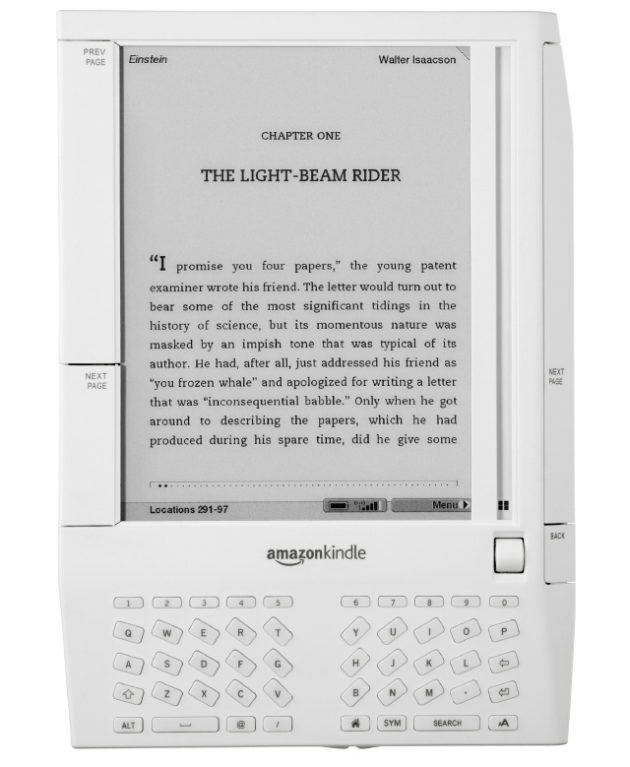
Kindle 1


The Kindle price came down, and the Kindle line expanded from one basic model with 3G connectivity and an e-ink screen to several different models with different features, including wifi and front lighting. The Fire tablet was added to provide color and multi-use functions, but the e-ink versions are still sold. Lots of people read on tablets or even smart phones now.  I refer e-ink, but to each his own.

In 2008, my son was in the hospital for a week or so, and while I sat by his bedside, I read books on my Kindle 1. No one knew what it was back then. It's a new world now, and ereaders are everywhere. Also, self-publishing has benefited from ereaders and tablets. It's difficult to compete on price in print publishing, but it's easy to do with ebooks. Amazon still dominates ebook sales, as every self-published author knows. The Kindle Unlimited (KU) problem requires that authors a) only have that ebook for sale on Amazon and b) be paid by pages read rather than per title. A lot of authors, me included, often make more on KU than on sales. This and the smaller number of non-Amazon sales make KU attractive, for certain genres. especially romance.

Amazon may be a soulless giant corporation bent on dominating the market, but they made self-publishing possible. 


Wednesday, December 23, 2020

Amazon— reviews versus ratings

 Amazon's reviewing protocol has changed over time. Amazon has always let any customer write  reviews, but now they label reviews  from people who actually bought the book or other item with the words "Verified purchase."

They used to require a customer who clicked "Write a review" to actually write something in the review box. I used to occasionally get annoyed-sounding reviews like this one, written by "Sj" about The Sixth Discipline


If you trouble reading the text, it says: "Again I leave a five star review for a book that I really liked but in order to leave that review I have to leave this review which is it’s a book I really liked. It’s so stupid to have to do this review wording crap." So, while he (or she) was willing to assign a rating of stars, he was reluctant to put why he liked the book into words. 

Clearly, Amazon heard him or her. They stopped requiring a written review and allower "reviewers" to simply assign a specified number of stars, without any supporting commentary In some ways, this is bad because reviews are much better than mere star ratings. However, I think people like Sj are far from rare. An author might well get a much higher number of ratings than actual reviews. Since my recent promotion of Alien Bonds, it has gone from 32 ratings/reviews to 53, but only six of the increase had actual reviews attached to the ratings (those six were all very nice reviews!) . 

Reviews are great, but I will take ratings if that's all I can get.


Friday, February 14, 2020

The Ins and Outs of My Recent Fussy Librarian Promotion

First, Happy Valentine's Day! I hope someone gave you a valentine.

Second, if you're not familiar with ebook promotional newsletters, basically, a company creates an email list of ebook buyers (subscribers have to opt in, but it's free to them) and then charges authors and publishers to include their books in a daily email to subscribers. There are many of these services now. BookBub is the biggest name (and the hardest to get into), but there are others, including Book Gorilla, Bargain Booksy/Free Booksy (they separate free books and cheap books into their two emails and if you want both, you have to subscribe to both.), The Fussy Librarian, and Ereader News Today (ENT). When books are on sale but not free, the email entry has an affiliate link and the company gets a small cut from the sale.

On February 8, I ran a Fussy Librarian promotion for The Sixth Discipline (a free ebook!) . The results were pretty good. I had not used FL in a while, so I didn't know what to expect.

I gave away hundreds of copies, mostly on Kindle. And of course, even though the email itself usually generates "sales" for the one day it runs, Amazon's online algorithms push popular books to readers so increased "sales" continues for a few days. As you can see in the screen snap below, the promo offered links to the the book on Kindle, Nook (B&N), Apple, Kobo and Google Play. The results in the list below the screen snap are "sales" for the day of the promo plus three days after.


Vendor:           No. of Copies given away February 8, 9, 10, and 11

Amazon Kindle: 277 (plus 5 paid*), 88 (plus 2 paid*), 28 (plus  1 paid*), 21 (none paid*)
Google Books: 20, 3, 2, 0
iBooks/Apple Books: 19, 0, 0, 0
Barnes & Noble 0, 0, 0, 0
Smashwords: 0, 1, 2, 0 (note: their link was not listed in the ad; these are normal numbers for comparison)
Kobo 0, 0, 0, 0

* The Kindle version wasn't free in all Amazon bookstores so the paid numbers represent foreign sales.

Note that The Sixth Discipline was my first published title, and it came out in 2011. It is free on Amazon only because Smashwords lets an author make a book free, and because Smashwords is a distributor as well as an e-tailer, the book is thus free on other platforms as well. Amazon practices price matching (which is why you see "Tell us about a cheaper price" links on a book's Amazon page);  if you make the book free elsewhere, Amazon will make the Kindle version free also. These days, I usually give away from zero to three Kindle copies every day, so promotions are helpful to boost "sales."

I think in a way, these numbers do a good job of representing how well each vendor is doing at ebook sales. Amazon is way ahead of the pack; its second day number beat all the others' first day totals combined. But Google and Apple both have a significant ebook presence, On the other hand, Barnes & Noble is pretty much dead in the water, and Kobo is going nowhere (at least in the US; it is more popular overseas where Amazon is less dominant). This explains one of the main reasons Amazon can tempt authors and publishers into enrolling their books in Kindle Unlimited: they give up small sales numbers on other platforms in return for money from KU borrows.

Right now both The Sixth Discipline and its sequel No Safe Haven are available only in ebook form but I am having new covers made, and formatting the books for print. I hope to have paperback versions available in a month or so. I might run another promotion after that, as a test of the new covers.

A word to other authors: Giving away this book makes some sense because there is a direct sequel that is not free, and I always see increased sales of it after a promotion of the first book. Giving away a standalone book is not usually as good an idea.  For one thing, a huge number of free ebooks are never read. Making a book free eliminates the cost barrier, so a lot of readers download a free book first, and then look to see if they want to read it. If you have books that are very similar, it can still be a good idea to make a book free for a day or two, in that it can drive up your sales numbers on Amazon temporarily and thus get the book in front of a lot of readers through the "customers also bought" function. That's another benefit of Kindle Unlimited; authors can make their books free or discounted for short periods of time.


Saturday, January 18, 2020

My review of the Kindle Oasis

Santa,  in the form of my husband,  was good to me this year. I got the new Kindle Oasis for Christmas!

I love this Kindle!  The screen is slightly bigger,  which is nice, especially if you like to read with a larger font. Also, the design accommodates one-handed reading much better than previous Kindles. One side is wider than the other,  and has actual page turn buttons, not like the recessed page turn spots on my Kindle Voyage.  If you're left-handed, you simply flip it over and the buttons are in the left. Mind you it still has a touch screen if you prefer swiping pages to pushing buttons.

It also has Bluetooth, but I haven't used it yet.
Other advantages are that the Oasis is waterproof and it has a warmer light, although I find that a pretty subtle difference.Like the Voyage and the paperwhite, if you buy the cover for it, the Oasis "wakes up" when you open the over. It appears to use exactly the same charging connection as earlier Kindles.

The on-off switch is on on the top edge (assuming right handed buttons). Bt you won't need to use it much unless you're reading without the cover on.


You can't see the button in this view because the camera's light reflected off the metal but it's there. With the cover on and no buttons visible, it's easier to see how close to a square the Oasis is.


All in all, I love my new Kindle! Whether it's enough better than a Paperwhite or the (no longer for sale new, except possibly from 3rd party sellers on Amazon) Voyage to justify the price increase, I can't say, but I'm not giving it back! As usual, I got the 3G connectivity as well as WiFi. All my Kindles have worked great on my home WiFi but there were a few times I could not use hotel Wifi so I always get the 3G. If you're holding a Kindle in your hand and wanting a book, it's a terrible feeling NOT to to be able to get it..


Tuesday, March 19, 2019

KDP Print versus Nook Press

One of my most popular blog posts is from 2016, when I compared using Amazon's CreateSpace to using Barnes & Noble's Nook Press Print. CreateSpace is gone now, replaced by KDP Print, but I recently published Tribes as a paperback on both KDP Print and on Nook Press, so below is a comparison of print publishing via Amazon and Barnes and Noble using the versions of those platforms in use today.

Both platforms have fully integrated print and ebook publication. Each title appears once in the author's list of Projects (B&N) or on the Bookshelf  (KDP), with the ability to add it in a second format and neither one makes you create the ebook first.. Basically, most of the features/options below apply to both ebook and print formats.

Pre-order

Nook Press offered the choice of putting the book on sale now or using pre-order but it didn't give me a chance to say when it would be available. After processing finished, I saw this message on my projects page.

  • Your pre-order print book Tribes has a publication date of March 26, 2019. You must upload your final files by March 11, 2019. If you’re unable to do so, you must push your publication date or your book will go off sale.

And that was that! So pre-ordering was available on B&N but without a lot of options.

With KDP, pre-ordering is an option only for Kindle books. It does let you set the date, though. In fact, the pre-order option is the only way you can launch the book with the X-Ray feature enabled from the start. 

Categories:

KDP only allows two categories but it was very easy to add both.

Nook says it allows 5 categories but after I added the first, I could not figure out how to add more.  Also, selecting a category required me to specify three levels: category, subcategory, and sub-subcategory.


ISBN:

Both KDP Print and Nook Press provide free ISBNs for print books, but if you use their ISBN, it cannot be used anywhere else. I always buy my own ISBNs and register them to my imprint, Cracked Mirror Press. I want the paperback to have one single ISBN.

In the past, B&N has rejected the ISBN I used on Amazon KDP, but this time  I had not yet clicked publish on Amazon when I set up the Nook version. Also, I didn't select "expanded distribution" on KDP, which causes Amazon to make the book available on other online bookstores such as Barnes & Noble, Consequently, I was able to use my own ISBN for the Nook Press version.

Formats:

Both platforms offer paperback, but Nook Press can also do hardback. I have no idea of the requirements because I have never used that option, but it is there.

One advantage B&N has is the "Buy online, pick up in store" option that shows up on the product page. It's only really an advantage if a reader lives near a store with an Espresso Book Machine to print the book, but it's there.

Pricing:

Amazon stated my cost to print (which is the cost of author copies) as $4.44 and B&N estimated it as $5.00. This does not cover shipping, of course.

Proof copies:

Both platforms allow you to order a proof copy; the one from KDP had a "Not for resale" stripe on the front cover, but the Nook one did not.

Linking the print and ebook versions:

Both platforms allow you to create a new version of an existing title in a new format just by clicking a button on the entry for the existing format. I had, in fact, pulled the Nook Press version of Tribes from sale before I published the Nook press paperback, but it was still in the system (it was, in fact, still for sale, because before I published it to B&N directly, I made it available to B&N via Smashwords; this was years ago, well before I published it directly on Nook Press, I had quite a time getting that version pulled from sale). .Anyway, B&N automatically added the Nook book description and other details about the ebook when I clicked the link to create the print book .On the B&N product page, it showed one entry for Tribes but with two formats. So, linking product pages was no problem on the Nook end.

On Amazon, for some reason even though I created the paperback by clicking the "Create paperback" button on the Kindle version's entry, it did not link the product pages. If you searched Amazon for the title and author without specifying Kindle, it showed both formats but with two entries, like this:


If you limited the search to the Kindle store, you would see only the Kindle version, with no indication a paperback exists. Likewise, clicking one entry brings up that product page with no link to the other version. Amazon claims linking will happen automatically within 72 hours, but I have always had to ask them to link the books, which is what I had to do for Tribes. It didn't take them long and now it looks like this:


Conclusion

In terms of ease of use, the two platforms are actually pretty similar. Also of note is that the PDFs for the interior and the cover worked fine on both platforms. Of course, in both cases, I had selected white paper instead of cream, which I suspect is why the covers worked for both.


Tuesday, June 12, 2018

Is Amazon killing the product giveaway for Kindle books?

UPDATE:  The links are back! It must have been a glitch.

A useful marketing  took for authors is Amazon's product giveaway. Anyone with an Amazon account in good standing can give away one or more print books (or non-digital other products). Some time ago they added that functionality for Kindle books, too, but now it looks like they plan to take it away because the buttons have gone from the product pages for Kindle books.

This is what I see immediately below the "Write a review" button (which always appears  after the last visible review) for the paperback version of Alien Bonds:


This is what I see below the "Write a Review" button for the Kindle version of the same title:


It just goes right into "what else did customers look at" list!  No button for hosting a giveaway!

On the other hand, I just successfully hosted a giveaway of a Kindle book by using the "Copy This Giveaway" button that appears on my Completed Giveaways page. Ergo, the functionally still works for Kindle books, but the buttons are gone. There's no mention of this that I can see on Amazon's Giveaway FAQ. In fact it still lists Kindle books as being eligible, so who knows if Amazon is really killing it or somehow the buttons just got deleted.


Monday, February 26, 2018

Amazon Exclusivity: What does it buy you?

The answer is, it depends. Mostly, in my experience it depends on your book. If you're self-publishing in the US, your biggest single market will almost certainly be the Kindle store. This is not to say that other markets should be ignored. Barnes & Noble (Nook), Apple  iBooks, Kobo, Google Play, and Smashwords sell plenty of ebooks.

Pricing and Countdown Deals

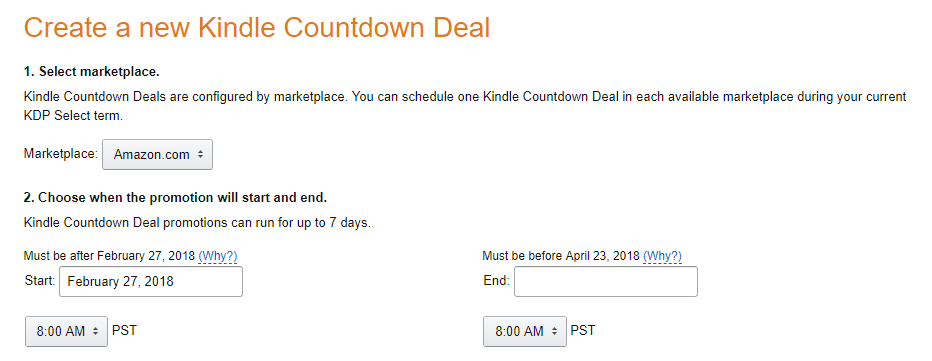
However, selling a book is not always as simple as slapping a price on it and saying "For Sale." Amazon limits the minimum price for a Kindle book sold via KDP to 99¢. It encourages you to price the book between $2.99 and $9.99 by offering the maximum royalty percentage for books in that range. If you enroll your book in the KDP Select program, it means you cannot sell it in ebook form anywhere except the Kindle store (This doesn't apply to print sales). It also means Amazon offers incentives not otherwise available.  Specifically, you can run Kindle Countdown Deals where for the limited number of days specified, the book is available at a sale price (US or UK only). As opposed to you simply lowering the price yourself (which you could do at any time) the regular price still shows up, but it will be crossed out to show the book is on a limited time sale.


Kindle Unlimited (KU)*

The other big benefit is that your book is available in the Kindle Unlimited subscription program. KU subscribers are Amazon customers who pay a monthly flat fee. This allows them to read any book they want in the KU program. There's a limit to how many they can have at once, but not how many they can read. Amazon pays the author not a flat royalty per book, but a per-page-read fee. The amount is not guaranteed, but lately for the US KU market it has been running about 0.0048¢ per "Kindle edition normalized page"**. It is usually less in the foreign KU markets, but the US is usually the biggest one anyway. 


Genre, length, and readability will affect how much money your book can make in the KU program. My experience is limited since I have had only three books in this program. The enrollment is not a marriage; you don't have to keep the book exclusive forever. When you sign up, it's for a 3-month period and then you can renew again every 3 months, if you wish. If you don't renew, your book is no longer in KU and you can't run price promotions. With Saronna's Gift, which is a science fiction romance, I made enough with KU borrows to make it worthwhile to say in for two full periods, that is, 6 months. With Turnabout, a YA science fiction novel that is in no way a romance, I never made much in the KU program so I let it expire after the first 3-month period. Note that Turnabout is also considerably shorter-- only about 80,000 words, which meant less money per KU reader.

To sum up, I would expect a book that was a page turner, a romance, and fairly long would do very well in KU. And, for what it's worth, here's my advice:

  • Always start in KDP Select to see how the book does
  • Set a goal for KU borrows (say a third or maybe half of what the royalties are) and drop out when you go below your goal.
  • Once you're out of KDP Select, go for every market you can! 

Footnotes:
* I am aware that KDP Select also gets your book into the Kindle Owners Lending Library, but frankly, I don't think this is nearly as big a deal as KU so I didn't spend any time talking about it.
** Amazon calculates pages in its own way, but Alien Bonds was 128,000 words and Amazon said it had 658 KENP pages. That's approximately 195 words per KENP page.

Saturday, August 5, 2017

Dueling promotions and Amazon lets me see the future!

I've been running two promotions this month, one to advertise that Turnabout is only 99¢ (for a few days only) and one to advertise that The Sixth Discipline is free.

One advantage to advertising a book, even a free one, is if you sell or give away enough copies it gets into Amazon's ranked groups (100 top free science fiction, e.g,), and folks who didn't get the email promotion notice it.  Turnabout did okay, It made it to:


But The Sixth Discipline jumped up to:
Even though the email promotion for T6D was Friday, it's still going strong; I've given away over 200 copies today.. But in checking for free downloads via the KDP interface,I discovered something I had never noticed. Using my phone (I was walking the dog and when we stopped to rest in the shade, I checked my numbers), the Sales Dashboard tab let me select tomorrow's date as part of my date range! And when I did that, I could see I already have 23 downloads, presumably from time zones where it's already August 6. 

The screen shot below was created in Firefox, as I discovered the Chrome browser didn't let me select a one-day future date, but the Firefox version did.  I highlighted the date range so you can see it's for those two days. I couldn't include Thursday because it had over 1,000 downloads and that would make tomorrow's 23 too small to show as more than a tiny blue line.


The really odd thing is, I was using Chrome for Android on my phone when I noticed this! 

Also note, these numbers are for Amazon only. iBooks and B&N take a little longer to report "sales figures" because I get them via Smashwords. 


Friday, April 21, 2017

Formatting an ebook: New Amazon tool for self-published authors

If you want to self-publish ebooks, you need to learn some things about ebooks. Ebooks are really just files, and in those files the underlying format is HTML tagging. the same tagging that drives the web. There are two main sets of tagging schemes. Epub (sometimes written as ePub) works for iBooks, Nook, and pretty much all others bookstores. Amazon's Kindle, though, has its own format based on mobi. It still uses HTML tags, remember, but it's a different set of rules on which tags do what and how files are structured.

Amazon's KDP platform for self-publishing actually allows authors to upload a MS Word file. If you have a novel that is all text, and you use Word's formatting styles consistently, KDP does a good job of converting the files. If you want new chapters to start on a new screen, for example, you need to be sure the word style for the chapter name or number creates a new page in print. But of course, you can't really tweak the format easily. If you want to change something, you need to go back to Word, edit the file, reload it to KDP, and look at it again. If you have the kind of book that has fancy formatting or lots of images, this can be tedious.

As first reported by The Digital Reader, Amazon has launched  a beta version of a new tool called Kindle Create.  The Talking New Media blog checked it out, too, and reported on their first impressions.


The new tool is different because you download it and run it locally, o your PC or Mac, and then preview the results from within the app itself. It takes over 500 MB of disc space, but hard drives are pretty big these days. 

Although the Amazon page only mentions Word files, the program will accept PDFs, but there was some discussion in the comments on the Talking New Media post that suggetsed it wasn't really converting the PDF but just wrapping it in code that made it into a "print replica" not a true ebook. 

I'm not sure this new took will help me that much since I have started putting my books out in paperback, also. I now use Adobe's InDesign which can produce a print-ready PDF and also an epub file from the same input. But if you self-publish books with a tricky format and want to try this new tool,Amazon is actively soliciting feedback.

Friday, July 22, 2016

Where Magic Rules is re-launching!

So, now that I have mastered InDesign, I am working on putting out my books in print, via CreateSpace. This is going to be a fair amount of work, so I started with the shortest, the fantasy novella Where Magic Rules, which is only 25,000 words long. I made it free a while ago, and have left it that way until now.

[For those who care, the way to make a book free in the Kindle store is to load it to a platform like Smashwords, which will let you make it free forever, and also sends it to the B&N Nook store, the Apple iBooks store, Kobo, and others, as a free book. Once AMazon knows it's free on those platforms, they will price match.]

Now, however, as the paperback is coming out, I am going to price the ebook version at its original price of 99¢ but I will offer it free to anyone who buys the paperback. The Amazon program for this is called "matchbook."

So, if anyone wants a free fantasy novella on Kindle, get it now! In a day or two, it will cost 99¢ (or $5.99 for the paperback).


Sunday, October 18, 2015

Big Brother knows what you don't know

Assuming the reason people look up a word in their Kindle dictionaries is because they don't know its meaning, Amazon knows what it's customers don't know. They recently released a list of the most-looked-up words. I knew a lot of them, but some (see yellow highlighting) were unknown.


The built-in dictionary is a great feature of ereaders, but it's kind of creepy to think Amazon is tracking which words are looked up.

Saturday, July 4, 2015

What Amazon Knows

Digital vs. Print

The experience of digital reading is not fundamentally different from reading on paper, especially if you read on an e-ink device.  But digital purchasing is different.  If you walk into your local bookstore and put cash on the counter for the latest best seller, the retailer has no way to track who you are. With ebooks, the retailer always knows the buyer, because the transaction happens online and involves a credit card.

I don't know much about other ebook readers, because I have had a Kindle since 2007 (that's my latest, the new Kindle Voyage in the photo below), but Amazon has been adding features ever since they came out with the original Kindle. After they created Kindle apps, which works on phones, tablets, PCs, Macs, etc., one of the things they did was to allow you to sync your books across your devices. That is, if you like to read on your phone with a Kindle app while you're on the bus to work, and then switch to reading on your Kindle when you get home, Amazon keeps your place for you. Even audiobook versions are supported by this function, if you buy them from Amazon.


Amazon as Big Brother

Of course, for syncing to work, you have to be connected to Amazon's cloud. When you turn on the wireless connection (or in the new Kindle parlance, you turn off airplane mode), the function of checking for new new items also syncs. As part of that, an enormous database tracks information on every Kindle title you ever bought. Amazon records what devices you sent the books to, where you are in every book or document on every Kindle or app, what text you have highlighted, and any notes you have made. 

Keep in mind that Amazon isn't actually psychic. They don't really know what you have read, only what you have looked at. If you were to open a brand new book and use the Go To menu to go to the last chapter, that would mark that page that as the "last page read." On the Home screen (in List mode), the little dots under the title that track your progress in the book would jump almost to the end, even though you haven't read a word. Likewise, if you finish reading a book and go back to chapter one before connecting, Amazon's database will be marked as if you have just started that book. Of course, a reader usually has no reason to do this, which is why I feel confident in saying Amazon doesn't bother tracking every keystroke.

Further, Amazon only knows the new information after your Kindle has connected. E-ink Kindles have great battery life, but only if wifi and/or 3G are not on, so most people read with in airplane mode. Of course, with tablets and phones, people are used to charging them often, so they're usually connected all the time.  However, even with e-ink Kindles, sooner or later, the reader will need to connect to get a new book, and at that point, the cloud will database will be updated. 

Borrowing ebooks

This need for connectivity means that ebooks can easily support borrowing. Amazon can loan you a book, and then take it back later. In fact, they have two separate borrowing programs. The Kindle Owners Lending Library is an added benefit for people who a) pay the annual Prime membership fee and b) own a Kindle or a Kindle Fire (not just an app on a phone or a tablet). These folks can borrow one book a month, but only books that participate,

The second program is Kindle Unlimited (KU), which is Amazon's ebooks subscription service. KU readers pay a flat fee per month. They can use any Kindle device or app to borrow as many KU-participating books as they like but they can have only 10 out at once. This program is especially popular with romance readers, many of whom go through books like winos go through Two Buck Chuck. In fact, Scribd just pulled most romance titles from their subscription program for being too popular.  They weren't charging enough to be able to pay the authors, and let the readers get all the books they want. I don't understand why they didn't create a second program for romance, or make the first program multi-level, with a higher tier price for voracious readers. Amazon probably has a similar situation, but they took a different approach. 

How the author gets paid for borrowed books

When Amazon started  Kindle Unlimited, they decided that they would pay participating authors a sort of royalty as soon as a borrower got through 10% of the book.  I say "sort of royalty" because the fee was unrelated to cover price or length, and was determined after the fact by dividing up the pot of money Amazon had set aside for that purpose.  These rules meant a novella of 100 pages paid the author the same after the borrower read 10 pages as a 1000-page novel paid after the borrower read 100 pages.  

Guess what? Amazon has changed the rules. They have announced they will pay a per-page fee, based on the actual number of "Kindle Edition Normalized Pages" (KENP).  This shifts the compensation paradigm on its head. Now longer works will make more for the author (still regardless of cover price).  Some people have pointed out that this rewards authors for writing page-turners, which I think is true, and is not a bad thing.

As someone whose only Kindle Unlimited book is a full-length novel, I am fine with the new model. I do wonder what the fee will be. Since the old system paid about $1.40 per borrow, it would have to be at least $0.0028 per page to reward the author of a 500-page book at about the same level as before. There is speculation that it could be higher, and pay out twice as much as before, when the entire book is actually finished. I also wish Amazon would tell us how many copies are being read at once. Right now the report shows only total page count per marketplace (US, UK, Germany, etc), without any indication of how many readers are being counted. 

Conclusion

Amazon knows way more than who is buying which books. They know which books are read immediately, and which wait to be opened; which books are read slowly, and which are devoured on the same day they're purchased; which are abandoned midway through and never finished at all. This is information that print books can never provide.

You can think of Amazon as Big Brother, if you like, but they are far from alone in the corporate world.  We needed a new toilet recently, so I used Google to find photos and info online, so I would know what models the plumber was talking about. I now have toilet ads all over my Facebook feed. Google is pretty much the ultimate Biggest Brother, but they don't seem to be that good at selling ebooks, at least not my ebooks. On the other hand, the commenters on this post seem to have had some luck with Google Play; I wish they had mentioned their genres. If anyone out there has any info on how Google Books is doing generally, I'd love to know.

The writer, as usual, gets left out in terms of information sharing, However, I do like the thrill of checking the new Amazon report and seeing that someone is reading my book!


Thursday, May 22, 2014

Publishers: Be bold or go bust

Amazon and Hachette, a Big-5 publisher, are having a very public spat over terms.  Amazon has always operated with very tight (for years nonexistent) profit margins, keeping prices low in order to gain customers. This kind of trade-off of short-term profit for long-term growth can work in a big corporation, but sooner or later, investors want dividends, and that money has so come from somewhere, so Amazon has decided to try squeezing the middle man, which in this case is a publisher.

As this Publishers' Weekly post makes clear, lots of people have a dog in this fight. Authors feel threatened, agents are wary, and publishers and booksellers are all claiming Amazon is the bad guy who is out to destroy them. As a self-published writer, I'm less affected by this; my dog is more of Tamagotchi.

The PW article says publishers are worried about bookstores, but I doubt that comes from their goodness of their hearts. Basically, everyone is worried about their own best interests. The real problem publishers have is that they need their enemy. They can't refuse to do business with Amazon because that's a huge percentage of the market. At the same time, what's clear to me is that in the very long term (as in 20 years into the future), things may be very different.

Until the web came along, print books have always been sold almost entirely in retail stores. This was true of other goods, too--furniture, clothes, pet supplies--but now consumers can order books and other things while sitting at home or travelling on a bus or anywhere else they can pull up a browser or an app and click a button.

Some goods are less vulnerable to online erosion. I have not had much luck buying shoes on the web because I have a high instep. On the other hand, brand name pet supplies are the same thing whether I drive all the way to the store or order them online. Some products, like books, are ripe for online selling; there are so many, many titles a bookstore has to stock, that it's hard to compete on price and selection when the competition is a series of giant warehouses. eBooks have upped the ante considerably, but even before the Kindle, bookstores had a handicap.

The digital transition made things worse for bookstores, and to some extent publishers, but for publishers, there is some light at the end of the tunnel if only they could be more agile and less resistant to change.  Jeff Bezos, love him or hate him, is a true visionary. He recognized very early on that the internet was going to radically change the way business is conducted, and he jumped in with both feet. Publishers have (so far) mostly refused to leave their comfort zones. What they should realize is that change also brings opportunity.

Being a retailer of digital books takes money and expertise, but it does not take the same amount of capital as huge chains of bookstores. eBooks provide publishers with a chance to finally, at long last, make the reader their customer. Right now Amazon and Barnes & Noble and smaller bookstores are their customers. They have no way of knowing who the readers of their books are.

But they could. If they dare.


Monday, July 29, 2013

Amazon adds a great new feature to Kindle: automatic delivery of corrections


I went to my "Manage Your Kindle" page on Amazon today, to send a copy of the J.K. Rowling/Robert Galbraith mystery novel The Cuckoo's Calling to my husband's iPad, and I noticed something new.  There was a notice above the section with the list of my books that said I could sign up for automatic updates when a corrected version of an ebook comes out. Naturally, I clicked OK!

A big advantage of ebooks over print is they can be corrected if errors (typos as well as formatting errors) are found. Newer Kindles even offer a way to report these kinds of mistakes (in the More menu that comes up when you highlight a phrase).  But once the publisher has fixed the mistakes, someone who has already bought that book won't see that fix unless they download the book again.  Amazon will email buyers if the mistake is significant, but then they buyer has to request a new copy. This new feature is a "sign up once, and it's automatic from then on" thing, which is much better.

The number of errors in ebooks from self-publishers is widely variable, depending on the author's attention to detail. The number of errors in traditional books used to be just awful, mostly because of workflow issues, but they have (mostly) gotten better. I have found a couple of typos in The Cuckoo's Calling, though (an excellent book, by the way!). I will have to report them and see how well this new feature works!


Tuesday, June 25, 2013

An interesting case

An interesting point about ebooks is that their use is not governed merely by the technology available but by the marketplace. Sony had a very nice e-ink reader before Amazon came out with the first gen Kindle (which looked a little clunky in comparison), but Sony didn't have much of a bookstore, and its Reader never got much traction in the marketplace. Amazon was the first company to successfully deal with the chicken-egg problem: no one would buy an ereader unless there were lots of ebooks to read, and one one would publish in ebook form unless there were lots of folks with ereaders. Their success gave them a solid head start in the ebook race.

To establish the Kindle as a viable reading platform, Amazon not only created apps for other devices (iPhones, iPads, PCs, Android), they discounted the price of ebooks so that best sellers were rarely more than $9.99. They could do this because publishers sold ebooks at wholesale rates; they set a price, and Amazon paid them that amount. Amazon then turned around and set its own retail price at whatever it wanted, sometimes less than it had paid for the book.

It was the Kindle's success that made the publishers fear it. In case you haven't been following it, there is a case in federal court right now that relates to the struggle for the ebook market. The Department of Justice is suing Apple about possible price fixing and antitrust aspects of its agreements with five of six of the major publishers; those agreements called for agency pricing where the publisher sets the retail price and the retailers gets a set percentage of it when the book is sold. The five publishers, who made Amazon accept agency pricing, too, have all already settled.

Apple has a lot of (very good) lawyers, so I am wondering how this lawsuit will come out. A judge is hearing it, not a jury, so there won't be any kind of deadlock. But I do wonder if Steve Jobs were still alive if they would call him to the witness stand.

The case is awaiting a decision and speculation is rife on the internet.

Thursday, June 13, 2013

Amazon goes to India!

Amazon is now reporting sales from India in a separate sales report, which told me there is now a Kindle store in India.  Here is the sales report list, which illustrates how many Kindle stores there are at the moment:


My books look so much more expensive in rupees! And The Sixth Discipline isn't free there, at least not yet. See what I mean:


In my royalty reports, I have seen some sales of books that should have had a royalty rate of 70% but they were in fact only paid at 35%, which Amazon tells me means they were not sold in the US. I wondered if they were from India (which until very recently was folded into the US Kindle store) and now I'll know.


Tuesday, May 14, 2013

The Sixth Discipline just got X-Rayed!

The X-Ray feature on Kindle is really handy for epic books with a large cast of characters or those stories that span years, where a character can disappear for pages and pages and then pop back in again. X-Ray give you a idea how important the character is, and who they are, but it only works if the publisher has gone the extra step and provided Amazon with a file to use to generate the X-Ray.

In addition to the newly-purchased Goodreads, Amazon also owns social reader site Shelfari, and one of the things this means is that on Shelfari, the author or any reader can create lists of characters and places in the book. Those lists are then available to view on the bottom of the product page on Amazon.


It looks like Amazon might be planning to spin this function off into creating X-Ray files for KDP books, because my book just got a whole bunch of characters added by someone known as "X-Ray," who has also added characters to a boatload of books!

It would be cool if it's true!

Update:  I just downloaded this book again and it now has the X-Ray feature!  Yay!


Saturday, October 20, 2012

Did Smashwords update all the big retailers at once?

I haven't been checking sales reports on Smashwords lately, so I don't know if they did them all on one day or three days in a row, but there are now new sales reported for Sony, Apple iBooks, and Barnes & Noble. I did best on iBooks as usual, with Barnes & Noble next and Sony last.

As on Amazon. No Safe Haven is selling the best, but Shades of Empire isn't that far behind it. Also, I have more sales in the US than anywhere else. I wish I knew how The Sixth Discipline (free book!) was doing on all those platforms but B&N is the only one that lists numbers for free books (except maybe Sony, and I haven't got a free book with them yet).


Thursday, October 18, 2012

Amazon to me: We've got good news and bad news

Last week Amazon sent me an email that my Kindle Paperwhite would be a week late. Today they sent me an email that they would issue me a $10 credit on my Amazon account to make up for the inconvenience. Considering they're selling the thing on a very slender (or possibly even nonexistent) profit margin, I call that pretty nice.

I don't say I wouldn't rather have the Paperwhite on time, but if I can't have that then I'll take it late with a consolation prize.


Wednesday, September 19, 2012

Call me a squeaky wheel!

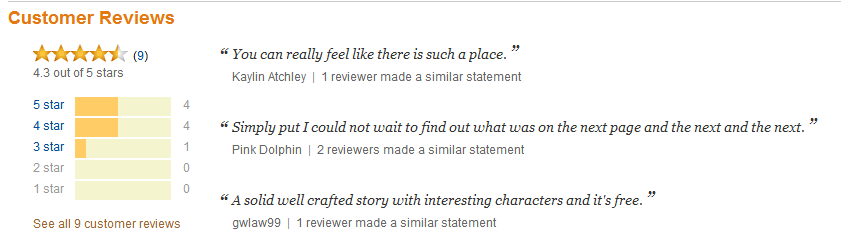
The old saying goes that it's the squeaky wheel that gets the oil. My last post was about how only a few people take the trouble to post reviews online, and sure enough, I got a few more reviews in the last few days.  This made me notice something Amazon is doing when a book has five or more reviews. They generate snippets of a single sentence from three different people's reviews and mention when other reviewers have expressed the same sentiment. Below is an example from The Sixth Discipline, my free book, which now has nine reviews.  Note the middle entry,  from a review by someone who goes by the name Pink Dolphin, which says “Simply put I could not wait to find out what was on the next page and the next and the next.” Below the snippet it says two other reviewers made a similar statement.


I'm pretty sure Amazon is generating these in an automated way, using some sort of algorithm to identify positive language about the book (I have never seen a negative snippet) and even equating similar sentences. There are millions of books on Amazon, so I can't believe someone actually reads all the reviews. Somehow this kind of natural language parsing seems a lot cooler to me when it's being used to sell my books to you than when Google advertisers are trying to sell their products to me!

And I know five reviews is the requirement for snippets, because Tribes has four very nice reviews, but the column next to the stars rankings is empty.


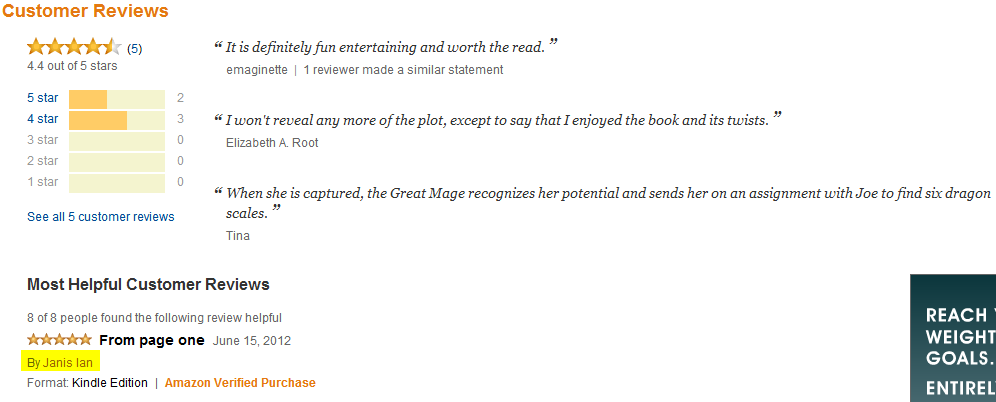
On the other hand, Where Magic Rules, my fantasy novella, has five reviews and sure enough, it has snippets!


Note the yellow highlighting in that screen shot. That's to point out that WMR got a celebrity review from folk singer Janis Ian!

You couldn't expect me to talk about reviews and not mention that!